

SubBurn is made and published by Yi Fang. AppBrain is an independent app data site and isn't affiliated with Yi Fang. The app name, icon, screenshots and description belong to Yi Fang and are shown as published on the App Store.
AppBrain's verdict
- Last updated
- June 4, 2026
Rankings
App Store top chartsApp Store Rankings for SubBurn
This app is not ranked
Competitors
Similar apps and more from Yi FangMore from Yi Fang


Releases
Updates seen on the App Store- Version
- 1.0
- Launched
- June 2026
No changelog data
User feedback
Ratings and reviews on the App StoreComments on SubBurn for iOS
We don't have enough comments to show example comments. Please check back later.
Technology
Found in the app by AppBrain- Price
- Free
- App size
- 2.59 MB
- Content rating
- Everyone
Technologies used by SubBurn
About the app and developer
About SubBurn
SubBurn is a finance app developed by Yi Fang.
What is the rating of SubBurn?
SubBurn has no ratings yet.
Is SubBurn free?
SubBurn is free. The app size is 2.59 MB. The latest version available is 1.0. The last update was on June 4, 2026.
What are the requirements for SubBurn?
The app has a content rating of Everyone. The app has been available on the App Store since June 2026.
Developer information for Yi Fang
Address:
Store listing
By Yi Fang, from the App Store


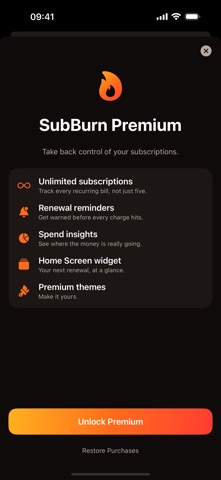
Screenshots by Yi Fang, from the the App Store listing
Description by Yi Fang Written by the developer, not by AppBrain. Click to read.
SubBurn is the offline-first way to track every recurring subscription in one place — App Store and non-App-Store alike — see your true spend, and never get surprised by a renewal again.
SaaS creep is real. Netflix on the web, Adobe on a card, a domain that quietly renews, that app you forgot you were paying for. Apple's subscription manager is buried in Settings and only sees App Store subscriptions. SubBurn sees everything you add — and keeps it all on your device.
WHY SUBBURN
• Add a subscription in seconds from a built-in catalog of popular services
• See your true normalized spend per month AND per year at a glance
• Get a local reminder a few days before each renewal, so a charge never sneaks up
• Mix any billing cycle — weekly, monthly, yearly — and SubBurn does the math
• A clean dashboard that shows exactly where your money goes
• Home screen widget with your upcoming renewals and monthly total
PRIVACY FIRST
SubBurn keeps your subscriptions entirely on your iPhone. There are no accounts, no cloud sync, and no analytics or tracking. Your subscription data lives only in a secure on-device store and is never uploaded or sold.
FREE TO START
Track up to 5 active subscriptions and use the full dashboard for free. Upgrade to Premium once for unlimited subscriptions, renewal reminders, spending insights, the home screen widget, and themes.
HOW IT WORKS
1. Add your subscriptions from the catalog or enter your own.
2. Set each one's cost and billing cycle.
3. See your real monthly and yearly spend instantly.
4. Let SubBurn remind you before every renewal.
Take back control of your subscriptions. Add your first one today.
SaaS creep is real. Netflix on the web, Adobe on a card, a domain that quietly renews, that app you forgot you were paying for. Apple's subscription manager is buried in Settings and only sees App Store subscriptions. SubBurn sees everything you add — and keeps it all on your device.
WHY SUBBURN
• Add a subscription in seconds from a built-in catalog of popular services
• See your true normalized spend per month AND per year at a glance
• Get a local reminder a few days before each renewal, so a charge never sneaks up
• Mix any billing cycle — weekly, monthly, yearly — and SubBurn does the math
• A clean dashboard that shows exactly where your money goes
• Home screen widget with your upcoming renewals and monthly total
PRIVACY FIRST
SubBurn keeps your subscriptions entirely on your iPhone. There are no accounts, no cloud sync, and no analytics or tracking. Your subscription data lives only in a secure on-device store and is never uploaded or sold.
FREE TO START
Track up to 5 active subscriptions and use the full dashboard for free. Upgrade to Premium once for unlimited subscriptions, renewal reminders, spending insights, the home screen widget, and themes.
HOW IT WORKS
1. Add your subscriptions from the catalog or enter your own.
2. Set each one's cost and billing cycle.
3. See your real monthly and yearly spend instantly.
4. Let SubBurn remind you before every renewal.
Take back control of your subscriptions. Add your first one today.