

SubCue is made and published by Chris Nagy. AppBrain is an independent app data site and isn't affiliated with Chris Nagy. The app name, icon, screenshots and description belong to Chris Nagy and are shown as published on the App Store.
AppBrain's verdict
- Last updated
- July 1, 2026
Rankings
App Store top chartsApp Store Rankings for SubCue
This app is not ranked
Competitors
Similar apps and more from Chris NagyAlternatives to SubCue





More from Chris Nagy


Releases
Updates seen on the App Store- Version
- 3.1
- Launched
- July 2025
No changelog data
User feedback
Ratings and reviews on the App StoreComments on SubCue for iOS
We don't have enough comments to show example comments. Please check back later.
Technology
Found in the app by AppBrain- Price
- Free
- App size
- 20.7 MB
- Content rating
- Everyone
Technologies used by SubCue
About the app and developer
About SubCue
SubCue is a finance app developed by Chris Nagy.
User Ratings
The app has no ratings yet.
App Information
SubCue is freely available from the App Store. The app size is 20.68 MB. The latest version available is 3.1. The last update was on July 1, 2026.
Technical Requirements
The app has a content rating of Everyone. The app has been available on the App Store since July 2025.
Developer information for Chris Nagy
Address:
Store listing
By Chris Nagy, from the App Store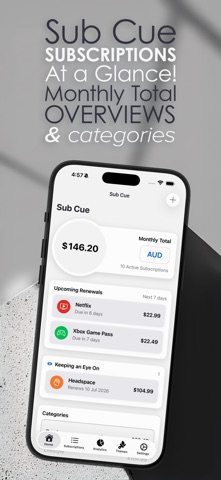





Screenshots by Chris Nagy, from the the App Store listing
Description by Chris Nagy Written by the developer, not by AppBrain. Click to read.
Subscription Chaos, Untangled
Now optimized for iPhone and iPad, with adaptive layouts that make better use of larger screens.
Subscriptions are easy to start, easy to forget, and very good at renewing right after you meant to cancel them.
From free trials and annual plans to streaming, work tools, gaming, fitness, education, and more, SubCue keeps your recurring charges visible before they become surprises.
Includes a 7-day free trial with full access.
Why SubCue?
• iPhone & iPad Support - Track subscriptions comfortably on your phone or with expanded iPad layouts.
• Smart Setup - Add subscriptions quickly with a 300+ service catalog and curated regional estimates for preloaded services.
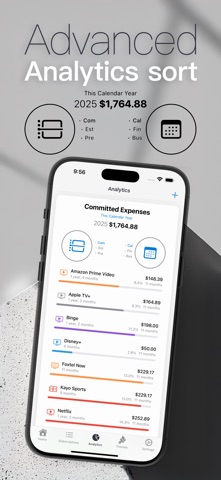
• Clear Analytics - See your subscription spend by month, category, calendar year, financial year, and business expenses.
• Keeping an Eye On - Mark subscriptions you’re unsure about and keep them front and centre on your Home dashboard.
• Renewal Awareness - Stay ahead of upcoming renewals with configurable reminders and tap-to-open notifications.
• Privacy First - Your data stays on your device.
• Simple Upgrade Options - Yearly plan or one-time lifetime unlock.
Key Features:
• Dashboard - At-a-glance monthly spend, upcoming due dates, watched subscriptions, and spending alerts.
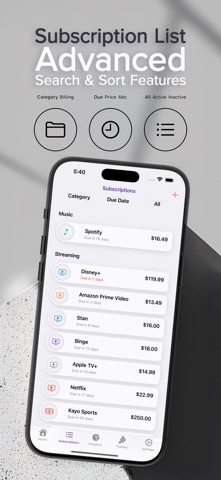
• Subscription Management - Add, edit, pause/reactivate, and delete subscriptions.
• Billing Cycles - Monthly and yearly in limited mode; quarterly and every 6 months with paid access.
• Service Catalog - Search from 300+ preset services across Streaming, Productivity, Music, Gaming, Sports, Education, and Health & Fitness.
• Watchlist - Tap the eye icon on any subscription to keep it visible on your Home screen.
• Star Ratings - Rate subscriptions 1-5 stars to track value over time.
• Activity Tracking - Month-by-month usage/activity timeline.
• Business Tracking - Mark business expenses with financial-year support.
• Custom Categories - Organise subscriptions your way.
• Private Notes - Face ID / Touch ID protection for subscription notes.
• Themes - Deep Memory in limited mode; all 6 themes with paid access.
• Export Tools - TXT export in limited mode; full export formats with paid access.
• Backup & Restore - Import SubCue Backup files with paid access.
Who It’s For:
• Budget-focused users who want visibility into recurring spend
• Business owners tracking recurring software and tool costs
• iPad users who want a larger subscription dashboard
• Privacy-minded users who prefer local-first storage
• Data-focused users who like trends, breakdowns, and spend insights
Free Trial & Pricing:
Includes a 7-day free trial with full access. After the trial, the app continues in limited mode unless you subscribe or choose lifetime unlock.
Limited Mode Includes:
• Manage up to 10 subscriptions
• Add and edit subscriptions within that limit
• Monthly and yearly billing cycles
• Core analytics and due-date tracking
• Watchlist support
• TXT export
• Delete subscriptions anytime
Subscribe or Choose Lifetime Unlock to Get:
• Unlimited subscriptions
• Quarterly and every-6-month billing cycles
• Renewal notifications and spending alerts
• Activity timeline editing and private notes
• Custom categories and star ratings
• All 6 themes
• Full export formats: SubCue Backup, CSV, TSV, TXT
• Backup import
Terms of Use: https://www.apple.com/legal/internet-services/itunes/dev/stdeula/
Privacy Policy: https://butterflybombarby.au/subcue/privacy/
Now optimized for iPhone and iPad, with adaptive layouts that make better use of larger screens.
Subscriptions are easy to start, easy to forget, and very good at renewing right after you meant to cancel them.
From free trials and annual plans to streaming, work tools, gaming, fitness, education, and more, SubCue keeps your recurring charges visible before they become surprises.
Includes a 7-day free trial with full access.
Why SubCue?
• iPhone & iPad Support - Track subscriptions comfortably on your phone or with expanded iPad layouts.
• Smart Setup - Add subscriptions quickly with a 300+ service catalog and curated regional estimates for preloaded services.
• Clear Analytics - See your subscription spend by month, category, calendar year, financial year, and business expenses.
• Keeping an Eye On - Mark subscriptions you’re unsure about and keep them front and centre on your Home dashboard.
• Renewal Awareness - Stay ahead of upcoming renewals with configurable reminders and tap-to-open notifications.
• Privacy First - Your data stays on your device.
• Simple Upgrade Options - Yearly plan or one-time lifetime unlock.
Key Features:
• Dashboard - At-a-glance monthly spend, upcoming due dates, watched subscriptions, and spending alerts.
• Subscription Management - Add, edit, pause/reactivate, and delete subscriptions.
• Billing Cycles - Monthly and yearly in limited mode; quarterly and every 6 months with paid access.
• Service Catalog - Search from 300+ preset services across Streaming, Productivity, Music, Gaming, Sports, Education, and Health & Fitness.
• Watchlist - Tap the eye icon on any subscription to keep it visible on your Home screen.
• Star Ratings - Rate subscriptions 1-5 stars to track value over time.
• Activity Tracking - Month-by-month usage/activity timeline.
• Business Tracking - Mark business expenses with financial-year support.
• Custom Categories - Organise subscriptions your way.
• Private Notes - Face ID / Touch ID protection for subscription notes.
• Themes - Deep Memory in limited mode; all 6 themes with paid access.
• Export Tools - TXT export in limited mode; full export formats with paid access.
• Backup & Restore - Import SubCue Backup files with paid access.
Who It’s For:
• Budget-focused users who want visibility into recurring spend
• Business owners tracking recurring software and tool costs
• iPad users who want a larger subscription dashboard
• Privacy-minded users who prefer local-first storage
• Data-focused users who like trends, breakdowns, and spend insights
Free Trial & Pricing:
Includes a 7-day free trial with full access. After the trial, the app continues in limited mode unless you subscribe or choose lifetime unlock.
Limited Mode Includes:
• Manage up to 10 subscriptions
• Add and edit subscriptions within that limit
• Monthly and yearly billing cycles
• Core analytics and due-date tracking
• Watchlist support
• TXT export
• Delete subscriptions anytime
Subscribe or Choose Lifetime Unlock to Get:
• Unlimited subscriptions
• Quarterly and every-6-month billing cycles
• Renewal notifications and spending alerts
• Activity timeline editing and private notes
• Custom categories and star ratings
• All 6 themes
• Full export formats: SubCue Backup, CSV, TSV, TXT
• Backup import
Terms of Use: https://www.apple.com/legal/internet-services/itunes/dev/stdeula/
Privacy Policy: https://butterflybombarby.au/subcue/privacy/