


AppBrain's verdict
- Last updated
- November 6, 2026
- Size
- 144.5 MB
User feedback
Ratings and reviews on the App StoreComments on Subly: AI Video Subtitles for iOS
We don't have enough comments to show example comments. Please check back later.
Store listing
By Andrei Bialiauski, from the App StoreDescription by Andrei Bialiauski Written by the developer, not by AppBrain. Click to read.
Add subtitles to video offline. Transcribe speech to text in 100+ languages. Turn talking clips into captioned Reels, Shorts, Stories, TikToks, lessons, interviews and vlogs — most people watch with the sound off, and captions are what keeps them watching.
HOW TO ADD SUBTITLES TO A VIDEO
1. Import a video or an audio file from Photos or Files, or share it into Subly from any app.
2. Subly transcribes the speech on device with Whisper AI.
3. Edit the text, fix the timing, pick a caption style.
4. Export a video with burned-in subtitles, or an SRT / VTT / TXT file.
100% ON-DEVICE, 100% PRIVATE
• Offline subtitle generator — after one model download, no internet needed
• Video and audio never leave your iPhone; nothing is uploaded to a server
• No sign-up, no login, no watermark on your exports
SPEECH TO TEXT IN 100+ LANGUAGES
• Automatic speech recognition powered by Whisper AI
• Auto language detection, or pick the spoken language for extra speed
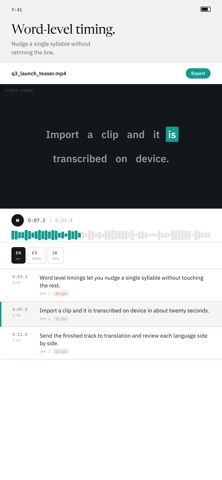
• Word-level timing — every word synced to the video
• Pick your model: smaller for speed, larger for accuracy
• Long videos are supported too — from short hooks to full interviews
• Have a script? Subly puts your exact words on the spoken timing
• Already have subtitles? Import SRT or VTT and skip recognition
BILINGUAL SUBTITLES AND TRANSLATION
• Translate subtitles into another language while transcribing
• Show the original and the translation together, one line above the other
A REAL SUBTITLE EDITOR
• Edit any word; retime the start and end of every cue
• Split a cue at the playhead, merge cues, delete what you do not need
• Find and replace across the whole transcript
• A personal dictionary that fixes recurring names and terms automatically next time
• Speaker labels — by name or by color, on screen and in exports
• Cut pauses and filler words (um, uh) in one tap
• Readability warnings when a line runs too fast or too long
CAPTION STYLES FOR SOCIAL VIDEO
• Ready-made caption templates, previewed live on your own video
• Karaoke word highlight — the spoken word lights up as it is said
• Animated captions: fade, rise, pop, bounce, typewriter, blur in, shake
• One-word-at-a-time mode for high-retention captions
• Fonts, colors, highlight colors, backgrounds: box, band, glass, glow, outline, soft shadow, accent plate
• Drag to place, pinch to resize anywhere in the frame
• Hook title: a big headline over the first seconds of the clip
• Emoji that match what is being said
• Safe-zone guides for TikTok, Reels and Shorts
• Save your own look as a template, reuse it or share it as a file
EXPORT ANYWHERE
• Burn subtitles into the video and save it to Photos
• Choose resolution up to 4K, codec and frame rate
• Share the finished clip to TikTok, Instagram, YouTube or WhatsApp
• Export subtitle files: SRT, VTT and styled ASS
• Captions only: a transparent caption layer for your video editor
• FCPXML and EDL cut lists for Final Cut, Premiere and DaVinci
• Export the transcript as TXT or Markdown, or copy it to the clipboard
PROJECTS AND BATCHES
• Every video becomes a project you can reopen, restyle and export again
• Queue several videos and transcribe them one after another
• Trim first and transcribe only the part you need
• Search every project by what was said in it
Subly is an auto caption generator, transcription app, subtitle maker and editor, SRT maker and offline speech-to-text notepad in one — for creators, teachers, journalists, podcasters and anyone who needs subtitles fast.
The app speaks 34 languages. Free to use, ad-supported.
Questions or a feature request? Leave a review or write to us from the support page — we read everything.
Terms of Use: https://www.apple.com/legal/internet-services/itunes/dev/stdeula/
Safety and technology
Found in the app by AppBrain- Price
- Free
- App size
- 144.5 MB
- Content rating
- Everyone
Technologies used by Subly: AI Video Subtitles
Releases
Updates seen on the App Store- Version
- 1.11.0
- Launched
- October 2026
No changelog data
Alternatives
Similar apps and more from Andrei BialiauskiAlso available on Google Play

Rankings
App Store top chartsApp Store Rankings for Subly: AI Video Subtitles
About the app and developer
About Subly: AI Video Subtitles
Subly: AI Video Subtitles is a photo & video app developed by Andrei Bialiauski.
What is the rating of Subly: AI Video Subtitles?
Subly: AI Video Subtitles has no ratings yet.
Is Subly: AI Video Subtitles free?
Subly: AI Video Subtitles is free. The app size is 144.50 MB. The latest version available is 1.11.0. The last update was on November 6, 2026.
What are the requirements for Subly: AI Video Subtitles?
The app has a content rating of Everyone. The app has been available on the App Store since October 2026.
Subly: AI Video Subtitles is made and published by Andrei Bialiauski. AppBrain is an independent app data site and isn't affiliated with Andrei Bialiauski. The app name, icon, screenshots and description belong to Andrei Bialiauski and are shown as published on the App Store.
Developer information for Andrei Bialiauski
Address:
Frequently asked questions about Subly: AI Video Subtitles
Is Subly: AI Video Subtitles free?
Yes. Subly: AI Video Subtitles is free on the App Store.
Is Subly: AI Video Subtitles still available?
Yes. Subly: AI Video Subtitles is on the App Store, and the last update we saw was on November 6, 2026.
How large is Subly: AI Video Subtitles?
Subly: AI Video Subtitles is 144.50 MB.
Is Subly: AI Video Subtitles suitable for children?
App Store rates the content of Subly: AI Video Subtitles as suitable for everyone.
Who made Subly: AI Video Subtitles?
Subly: AI Video Subtitles was developed by Andrei Bialiauski. It is listed in the photo & video category on the App Store.