

Submemo - Subscription Tracker
Submemo - Subscription Tracker is made and published by Jun Tsuda. AppBrain is an independent app data site and isn't affiliated with Jun Tsuda. The app name, icon, screenshots and description belong to Jun Tsuda and are shown as published on the App Store.
AppBrain's verdict
- Last updated
- September 3, 2026
Rankings
App Store top chartsApp Store Rankings for Submemo - Subscription Tracker
Competitors
Similar apps and more from Jun TsudaAlternatives to Submemo - Subscription Tracker


More from Jun Tsuda


Releases
Updates seen on the App Store- Version
- 2.0
- Launched
- August 2026
No changelog data
User feedback
Ratings and reviews on the App StoreComments on Submemo - Subscription Tracker for iOS
We don't have enough comments to show example comments. Please check back later.
Technology
Found in the app by AppBrain- Price
- Free
- App size
- 6.99 MB
- Content rating
- Everyone
Technologies used by Submemo - Subscription Tracker
About the app and developer
About Submemo - Subscription Tracker
Submemo - Subscription Tracker is a finance app developed by Jun Tsuda.
User Ratings
The app has no ratings yet.
App Information
Submemo - Subscription Tracker is freely available from the App Store. The app size is 6.99 MB. The latest version available is 2.0. The last update was on September 3, 2026.
Technical Requirements
The app has a content rating of Everyone. The app has been available on the App Store since August 2026.
Developer information for Jun Tsuda
Address:
Store listing
By Jun Tsuda, from the App Store


Description by Jun Tsuda Written by the developer, not by AppBrain. Click to read.
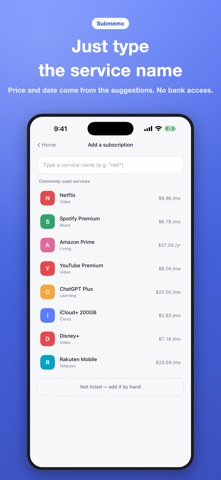
Submemo lets you write down the subscriptions you already pay for, then shows this month's total and the next renewal on a single screen. It never connects to your bank or credit card, and there is no account to create.
■ Just type the service name
A built-in catalog of common services fills in the price and billing cycle for you. Anything not listed can be added by hand. Monthly, yearly, weekly and every-two-months billing are all supported, and the monthly and yearly figures are worked out for you.
■ This month, per year, per day
This month's bill is shown up front. Tap the amount to switch to the yearly equivalent or the daily cost, so you can judge for yourself whether something is worth it. Yearly plans are also shown split by month, side by side with monthly ones.
■ Never miss a free trial ending
A top-priority alert a few days before a trial ends, shown on the Lock Screen. The amount and the date are in the text, so you can decide without opening it. For renewals, choose 7 days, 3 days, the day before, or the same day — and tap "Later" to be reminded again.
■ Where the money goes, by category
See the share and amount for each category: video, music, cloud, games, learning, telecom, living and more. Tap a category to open everything inside it. You can add and edit categories yourself.
■ Find what you never use
Mark the ones you barely touch, then see what cancelling them would save you in a year. Tap to include or exclude each one, so you can try "keep this, drop that" before deciding. There is a highest-first list too.
■ Foreign currency, converted
USD and EUR prices are converted to yen and included in the total. Rates come from the European Central Bank automatically, or you can set them yourself.
■ Also included
- iCloud sync (can be turned off)
- CSV export (opens straight in Excel or a spreadsheet)
- Breakdown by payment method
- A record of price increases
- Dark and light appearance
- English and Japanese
■ No bank. No card. Ever.
There is no statement-reading machinery here. What you add stays on your device and is never sent to our servers. No usage analytics, no advertising measurement.
The only outside connection is fetching an exchange rate to convert foreign currencies. Even then, the request contains currency codes alone — none of your entries, and nothing identifying your device.