Download Android Apps and Games
AppBrain
  • Apps
  • Apps being viewed right now Trending apps today Most popular apps All-time most downloaded apps Top rated apps
  • Intelligence ▾
    Intelligence overview → Track any Android app or your whole market
    Track & analyze
    Keyword Tracker & OptimizerTrack & improve Play rankings App Performance ReportOne-off PDF for any app StatisticsFree Android & Play market stats
    Promote your app
    Featured Apps App Links
  • Intelligence
  • Pricing
  • Dashboard
  • Sign up
  • Log in
Last updated on: 2026-07-14
App Store Apps > Productivity > Subtext: AI Writing Assistant
Subtext: AI Writing Assistant icon

Subtext: AI Writing Assistant

1.3.14
ANTON LICHT
4.90
20 reviews
Free

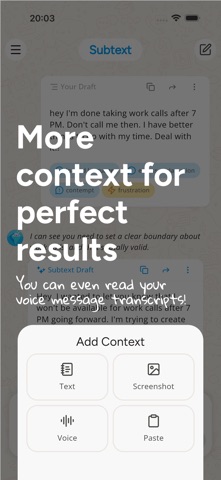
Subtext: AI Writing Assistant Screenshot 1 of 8
Subtext: AI Writing Assistant Screenshot 2 of 8
Subtext: AI Writing Assistant Screenshot 3 of 8
Subtext: AI Writing Assistant Screenshot 4 of 8
Subtext: AI Writing Assistant Screenshot 5 of 8
Subtext: AI Writing Assistant Screenshot 6 of 8
Subtext: AI Writing Assistant Screenshot 7 of 8
Subtext: AI Writing Assistant Screenshot 8 of 8
Download from the App Store Android version

About Subtext: AI Writing Assistant

Subtext: AI Writing Assistant is an overall app developed by ANTON LICHT.

How many times has Subtext: AI Writing Assistant been downloaded?

What is the rating of Subtext: AI Writing Assistant?

Subtext: AI Writing Assistant is rated 4.90 out of 5 stars, based on 20 ratings.

Is Subtext: AI Writing Assistant free?

Subtext: AI Writing Assistant is free to download. The APK download size is 74.22 MB. The latest version available is 1.3.14. The last update was on July 10, 2026.

What are the requirements for Subtext: AI Writing Assistant?

The app has a content rating of Everyone. The app has been available on Google Play February 2025.

Description
Subtext AI is your writing and communication assistant for everyday messages, replies, and difficult conversations.

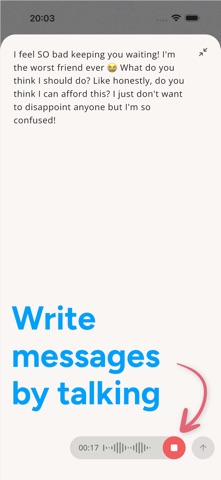
Write from scratch, paste a draft, or share a screenshot of a conversation. Subtext helps you see how your message may come across, improve your wording, and draft replies that feel clear, thoughtful, and natural.

Use it for texts, emails, dating conversations, work replies, group chats, follow-ups, check-ins, and those moments when you know what you want to say but not exactly how to say it.


WHO IT'S FOR

- People who rewrite the same message five times before sending
- Overthinkers, over-editors, and anyone wondering "does this sound okay?"
- People navigating sensitive conversations, follow-ups, boundaries, or unexpected replies
- Anyone who wants their writing to better match their intention


WHAT SUBTEXT DOES

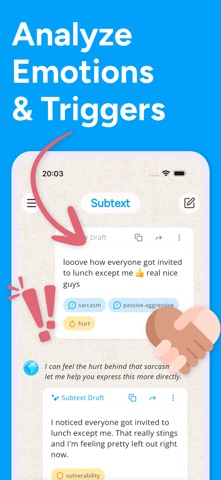
- Message Analyzer: Review tone, clarity, and how your message may come across. Spot wording that could feel unclear, too harsh, too passive, or easy to misread.
- Writing Coach and Proofreader: Understand why certain phrases need work and how to improve them. Fix grammar, spelling, and sentence structure automatically.
- Smart Reply and Response Generator: Generate or improve replies based on conversation context. Paste a screenshot or type the conversation, and get response options that fit.
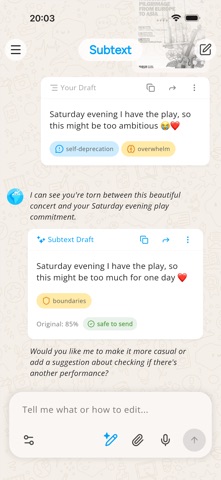
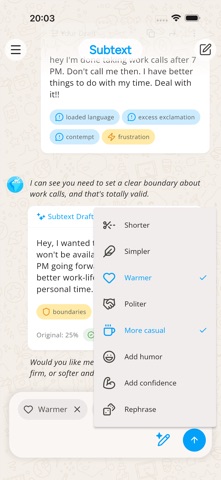
- Tone Tuner: Make your message warmer, clearer, shorter, softer, firmer, or more professional.
- Rewriter and Rephraser: Turn rough drafts, scattered notes, and half-finished thoughts into polished messages.
- Context Summary: Paste a full conversation and get a breakdown of the key points, possible tone and intent, and reply options.


USE IT FOR

- Turning drafts and notes into clear messages
- Proofreading before you hit send
- Quick replies when you're not sure what to say
- Navigating sensitive or emotionally loaded conversations
- Setting boundaries without overexplaining
- Following up on unanswered messages
- Work emails and professional communication
- Group chats, dating, friendships, and family messages
- Exploring how a message might be interpreted before sending


WHY PEOPLE USE IT

- Write with less second-guessing
- Say what you mean without overexplaining or underexplaining
- Avoid wording that may come across the wrong way
- Get practical, real-time feedback that helps you improve over time
- Keep your own voice while making sure your message is clear

Subtext uses AI to analyze tone, suggest improvements, and help you communicate with more confidence, one message at a time.

Subtext is a writing and communication assistant. It does not provide therapy, diagnosis, or medical advice. AI suggestions may not always be accurate or appropriate. Review messages before sending.
Show more Show less

More data about Subtext: AI Writing Assistant

Price Free to download
Rating 4.90 based on 20 ratings
Ranking Not ranked
Version 1.3.14
App download size 74.2 MB
Suitable for Everyone

Alternative downloads for the Subtext: AI Writing Assistant app

Genora AI – Chat Bot Assistant icon Genora AI – Chat Bot Assistant
MOBIWAYS LTD
4.4
Free
9.4K ratings
Grammar+ AI Writing Checker icon Grammar+ AI Writing Checker
Aleksei Khaliapin
4.8
Free
40 ratings
Zettelbox - AI Note Taking icon Zettelbox - AI Note Taking
Hong Kong Source Research Society Supply Chain Limited
4.3
Free
24 ratings
Typi: AI Emoji Keyboard App icon Typi: AI Emoji Keyboard App
GRIMLAX TRADE, S.L.
4.6
Free
73 ratings
AI Grammar & Paraphrase Tool icon AI Grammar & Paraphrase Tool
Roberto Diaz Badra
4.8
Free
40 ratings
Credible: Speech Coach icon Credible: Speech Coach
WearableSoft
4.4
Free
240 ratings
AI essay writer: EssayMate icon AI essay writer: EssayMate
PAPYONLAB YAZILIM BILGI TEKNOLOJILERI TICARET LIMITED SIRKETI
4.8
Free
111 ratings
Paraphrase AI: Reword Tool icon Paraphrase AI: Reword Tool
Young Aces LLC
4.6
Free
156 ratings

Changelog of Subtext: AI Writing Assistant

No changelog data

Developer information for ANTON LICHT

ANTON LICHT

Address:

Share Subtext: AI Writing Assistant

Comments on Subtext: AI Writing Assistant for iOS

We don't have enough comments to show example comments. Please check back later.

App Store Rankings for Subtext: AI Writing Assistant

This app is not ranked

Technologies used by Subtext: AI Writing Assistant

Genora AI – Chat Bot Assistant icon Genora AI – Chat Bot Assistant
Grammar+ AI Writing Checker icon Grammar+ AI Writing Checker
Zettelbox - AI Note Taking icon Zettelbox - AI Note Taking
Typi: AI Emoji Keyboard App icon Typi: AI Emoji Keyboard App
AI Grammar & Paraphrase Tool icon AI Grammar & Paraphrase Tool
Credible: Speech Coach icon Credible: Speech Coach
AI essay writer: EssayMate icon AI essay writer: EssayMate
Paraphrase AI: Reword Tool icon Paraphrase AI: Reword Tool

Back to top
AppBrain Intelligence premium content

Subscribe now to get full and unlimited access to AppBrain Intelligence. You'll have access to:

  • App Intelligence dashboard (performance timeline, competitor comparison, country rankings, insight cards)
  • Detailed ranking data per app
  • Full timeline per developer
  • Device market shares data per country
  • Unlimited keyword tracking
1 Month

$75/mo
(billed every month)

SAVE 0%
Subscribe
3 Months

$65/mo
($195 billed every 3 months)

SAVE 13%
Subscribe
1 Year

$57.50/mo
($690 billed every year)

SAVE 23%
Subscribe
Each subscription will automatically renew 3 days before the expiration date for the same time period. Subscriptions can be cancelled at any time before the renewal.

AppBrain is a directory focused on discovering great apps and games. We give statistics, rankings and search options that Google Play and the App Store don't have. All trademarks are owned by their respective owners. AppBrain doesn't offer APKs or binaries, and always lets users install the official version from Google Play or the App Store.

More apps

  • Top Android apps being viewed
  • View Fermata Auto Android
  • Radiate
  • Samsung Gallery

Android Statistics

  • Android statistics
  • Google Play Developer stats
  • Trending Android Apps
  • Top popular Apps
  • Buy the best Android phone

About AppBrain

  • Contact
  • Privacy
  • Documentation
  • DMCA takedowns
  • Articles
  • Blog
  • Free webpage for your Android app
© 2010-2026 - AppBrain