SubTracker Sub-Manager is a finance app developed by Pierfrancesco Amendola.
User Ratings
SubTracker Sub-Manager is rated 4.00 out of 5 stars. The rating is based on 4 ratings.
App Information
SubTracker Sub-Manager is FREE to download. The download size is 10.38 MB. The latest version available is 1.2. The last update was on September 10, 2026.
Technical Requirements
The app has a content rating of Everyone. The app has been available on the App Store since January 2026.
Description
Lost track of how much you spend on subscriptions every month? SubTracker gives you full control over your recurring expenses — Netflix, Spotify, iCloud, gym memberships, AI tools, and more.
- Smart Dashboard See your total monthly and yearly subscription costs at a glance. Filter by category (Entertainment, Music, Productivity, AI, Health, Gaming, Education, and more) and sort by price, name, or renewal date.
- Renewal Calendar No more bill surprises! The built-in calendar shows you exactly when each subscription renews, with monthly and daily views so you never miss a renewal date.
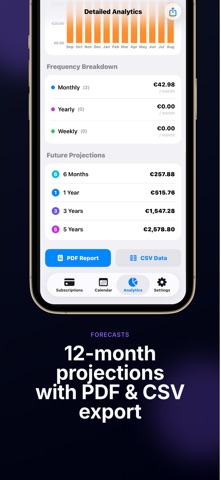
- Detailed Analytics (Premium) Interactive charts with 12-month forecasts, category breakdown, average daily cost, most expensive subscription, and savings from paused subscriptions. Export your data as PDF or CSV for complete financial oversight.
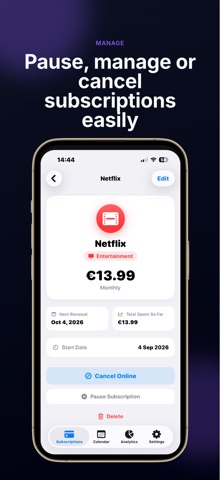
- Add in Seconds Choose from 30+ preloaded presets (Netflix, Spotify, ChatGPT, Notion, Adobe, Xbox Game Pass...) or create fully custom subscriptions with your choice of icon, color, and billing frequency.
- Renewal Reminders Get notified before each renewal so you can decide whether to keep or cancel before you're charged.
- Privacy & Security Protect your financial data with Face ID or Touch ID. Your data stays on your device.
- 6 Languages, 10+ Currencies Available in Italian, English, French, German, Portuguese, and Spanish. Support for EUR, USD, GBP, CHF, BRL, JPY, and many more.
- Fully Customizable Light, dark, or automatic theme. Choose from 15 colors and 30+ icons to personalize every subscription.
- Home Screen Widget Keep an eye on your spending right from your Home Screen with the iPhone widget.
Key Features: • Real-time dashboard with monthly and yearly totals • Renewal calendar with monthly view • 9 subscription categories • 6 billing frequencies (weekly, monthly, bimonthly, quarterly, semiannual, yearly) • Pause/resume subscriptions • Direct cancellation links for each service • 30+ popular service presets • PDF and CSV export • Charts and 12-month forecasts • Biometric protection (Face ID / Touch ID) • Home Screen widget • Animated splash screen • No account required — works offline
SubTracker — because knowing where your money goes is the first step to saving it.
Each subscription will automatically renew 3 days before the expiration date for
the same time period. Subscriptions can be cancelled at any time before the renewal.