

SudoCubed
SudoCubed is made and published by Highway North Interactive Inc. AppBrain is an independent app data site and isn't affiliated with Highway North Interactive Inc. The app name, icon, screenshots and description belong to Highway North Interactive Inc. and are shown as published on the App Store.
AppBrain's verdict
Established- Rating on App Store
- 4.91
- 11 ratings
- Last updated
- February 10, 2025
It doesn't have enough ratings yet to judge what users think.
Rankings
App Store top chartsApp Store Rankings for SudoCubed
Competitors
Similar apps and more from Highway North Interactive Inc.








Releases
Updates seen on the App Store- Version
- 1.6
- Launched
- February 2019
No changelog data
User feedback
Ratings and reviews on the App StoreComments on SudoCubed for iOS
We don't have enough comments to show example comments. Please check back later.
Technology
Found in the app by AppBrain- Price
- Free
- App size
- 61.3 MB
- Content rating
- Everyone
Technologies used by SudoCubed
About the app and developer
About SudoCubed
SudoCubed is a games app developed by Highway North Interactive Inc.
What is the rating of SudoCubed?
SudoCubed is rated 4.91 out of 5 stars, based on 11 ratings.
Is SudoCubed free?
SudoCubed is free. The app size is 61.30 MB. The latest version available is 1.6. The last update was on February 10, 2025.
What are the requirements for SudoCubed?
The app has a content rating of Everyone. The app has been available on the App Store since February 2019.
Developer information for Highway North Interactive Inc.
Highway North Interactive Inc.
Address:
Store listing
By Highway North Interactive Inc., from the App Store
Description by Highway North Interactive Inc. Written by the developer, not by AppBrain. Click to read.
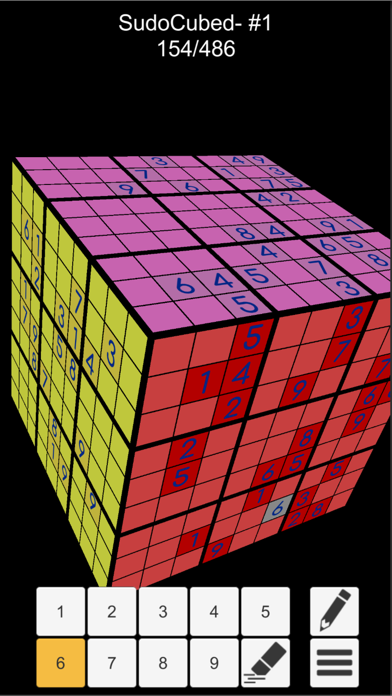
Game play is simple, but solving the cube is a challenge! Can you do it?
Rules:
Add numbers to the grid.
The numbers 1-9 must appear a single time in each row, column and 3x3 box.
There is a single solution for the entire cube!
This is a 3D puzzle.
Edge values of each cube face are shared between adjacent sides of the cube. When placing edge values, make sure to rotate the cube to check the other sides! You may find that the number you just placed should not be there!
Puzzles can be unlocked for free by watching a reward video. You also have the option of making a single in-app purchase to unlock all puzzles.
Controls:
Simply drag your finger to rotate the cube.
Tap a space to toggle the number.
Double tap the cube to auto-rotate it.
Use the pencil option to place multiple values in a square if you are unsure.
Expert mode is difficult and should be avoided unless you are truly an expert!
It may take several hours to complete an expert puzzle without any hints or error checking.
Enjoy!