

SumKey: Calculator Keyboard
SumKey: Calculator Keyboard is made and published by Che Wei Li. AppBrain is an independent app data site and isn't affiliated with Che Wei Li. The app name, icon, screenshots and description belong to Che Wei Li and are shown as published on the App Store.
AppBrain's verdict
- Last updated
- September 21, 2026
- Size
- 1.68 MB
User feedback
Ratings and reviews on the App StoreComments on SumKey: Calculator Keyboard for iOS
We don't have enough comments to show example comments. Please check back later.
Store listing
By Che Wei Li, from the App Store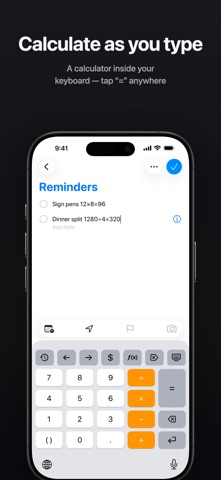

Description by Che Wei Li Written by the developer, not by AppBrain. Click to read.
Split a bill, quote a price, check a discount: wherever numbers come up, finish the math right there.
KEY FEATURES
● Calculate as you type: tap "=" after any expression and the answer appears inline; long-press "=" to keep just the result
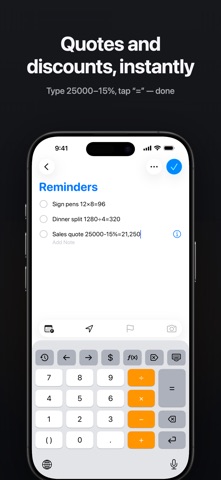
● Percent math the way you think: 4500 - 15% gives the discounted amount instantly
● History inside the keyboard: tap to re-insert a previous result or the whole expression; clearing always asks for confirmation
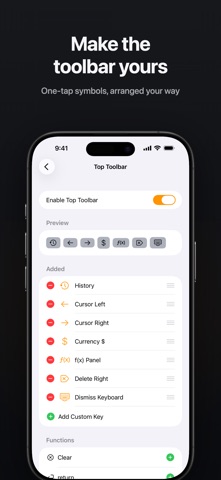
● Customizable toolbar: clear, cursor keys, forward delete, dismiss keyboard. Add, remove, and reorder freely, or create one-tap custom text keys
● Rearrangeable keys: swap the operator column and function keys; the spare key slot can be ( ), 00, 0.00 and more
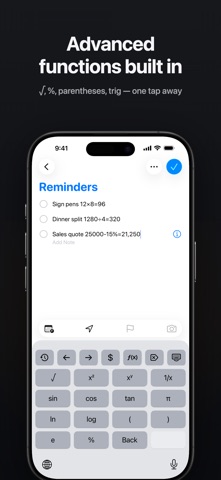
● f(x) panel for advanced functions: √, x², x^y, sin/cos/tan, ln, log, π and more
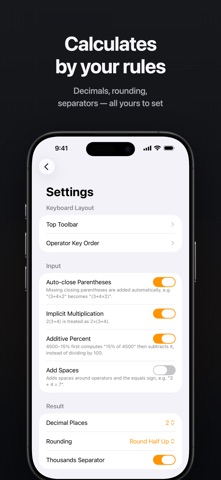
● Every calculation rule is a setting: 0–8 decimal places, rounding mode, thousands separators, implicit multiplication, auto-closing parentheses, operator spacing
● Home Screen widget: calculate on your Home Screen (iOS 17+), sharing the keyboard's settings
● Make it yours: light and dark themes that follow the system, 8 accent colors, and your choice of a black or white app icon
● Localized in English, Traditional Chinese, Japanese, and Simplified Chinese
PRIVACY: WE CAN'T SEE WHAT YOU TYPE
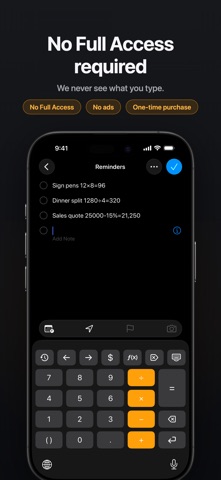
SumKey never asks for Full Access. That is a system-level guarantee: we cannot see, store, or upload anything you type. The keyboard cannot connect to the internet, contains no analytics or tracking, and works fully offline. Your calculation history stays on your device only.
ONE-TIME PURCHASE
Pay once, own everything. No subscription, no ads, no account, no in-app purchases.
SUPPORT
Questions or ideas? Email doka.software@gmail.com
Safety and technology
Found in the app by AppBrain- Price
- $1.99
- App size
- 1.68 MB
- Content rating
- Everyone
Technologies used by SumKey: Calculator Keyboard
Releases
Updates seen on the App Store- Version
- 1.0.3
- Launched
- August 2026
No changelog data
Alternatives
Similar apps and more from Che Wei LiAlternatives to SumKey: Calculator Keyboard


Rankings
App Store top chartsApp Store Rankings for SumKey: Calculator Keyboard
About the app and developer
About SumKey: Calculator Keyboard
SumKey: Calculator Keyboard is an utilities app developed by Che Wei Li.
User Ratings
The app has no ratings yet.
App Information
SumKey: Calculator Keyboard costs $1.99. The app size is 1.68 MB. The latest version available is 1.0.3. The last update was on September 21, 2026.
Technical Requirements
The app has a content rating of Everyone. The app has been available on the App Store since August 2026.
Developer information for Che Wei Li
Address:
Frequently asked questions about SumKey: Calculator Keyboard
Is SumKey: Calculator Keyboard free?
No. SumKey: Calculator Keyboard costs $1.99 on the App Store.
Is SumKey: Calculator Keyboard still available?
Yes. SumKey: Calculator Keyboard is on the App Store, and the last update we saw was on September 21, 2026.
How large is SumKey: Calculator Keyboard?
SumKey: Calculator Keyboard is 1.68 MB.
Is SumKey: Calculator Keyboard suitable for children?
App Store rates the content of SumKey: Calculator Keyboard as suitable for everyone.
Who made SumKey: Calculator Keyboard?
SumKey: Calculator Keyboard was developed by Che Wei Li. It is listed in the utilities category on the App Store.
What are the best alternatives to SumKey: Calculator Keyboard?
People looking at SumKey: Calculator Keyboard also look at these utilities apps: MemoShutter - No-Organize Cam, 計算工具鍵盤, Cycle Timers, NekoPurr, PackProof 出貨錄影.