
Sumoscience is made and published by Franklin Chang. AppBrain is an independent app data site and isn't affiliated with Franklin Chang. The app name, icon, screenshots and description belong to Franklin Chang and are shown as published on the App Store.
AppBrain's verdict
Established- Rating on App Store
- 4.75
- 8 ratings
- Last updated
- November 27, 2021
It doesn't have enough ratings yet to judge what users think.
Rankings
App Store top chartsApp Store Rankings for Sumoscience
Competitors
Similar apps and more from Franklin ChangAlternatives to Sumoscience






More from Franklin Chang



Releases
Updates seen on the App Store- Version
- 2.4
- Launched
- June 2019
No changelog data
User feedback
Ratings and reviews on the App StoreComments on Sumoscience for iOS
We don't have enough comments to show example comments. Please check back later.
Technology
Found in the app by AppBrain- Price
- Free
- App size
- 99.2 MB
- Content rating
- Everyone
Technologies used by Sumoscience
About the app and developer
About Sumoscience
Sumoscience is a games app developed by Franklin Chang.
What is the rating of Sumoscience?
Sumoscience is rated 4.75 out of 5 stars, based on 8 ratings.
Is Sumoscience free?
Sumoscience is free. The app size is 99.19 MB. The latest version available is 2.4. The last update was on November 27, 2021.
What are the requirements for Sumoscience?
The app has a content rating of Everyone. The app has been available on the App Store since June 2019.
Developer information for Franklin Chang
Address:
Frequently asked questions about Sumoscience
Is Sumoscience free?
Yes. Sumoscience is free on the App Store.
Is Sumoscience still available?
Yes. Sumoscience is on the App Store, and the last update we saw was on November 27, 2021.
How large is Sumoscience?
Sumoscience is 99.19 MB.
Is Sumoscience suitable for children?
App Store rates the content of Sumoscience as suitable for everyone.
How do people rate Sumoscience?
Sumoscience scores 4.75 out of 5 stars, from 8 ratings on the App Store.
Who made Sumoscience?
Sumoscience was developed by Franklin Chang. It is listed in the games category on the App Store.
What are the best alternatives to Sumoscience?
People looking at Sumoscience also look at these games apps: RoboSumo 3D Wrestle Jump Fight, Toy Boxing 3D, ToyBoxing3D2, Slap Fight : Kings of stickman, Shooting Craze Ragdoll Games.
Store listing
By Franklin Chang, from the App Store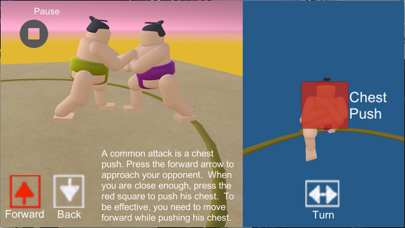





Description by Franklin Chang Written by the developer, not by AppBrain. Click to read.
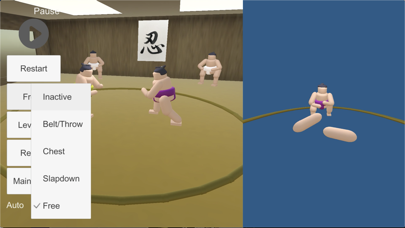
In the game, you are the wrestler with the yellow belt. On the right side is a first-person view of your opponent with buttons for various attacks.
1) Chest attack: Press the red button the push the chest. You need to be moving forward for this to be effective.
2) Slapdown: Drag down the yellow button and your arm will reach for their head and attempt to pull them down. After your arm makes contact with their head (button turns blue), you need to move backward to give more force to your pull. This only works if your opponent is moving forward.
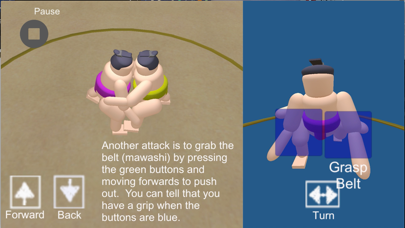
3) Grip Belt: You can press the green buttons to reach for the belt. When you have a grip, the button will turn blue. You can push them out of the ring. If you have a two-hand grip, you can sometimes lift them. You can escape from this grip by turning quickly.
4) Throw: Once you have a grip, you can turn quickly to the side opposite your grip. Once you are facing the same direction, you can step forward to throw them.
5) The forward and back buttons are on the left. The turn button is in the middle of the first-person view and it must be dragged left or right to turn.
There is a tournament room where you can compete in a tournament and get ranked from low Maegashira to Yokozuna. A tournament consists of 15 matches and you need to win 8 to be promoted. To get promoted to Ozeki, you need 33 wins in the last three matches. To get promoted to Yokozuna, you need to win two consecutive tournaments. When you finish a tournament, your rank will be posted on the leaderboards. There is one for overall high scores and one that is reset each month to provide a monthly tournament. In real world sumo, Yokozuna is an honorary rank and you cannot go down to ozeki (a Yokozuna can only retire). To simulate this, there is a Yokozuna leaderboard where the scores of tournaments by Yokozuna will be posted in terms of recency. To stay at the top of this leaderboard, you must regularly be in tournaments as a Yokozuna, otherwise your name will go down the list and that will be like retirement.
Also, in this room you can change the color of the sumo’s belt. Just click on the belt of either your own wrestler or your opponent, and select the color from the wheel. Then click the belt again to close the selector.
There is also a two-person room where you can play with others over wifi. Just connect to the same wifi. One player should press player 1 and the other player 2. Then both players press play and when they are both done, the sumo wrestlers will bow and the game will start. At the end, player 1 needs to press play to reset the game and then both players need to press play to start the bow.
Sumoscience attempts to mimic some of the difficulties in real sumo. The chest push is easy, but you need to keep your opponent in front of you. Slapdowns are more difficult, because you need to have enough room to move backwards without going out. Gripping the belt and pushing them out is relatively straight-forward, but can be difficult if they are doing the same thing to you. Throws are a powerful move, but they require the coordination of multiple movements. As in real sumo, moving forward and keeping your opponent in front of you are the basis of a good technique.