



AppBrain's verdict
- Last updated
- October 24, 2026
- Size
- 94.5 MB
User feedback
Ratings and reviews on the App StoreComments on SumSheet XLSX Editor for iOS
We don't have enough comments to show example comments. Please check back later.
Store listing
By HEALTH INFORMATIC SECURITY SYSTEM, S.L., from the App StoreDescription by HEALTH INFORMATIC SECURITY SYSTEM, S.L. Written by the developer, not by AppBrain. Click to read.
Named after the most famous formula on the planet, SumSheet runs on the same native XLSX engine that powers SumOffice on the desktop and on the server — so a workbook calculates the same wherever you open it. Change a price and the total recalculates, exactly as it would on a laptop.
WHAT IT DOES
• Opens .xlsx, .xlsm, .xlsb, .xltx and .xltm — from the Files app, mail, or any app’s “Open in…”
• Edits cells in the formula bar and recalculates formulas — across sheets too
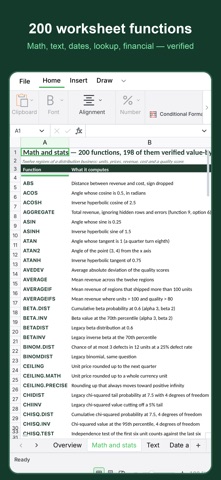
• 200 worksheet functions: math, text, dates, lookup, logical, financial, engineering
• Tables with filters, conditional formatting, number formats, charts — kept as in the file
• Keeps the workbook structure intact — sheets, formats, formulas, macros stay in the file
YOUR FILES STAY YOURS
Editing happens on the device. Workbooks are not uploaded anywhere, and the app does not require an account to open a file.
PART OF SUMOFFICE
SumOffice is an office suite built around one document engine: the same logic in a desktop application, inside your own product, on a server, and here on the phone. SumDoc is its document counterpart.
SumOffice is an independent product and is not affiliated with Microsoft.
Learn more: https://sumoffice.com
Privacy Policy: https://sumoffice.com/app-privacy.html
Terms of Use (EULA): https://www.apple.com/legal/internet-services/itunes/dev/stdeula/
Safety and technology
Found in the app by AppBrain- Price
- Free
- App size
- 94.5 MB
- Content rating
- Everyone
Technologies used by SumSheet XLSX Editor
Releases
Updates seen on the App Store- Version
- 2026.4.38
- Launched
- September 2026
No changelog data
Alternatives
Similar apps and more from HEALTH INFORMATIC SECURITY SYSTEM, S.L.Alternatives to SumSheet XLSX Editor


More from HEALTH INFORMATIC SECURITY SYSTEM, S.L.


Also available on Google Play

Rankings
App Store top chartsApp Store Rankings for SumSheet XLSX Editor
About the app and developer
About SumSheet XLSX Editor
SumSheet XLSX Editor is a productivity app developed by HEALTH INFORMATIC SECURITY SYSTEM, S.L.
What is the rating of SumSheet XLSX Editor?
SumSheet XLSX Editor has no ratings yet.
Is SumSheet XLSX Editor free?
SumSheet XLSX Editor is free. The app size is 94.50 MB. The latest version available is 2026.4.38. The last update was on October 24, 2026.
What are the requirements for SumSheet XLSX Editor?
The app has a content rating of Everyone. The app has been available on the App Store since September 2026.
SumSheet XLSX Editor is made and published by HEALTH INFORMATIC SECURITY SYSTEM, S.L. AppBrain is an independent app data site and isn't affiliated with HEALTH INFORMATIC SECURITY SYSTEM, S.L. The app name, icon, screenshots and description belong to HEALTH INFORMATIC SECURITY SYSTEM, S.L. and are shown as published on the App Store.
Developer information for HEALTH INFORMATIC SECURITY SYSTEM, S.L.
Frequently asked questions about SumSheet XLSX Editor
Is SumSheet XLSX Editor free?
Yes. SumSheet XLSX Editor is free on the App Store.
Is SumSheet XLSX Editor still available?
Yes. SumSheet XLSX Editor is on the App Store, and the last update we saw was on October 24, 2026.
How large is SumSheet XLSX Editor?
SumSheet XLSX Editor is 94.50 MB.
Is SumSheet XLSX Editor suitable for children?
App Store rates the content of SumSheet XLSX Editor as suitable for everyone.
Who made SumSheet XLSX Editor?
SumSheet XLSX Editor was developed by HEALTH INFORMATIC SECURITY SYSTEM, S.L. It is listed in the productivity category on the App Store.
What are the best alternatives to SumSheet XLSX Editor?
People looking at SumSheet XLSX Editor also look at these productivity apps: OneToolKit, SpitePDF: PDF Editor & Markup, PDF Reader & Document Viewer, MODV AI, PDF Reader - ProDoc+.