Download Android Apps and Games
AppBrain
  • Apps
  • Apps being viewed right now Trending apps today Most popular apps All-time most downloaded apps Top rated apps
  • Intelligence ▾
    Intelligence overview → Track any Android app or your whole market
    Track & analyze
    Keyword Tracker & OptimizerTrack & improve Play rankings App Performance ReportOne-off PDF for any app StatisticsFree Android & Play market stats
    Promote your app
    Featured Apps App Links
  • Intelligence
  • Pricing
  • Dashboard
  • Sign up
  • Log in
Last updated on: 2026-07-22
App Store Apps > Education > Sun to Moon Sleep Clock
Sun to Moon Sleep Clock icon

Sun to Moon Sleep Clock

5.1
Michael Sibley
4.50
105 reviews
$2.99

Sun to Moon Sleep Clock Screenshot 1 of 8
Sun to Moon Sleep Clock Screenshot 2 of 8
Sun to Moon Sleep Clock Screenshot 3 of 8
Sun to Moon Sleep Clock Screenshot 4 of 8
Sun to Moon Sleep Clock Screenshot 5 of 8
Sun to Moon Sleep Clock Screenshot 6 of 8
Sun to Moon Sleep Clock Screenshot 7 of 8
Sun to Moon Sleep Clock Screenshot 8 of 8
4.50 ยท 105 reviews
Download from the App Store

About Sun to Moon Sleep Clock

Sun to Moon Sleep Clock is an overall app developed by Michael Sibley.

Download Statistics

User Ratings

Sun to Moon Sleep Clock is rated 4.50 out of 5 stars. The rating is based on 110 ratings.

App Information

Sun to Moon Sleep Clock costs $2.99 to download. The APK download size is 51.72 MB. The latest version available is 5.1. The last update was on December 12, 2025.

Technical Requirements

The app has a content rating of Everyone. The app has been available on Google Play November 2015.

Description
Sun to Moon Sleep Clock is a gentle sleep trainer that helps toddlers and young children learn when to stay in bed and when it’s okay to get up. Throughout the night, 26 stars disappear one by one, giving kids an easy visual countdown until morning. The app is quick to set up, fully customizable, and packed with optional sleep sounds, wake sounds, nap timers, and bedtime-routine tools.

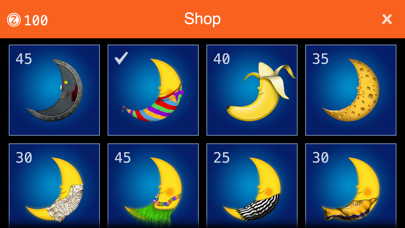
Kids can personalize the friendly Sun and Moon characters with outfits and accessories from their shops. Everything is unlocked from the start, but you can enable the optional Snooze Rewards system to encourage healthy sleep habits. The longer your child stays in bed, the more Snooze Coins they earn — and they can trade them for fun gifts for Sun and Moon.

Wake-up times can be set from the settings screen or by tapping the orange time buttons on the main daytime screen. Tapping Goodnight triggers an instant sunset at bedtime. Need an early wake-up for a nap or a schedule change? Tap Moon’s nose three times for an out-of-schedule sunrise — and three more times for an immediate sunrise.

Full instructions: https://www.msibley.com/sleep-clock
Updates & tips: https://www.facebook.com/suntomoonsleepclock

––––––––––––––––––––––––––––

Key Features

• Gentle sleep training with a visual star countdown
• Soothing sleep sounds: Fan, white noise (hair dryer), waves, heartbeat, whale song, rain and more — or silence
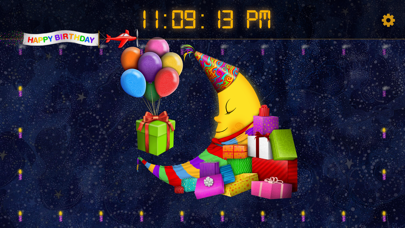
• Fun wake-up sounds: Birds, digital alarm, drums, rooster, Happy Birthday, Santa/Jingle Bells and more — or silence
• Custom schedules: Optional 7-day routine planner
• Digital or analog clock styles, including a large-digit mode
• Speaking Clock: Tap Sun or Moon’s mouth to hear the time (optional)
• Customizable outfits and accessories for Sun and Moon
• Themes: Birthday, Christmas, Easter, Halloween, St Patrick’s Day, Pirates, Sports, Space
• Snooze Rewards system using collectible Snooze Coins (optional)
• Shooting-star progress bar for nighttime visualization
• Final Countdown Mode: Faster 12-star countdown before wake-up (optional)
• Reading Time: Moon reads for up to an hour at sunrise or sunset
• Nose Tap Naps: Set a nap duration and activate with 3 taps
• Immediate Sunrise: Trigger instantly with 3 extra taps
• Morning Memo: Write a message for your child — Sun can read it aloud (optional)
• Dim & Auto-Dim controls to reduce brightness
• Dark Mode for softer nighttime colors
• Built-in help screens throughout the app
• Multilingual support: English, German, Spanish, French, Italian, Dutch, Portuguese, Simplified Chinese, Japanese and Korean
• PIN-protected settings with Face ID / Touch ID support (master code: 8529)
• Dreamy illustrations by artist Michael Sibley

––––––––––––––––––––––––––––

Helpful Notes

• For uninterrupted use, enable Guided Access to disable device buttons
• Keep your device plugged in while the app is running overnight
• Reduce screen brightness or enable Auto-Dim for extended nighttime use
• If you forget your settings PIN, the master code is 8529

––––––––––––––––––––––––––––

If You Find the App Helpful…

A rating or review on the App Store really helps us improve Sun to Moon.
Thank you for your support — and sweet dreams!
Show more Show less

More data about Sun to Moon Sleep Clock

Price $2.99
Rating 4.50 based on 110 ratings
Ranking Not ranked
Version 5.1
App download size 51.7 MB
Suitable for Everyone

Alternative downloads for the Sun to Moon Sleep Clock app

Night Light: Baby Sleep Clock icon Night Light: Baby Sleep Clock
NGC Media Limited
3.0
Free
3 ratings
TwinClock icon TwinClock
WhatElse Consulting Pty Ltd
0.0
Free
Spell Wizards icon Spell Wizards
Yugaya Health Private Limited
0.0
$2.99
Kids clock learning icon Kids clock learning
ZipoApps
1.7
$0.99
3 ratings
Our Place in Space icon Our Place in Space
The Nerve Centre
2.0
Free
1 ratings
Times Tables Challenge - Game icon Times Tables Challenge - Game
Rosetta Software Limited
4.1
Free
37 ratings
Squeebles Maths Race icon Squeebles Maths Race
KeyStageFun
2.8
$2.99
6 ratings
Police Games Toddler Kids FULL icon Police Games Toddler Kids FULL
Nancy Mossman
4.3
$3.99
234 ratings

More from Michael Sibley

Sun to Moon Sleep Clock Lite icon Sun to Moon Sleep Clock Lite
Michael Sibley
5.0
Free
1 ratings

Changelog of Sun to Moon Sleep Clock

No changelog data

Developer information for Michael Sibley

Michael Sibley

Address:

Share Sun to Moon Sleep Clock

Comments on Sun to Moon Sleep Clock for iOS

We don't have enough comments to show example comments. Please check back later.

App Store Rankings for Sun to Moon Sleep Clock

This app is not ranked

Technologies used by Sun to Moon Sleep Clock

Night Light: Baby Sleep Clock icon Night Light: Baby Sleep Clock
TwinClock icon TwinClock
Spell Wizards icon Spell Wizards
Kids clock learning icon Kids clock learning
Our Place in Space icon Our Place in Space
Times Tables Challenge - Game icon Times Tables Challenge - Game
Squeebles Maths Race icon Squeebles Maths Race
Police Games Toddler Kids FULL icon Police Games Toddler Kids FULL

Back to top
AppBrain Intelligence premium content

Subscribe now to get full and unlimited access to AppBrain Intelligence. You'll have access to:

  • App Intelligence dashboard (performance timeline, competitor comparison, country rankings, insight cards)
  • Detailed ranking data per app
  • Full timeline per developer
  • Device market shares data per country
  • Unlimited keyword tracking
1 Month

$75/mo
(billed every month)

SAVE 0%
Subscribe
3 Months

$65/mo
($195 billed every 3 months)

SAVE 13%
Subscribe
1 Year

$57.50/mo
($690 billed every year)

SAVE 23%
Subscribe
Each subscription will automatically renew 3 days before the expiration date for the same time period. Subscriptions can be cancelled at any time before the renewal.

AppBrain is a directory focused on discovering great apps and games. We give statistics, rankings and search options that Google Play and the App Store don't have. All trademarks are owned by their respective owners. AppBrain doesn't offer APKs or binaries, and always lets users install the official version from Google Play or the App Store.

More apps

  • Top Android apps being viewed
  • Christmas Cat Girl Keyboard Ba
  • Murder Cleaner
  • View 3 Tile Match - Puzzle Game

Android Statistics

  • Android statistics
  • Google Play Developer stats
  • Trending Android Apps
  • Top popular Apps
  • Buy the best Android phone

About AppBrain

  • Contact
  • Privacy
  • Documentation
  • DMCA takedowns
  • Articles
  • Blog
  • Free webpage for your Android app
© 2010-2026 - AppBrain