




AppBrain's verdict
- Last updated
- November 4, 2026
- Size
- 73.0 MB
User feedback
Ratings and reviews on the App StoreComments on Sunday: Weekly Planner for iOS
We don't have enough comments to show example comments. Please check back later.
Store listing
By Gunawan Santoso, from the App StoreDescription by Gunawan Santoso Written by the developer, not by AppBrain. Click to read.
Your tasks are saved on your phone the moment you type them, and they stay there. No sign-up, no cloud sync, nothing to set up.
YOUR WEEK AT A GLANCE
- A 7-day week view that feels like a paper weekly planner
- A Day view that works as a daily planner for today, and a Month view for the bigger picture
- Give a task a start time if you like: the Day view lays timed tasks on an hour-by-hour timeline, beside your calendar's events
- Swipe between weeks and jump back to today with one tap
- Start your week on Sunday, Monday or Saturday
CAPTURE TASKS IN SECONDS
- In the week view, tap a day, type and press return to add task after task
- Or type it the way you'd say it, like “dentist fri 3pm”, and quick add sets the day, time and reminder
- Rename any task right where it is
- Subtasks as a checklist, notes and a reminder on any task
- Long-press a task to drag it to another day of the week
NEVER LOSE A TASK
- Unfinished tasks roll over to today automatically, with Undo (you can turn it off)
- A Someday list for everything without a date; give an item a day when you're ready
- Recurring tasks: every day, every weekday, every week, every month, on chosen days or every few days, and you can defer a single occurrence
- Delete with a 5-second Undo, or skip one occurrence of a repeating task and keep the series
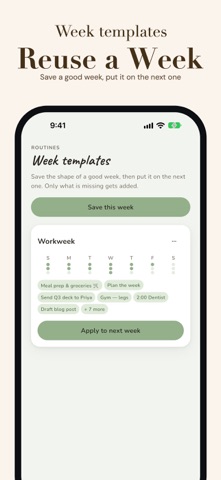
- Week templates: save a good week and put it on the next one; only what's missing is added
ORGANIZE YOUR WAY
- Create your own lists (work, family, health…), each with its own color, and filter the planner by list
- Search every task by title
- Highlighter colors and line-drawn stickers make a task stand out
- See your device calendar's events beside your tasks in the Week and Day views (read-only)
PRINT, EXPORT AND BACK UP
- A printable weekly planner page for this week, filled in or blank, to print or share as a PDF
- Six page designs, previewed before you print: Lined, Dotted, Grid, Minimal, Columns (the week across a landscape page) and Month (the whole month on one page)
- Export your tasks as text, CSV or calendar (ICS)
- Back up your lists and tasks to one file and restore them on a new phone
A WEEKLY REVIEW
- See what got done, then send each open task to next week, to Someday, or let it go
- An optional Sunday-evening reminder to plan the week ahead opens your weekly review
- Clear the last task of a day and Sunday celebrates with you
- Keep a streak of reviewed weeks and share your week as a card
COMFORTABLE TO USE
- Nine planner themes, each in light and dark: Paper, Sage, Linen, Harbor, Lavender and Kraft, plus the winter set Frost, Pine and Cocoa
- Light, dark or system appearance
- Large text up to 2×, reduce motion and screen-reader labels
- In English, French, German, Spanish, Portuguese, Dutch, Japanese and Korean
PRIVATE BY DESIGN
- Your tasks stay on your phone: no account, no cloud
- Move to a new phone with your own backup file
SUNDAY PRO
- Every planner feature is open to everyone
- Paper and Lined are yours from the start; the other themes, page designs and the seasonal sticker set unlock inside the app
- Sunday Pro, a one-time purchase, includes every theme, page design and sticker, the winter themes too, and as many week templates as you like
Sunday keeps planning simple: one calm weekly planner, one to-do list per day, and a week that tidies itself up.
Safety and technology
Found in the app by AppBrain- Price
- Free
- App size
- 73.0 MB
- Content rating
- Everyone
Technologies used by Sunday: Weekly Planner
Releases
Updates seen on the App Store- Version
- 1.9.0
- Launched
- June 2026
No changelog data
Alternatives
Similar apps and more from Gunawan Santoso


Rankings
App Store top chartsApp Store Rankings for Sunday: Weekly Planner
About the app and developer
About Sunday: Weekly Planner
Sunday: Weekly Planner is a productivity app developed by Gunawan Santoso.
User Ratings
The app has no ratings yet.
App Information
Sunday: Weekly Planner is freely available from the App Store. The app size is 72.97 MB. The latest version available is 1.9.0. The last update was on November 4, 2026.
Technical Requirements
The app has a content rating of Everyone. The app has been available on the App Store since June 2026.
Sunday: Weekly Planner is made and published by Gunawan Santoso. AppBrain is an independent app data site and isn't affiliated with Gunawan Santoso. The app name, icon, screenshots and description belong to Gunawan Santoso and are shown as published on the App Store.
Developer information for Gunawan Santoso
Address:
Frequently asked questions about Sunday: Weekly Planner
Is Sunday: Weekly Planner free?
Yes. Sunday: Weekly Planner is free on the App Store.
Is Sunday: Weekly Planner still available?
Yes. Sunday: Weekly Planner is on the App Store, and the last update we saw was on November 4, 2026.
How large is Sunday: Weekly Planner?
Sunday: Weekly Planner is 72.97 MB.
Is Sunday: Weekly Planner suitable for children?
App Store rates the content of Sunday: Weekly Planner as suitable for everyone.
Who made Sunday: Weekly Planner?
Sunday: Weekly Planner was developed by Gunawan Santoso. It is listed in the productivity category on the App Store.
What are the best alternatives to Sunday: Weekly Planner?
People looking at Sunday: Weekly Planner also look at these productivity apps: Meadova: Planner & Journal, Stedo: Daily Routine Planner, Multi Shift: Shift Planner, DOs - Daily Planner, Done It: Tasks & Reminders.