

SunTable-Spreadsheet view&edit
SunTable-Spreadsheet view&edit is made and published by Guangzhou Yeion Network Technology Co., Ltd. AppBrain is an independent app data site and isn't affiliated with Guangzhou Yeion Network Technology Co., Ltd. The app name, icon, screenshots and description belong to Guangzhou Yeion Network Technology Co., Ltd and are shown as published on the App Store.
AppBrain's verdict
- Rating on App Store
- 4.68
- 92 ratings
- Last updated
- July 28, 2026
- Size
- 95.4 MB
It doesn't have enough ratings yet to judge what users think.
User feedback
Ratings and reviews on the App StoreComments on SunTable-Spreadsheet view&edit for iOS
We don't have enough comments to show example comments. Please check back later.
Store listing
By Guangzhou Yeion Network Technology Co., Ltd, from the App Store


Description by Guangzhou Yeion Network Technology Co., Ltd Written by the developer, not by AppBrain. Click to read.
Our design concept is minimalist, and the goal is to solve the complex and difficult problem of making forms for ordinary people
The software is mainly divided into four modules
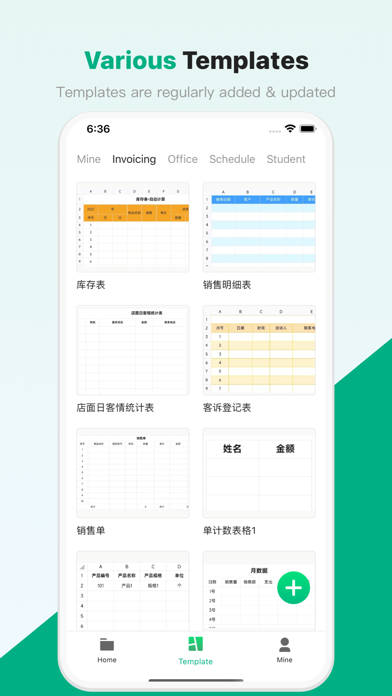
Homepage supports quick creation of blank forms and selection of templates designed by us to create forms
The file page can quickly view the table, which can be sorted in descending or ascending order according to creation time and update time, for faster selection
The video tutorial page provides video tutorials that we have carefully recorded for you, and Xiaobai can also get started quickly
mine? Recycle bin, draft box to escort your data security, and online customer service to contact and communicate at any time, ask questions if you don't understand, and solve all your doubts~
Our advantage:
- Simple! ! ! Get started in one minute with video tutorials.
- Various styles, support schedules and data tables, and facilitate the creation of billing type tables and class schedules and other scheduling tables
- Various templates, create forms through form templates, can quickly complete the work
- Powerful functions, support all common table functions such as modifying table fonts, backgrounds, borders, merging, formulas, etc.
- Support importing and exporting xlsx and xls files, restore the original appearance of the table one-to-one, and support cross-platform work requirements
- Drafts box, the phone is out of power and shut down? Phone freezes? The form is not lost, go back to the software and continue to edit and use it in the draft box
- Deleted the wrong one? Go to the recycle bin, there will be surprises
- Wrong? Support one-click withdrawal, at least the last 50 operation records can be withdrawn
- Withdrawing too far? Why not try to go back to the next step~
- 12345 Little Tiger Up the Mountain, this kind of regular content, why not try the one-click filling function?
- Calculations are too complicated? Why not try to select and then click SUM/AVERAGE/MAX/MIN/COUNT?, the original calculation can be so simple?
- A screenshot of a form sent by a good friend? Why not try to paste it directly after scanning? It turns out that the rows and columns can be automatically recognized, and the pictures can be changed directly into tables~
- What, Caton? Caton is impossible to Caton? If you don't believe me, try it~
- quick! ! ! Open forms fast, edit fast, make fast!
- Stable, safe and reliable. Perfect mechanism and algorithm to ensure data security and reliability
Some services within the software require the purchase of membership, including a one-time purchase of a permanent membership and a year-to-month continuous subscription membership.
Instructions for continuous subscription members:
- Subscription period: 1 year or one month
- Payment: Pay via iTunes Store account
- Cancel subscription: If you need to cancel the subscription, please manually turn off the automatic subscription in Apple ID settings management 24 hours before the current subscription expires
- Renewal: Debit the payment through the iTunes Store within 24 hours before the expiration date, and the subscription cycle will be extended for one year or one month after the deduction is successful
- Privacy Policy: http://www.onlybiaoge.cn/policy-ios/
- Terms of use: http://www.onlybiaoge.cn/terms-ios/
Safety and technology
Found in the app by AppBrain- Price
- Free
- App size
- 95.4 MB
- Content rating
- Everyone
Technologies used by SunTable-Spreadsheet view&edit
Releases
Updates seen on the App Store- Version
- 2.2.6
- Launched
- June 2022
No changelog data
Alternatives
Similar apps and more from Guangzhou Yeion Network Technology Co., LtdAlternatives to SunTable-Spreadsheet view&edit







Rankings
App Store top chartsApp Store Rankings for SunTable-Spreadsheet view&edit
About the app and developer
About SunTable-Spreadsheet view&edit
SunTable-Spreadsheet view&edit is a productivity app developed by Guangzhou Yeion Network Technology Co., Ltd.
User Ratings
SunTable-Spreadsheet view&edit is rated 4.68 out of 5 stars. The rating is based on 92 ratings.
App Information
SunTable-Spreadsheet view&edit is freely available from the App Store. The app size is 95.43 MB. The latest version available is 2.2.6. The last update was on July 28, 2026.
Technical Requirements
The app has a content rating of Everyone. The app has been available on the App Store since June 2022.
Developer information for Guangzhou Yeion Network Technology Co., Ltd
Frequently asked questions about SunTable-Spreadsheet view&edit
Is SunTable-Spreadsheet view&edit free?
Yes. SunTable-Spreadsheet view&edit is free on the App Store.
Is SunTable-Spreadsheet view&edit still available?
Yes. SunTable-Spreadsheet view&edit is on the App Store, and the last update we saw was on July 28, 2026.
How large is SunTable-Spreadsheet view&edit?
SunTable-Spreadsheet view&edit is 95.43 MB.
Is SunTable-Spreadsheet view&edit suitable for children?
App Store rates the content of SunTable-Spreadsheet view&edit as suitable for everyone.
How do people rate SunTable-Spreadsheet view&edit?
SunTable-Spreadsheet view&edit scores 4.68 out of 5 stars, from 92 ratings on the App Store.
Who made SunTable-Spreadsheet view&edit?
SunTable-Spreadsheet view&edit was developed by Guangzhou Yeion Network Technology Co., Ltd. It is listed in the productivity category on the App Store.
What are the best alternatives to SunTable-Spreadsheet view&edit?
People looking at SunTable-Spreadsheet view&edit also look at these productivity apps: The Spreadsheet App - Sheets, XLSX Sheets: Edit Spreadsheet, Document Manager:Docs,Sheets, 表格手机版-简易表格制作工具, StatPlus Statistics & Analysis.