

SupaFocus: Screen Time Control
SupaFocus: Screen Time Control is made and published by Andre Grillo. AppBrain is an independent app data site and isn't affiliated with Andre Grillo. The app name, icon, screenshots and description belong to Andre Grillo and are shown as published on the App Store.
AppBrain's verdict
- Rating on App Store
- 4.43
- 7 ratings
- Last updated
- September 19, 2026
It doesn't have enough ratings yet to judge what users think.
Rankings
App Store top chartsApp Store Rankings for SupaFocus: Screen Time Control
Competitors
Similar apps and more from Andre GrilloAlternatives to SupaFocus: Screen Time Control


More from Andre Grillo


Releases
Updates seen on the App Store- Version
- 2.0.6
- Launched
- March 2026
No changelog data
User feedback
Ratings and reviews on the App StoreComments on SupaFocus: Screen Time Control for iOS
We don't have enough comments to show example comments. Please check back later.
Technology
Found in the app by AppBrain- Price
- Free
- App size
- 25.8 MB
- Content rating
- Everyone
Technologies used by SupaFocus: Screen Time Control
About the app and developer
About SupaFocus: Screen Time Control
SupaFocus: Screen Time Control is a productivity app developed by Andre Grillo.
User Ratings
SupaFocus: Screen Time Control is rated 4.43 out of 5 stars. The rating is based on 7 ratings.
App Information
SupaFocus: Screen Time Control is freely available from the App Store. The app size is 25.80 MB. The latest version available is 2.0.6. The last update was on September 19, 2026.
Technical Requirements
The app has a content rating of Everyone. The app has been available on the App Store since March 2026.
Developer information for Andre Grillo
Address:
Store listing
By Andre Grillo, from the App Store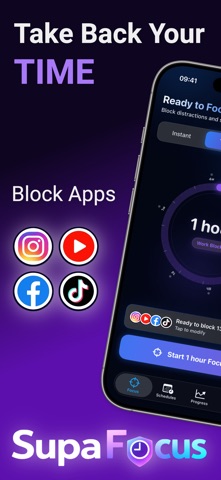




Description by Andre Grillo Written by the developer, not by AppBrain. Click to read.
Whether you're studying for exams, working on important projects, or simply trying to reduce phone distractions, SupaFocus gives you the tools to block apps & websites, track your progress, and stay accountable.
KEY FEATURES
Smart App & Website Blocking
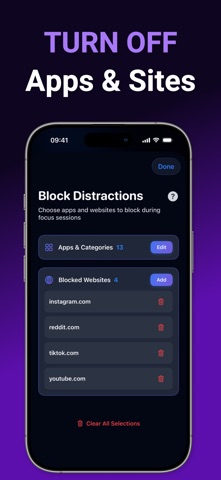
Select which apps and websites distract you most—social media, games, news, time-wasting sites—and block them during focus sessions.
Powered by Apple's Screen Time API for reliable blocking that actually works.
Usage Limits
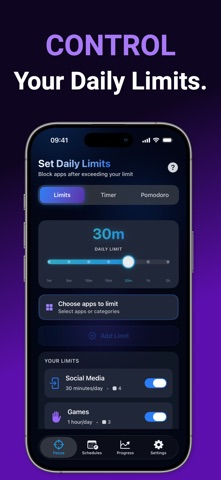
Set daily time limits for specific apps. When you exceed your limit, the app automatically gets blocked and you'll receive a notification—helping you build healthier digital habits.
Flexible Focus Modes
• Custom Timer: Set any duration you need
• Pomodoro Mode: 25-minute focus blocks with automatic breaks
Lock-In Commitment Levels
• Normal: End anytime with confirmation
• Time-Locked: 1-minute wait (free) or up to 10 minutes (Pro)
• Math Challenge: Solve 3 math problems to exit early (Pro)
• Strict: Cannot end until complete—unbreakable focus (Pro)
Focus Schedules
Create recurring schedules to automatically block apps at specific times. Perfect for "no social media during work hours" or "block games before bedtime."
Progress Tracking & Insights (FREE)
• View your daily, weekly, and monthly focus time
• Track completion rates and productivity trends
• Export your session history as CSV
• All statistics now available to everyone—no Pro needed
Achievements & Streaks (FREE)
Unlock all 50+ badges for consistency and stay motivated with daily streaks. Full achievement system now free for everyone.
Apple Watch Companion (FREE)
Start, pause, and monitor your focus sessions from your wrist—now available to everyone at no cost. Stay in flow without reaching for your phone.
Referral Program
Share SupaFocus with friends and everyone wins:
• Your friends get 1 month of Pro free when they join
• Invite 5 friends and earn a full year of Pro—on us
WHY SUPAFOCUS?
Unlike simple timers that rely on willpower alone, SupaFocus actively blocks distracting apps and websites at the system level—making it impossible to "just check Instagram for a minute."
Perfect for:
• Students preparing for exams or completing assignments
• Professionals tackling deep work and important projects
• Anyone looking to reduce screen time and build healthier phone habits
• Remote workers who need structure and accountability
HOW IT WORKS
Focus Timer (Custom & Pomodoro):
1. Grant Screen Time permission (one-time setup)
2. Select the apps and websites you want to block
3. Choose your focus mode: Custom Timer (5 min to 4 weeks) or Pomodoro (25 min + 5 min breaks)
4. Start your session—selected apps & websites are now blocked
5. Apps and websites unlock automatically when the timer ends
Usage Limits:
1. Create a usage limit for specific apps
2. Set your daily time budget (e.g., 30 min of social media per day)
3. Once you exceed your limit, the apps automatically get blocked
4. Limits reset at midnight each day
PREMIUM FEATURES
Upgrade to SupaFocus Pro to unlock:
• Unlimited schedules (free: 1 schedule)
• Unlimited usage limits (free: 1 limit)
• Strict lock-in mode (unbreakable focus)
• Math Challenge exit lock
• Extended time-lock durations (up to 10 minutes)
• Custom Pomodoro timings
Start with a 7-day free trial on the yearly plan, or choose monthly or lifetime plans.
Download SupaFocus today and transform your relationship with your phone. Your focused, productive self is just one session away.
---
Questions or feedback? Contact us at support@bysupa.app
Privacy Policy: https://supafocus.bysupa.app/en/privacy
Terms of Service: https://supafocus.bysupa.app/en/terms