


AppBrain's verdict
EstablishedWell rated- Rating on App Store
- 4.07
- 172 ratings
- Last updated
- November 11, 2026
- Size
- 46.5 MB
Users rate it well: 4.1 stars from 172 ratings.
User feedback
Ratings and reviews on the App StoreComments on Super Backup : Contacts & SMS for iOS
We don't have enough comments to show example comments. Please check back later.
Store listing
By Dropouts Technologies LLP, from the App StoreDescription by Dropouts Technologies LLP Written by the developer, not by AppBrain. Click to read.
SMS & IMESSAGE BACKUP
Save the conversations that matter before you switch phones, free up space or lose them by accident.
• Back up SMS and iMessage chats directly on your iPhone. No Mac, no PC, no cable
• Choose how far back to go: last 7 days, 30 days, 12 months or everything
• Long chats are backed up in small date steps, so even your busiest days come through complete
• Read your backed-up chats in the app as familiar chat bubbles, with your texts on the right
• Back up again anytime: new messages are added and nothing is saved twice
• After a quick one-time setup, backups run in the background while you stay in Super Backup
• A short video tutorial walks you through setup step by step
EXPORT YOUR TEXTS YOUR WAY
• PDF: a clean, printable transcript with chat bubbles, dates and page numbers
• Spreadsheet (CSV): opens in Excel, Numbers or Google Sheets with emoji and accents intact
• Text file (TXT): simple and readable anywhere
• Another OS file: move your one-to-one chats to an Another OS phone with a free SMS restore app
• Export one chat or all of them in a single file, then share by AirDrop, Mail, Files and more
PRIVATE BY DESIGN
Super Backup uses Apple's free Shortcuts app to read only the chats you choose, only when you ask. Your texts go straight into Super Backup and stay on your device. Nothing is uploaded.
CONTACTS BACKUP
• Back up all your contacts in one tap to a standard VCF (vCard) file
• Restore them on any iPhone or Another OS phone, or import them into most email and address book apps
• Keep a backup history showing the date, number of contacts and file size of each backup
• Save or share backups with Files, iCloud Drive, AirDrop, Mail and more
CONTACTS CLEANUP
• Find duplicate contacts, plus contacts that share a phone number or email
• Spot incomplete contacts with no name, no phone number or no email
• Merge duplicates into one complete contact
• Swipe left to delete, swipe right to keep
• Built-in safety net: Super Backup creates a backup automatically before deleting any contact
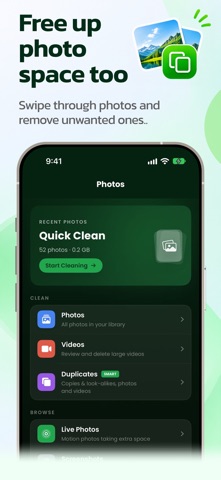
PHOTO CLEANUP & WI-FI TRANSFER
• Swipe through your photos month by month and delete the junk
• Find duplicate and look-alike photos and videos, and keep the best copy
• Review large videos, Live Photos, screenshots and media saved from social and messaging apps
• Send photos to your Mac or PC over Wi-Fi from any web browser: browse your albums and download a whole album as a ZIP. No cable, no iCloud
FREE PLAN
• Back up 1 SMS chat (its 10 newest messages) and export it as PDF, CSV, TXT or an Another OS file
• Back up up to 100 contacts per backup file
• Clean up to 7 photos and 3 contacts per day
PREMIUM
• Unlimited SMS chats and messages, with several chats backed up at once
• Unlimited contacts in every backup
• Unlimited photo and contact cleanup
• Wi-Fi photo transfer to Mac and PC
Choose a weekly or yearly subscription, or a one-time Lifetime purchase.
SUBSCRIPTION INFORMATION
• Payment is charged to your Apple Account when you confirm your purchase.
• Subscriptions renew automatically unless canceled at least 24 hours before the end of the current period. Your account is charged for renewal within 24 hours before the current period ends.
• You can manage or cancel your subscription anytime in your Apple Account settings.
• If a free trial is offered, any unused part of it ends when you buy a subscription.
Privacy Policy Link : https://www.dropouts.in/privacypolicy/privacy-policy.html
Terms and Conditions Link : https://www.dropouts.in/privacypolicy/terms-of-use.html
Safety and technology
Found in the app by AppBrain- Price
- Free
- App size
- 46.5 MB
- Content rating
- Everyone
Technologies used by Super Backup : Contacts & SMS
Releases
Updates seen on the App Store- Version
- 3.2.1
- Launched
- November 2015
No changelog data
Alternatives
Similar apps and more from Dropouts Technologies LLPAlternatives to Super Backup : Contacts & SMS


More from Dropouts Technologies LLP


Rankings
App Store top chartsApp Store Rankings for Super Backup : Contacts & SMS
About the app and developer
About Super Backup : Contacts & SMS
Super Backup : Contacts & SMS is an utilities app developed by Dropouts Technologies LLP.
User Ratings
Super Backup : Contacts & SMS is rated 4.07 out of 5 stars. The rating is based on 170 ratings.
App Information
Super Backup : Contacts & SMS is freely available from the App Store. The app size is 46.53 MB. The latest version available is 3.2.1. The last update was on November 11, 2026.
Technical Requirements
The app has a content rating of Everyone. The app has been available on the App Store since November 2015.
Super Backup : Contacts & SMS is made and published by Dropouts Technologies LLP. AppBrain is an independent app data site and isn't affiliated with Dropouts Technologies LLP. The app name, icon, screenshots and description belong to Dropouts Technologies LLP and are shown as published on the App Store.
Developer information for Dropouts Technologies LLP
Address:
Frequently asked questions about Super Backup : Contacts & SMS
Is Super Backup : Contacts & SMS free?
Yes. Super Backup : Contacts & SMS is free on the App Store.
Is Super Backup : Contacts & SMS still available?
Yes. Super Backup : Contacts & SMS is on the App Store, and the last update we saw was on November 11, 2026.
How large is Super Backup : Contacts & SMS?
Super Backup : Contacts & SMS is 46.53 MB.
Is Super Backup : Contacts & SMS suitable for children?
App Store rates the content of Super Backup : Contacts & SMS as suitable for everyone.
How do people rate Super Backup : Contacts & SMS?
Super Backup : Contacts & SMS scores 4.07 out of 5 stars, from 172 ratings on the App Store.
Who made Super Backup : Contacts & SMS?
Super Backup : Contacts & SMS was developed by Dropouts Technologies LLP. It is listed in the utilities category on the App Store.
What are the best alternatives to Super Backup : Contacts & SMS?
People looking at Super Backup : Contacts & SMS also look at these utilities apps: Contacts Backup Lite, Enable Copy for Safari, .mobileconfig Loader, Teendow, FontInstaller Install any font.