

super simple to do list
super simple to do list is made and published by Andeesh Mehdi Syed. AppBrain is an independent app data site and isn't affiliated with Andeesh Mehdi Syed. The app name, icon, screenshots and description belong to Andeesh Mehdi Syed and are shown as published on the App Store.
AppBrain's verdict
- Last updated
- September 1, 2026
Rankings
App Store top chartsApp Store Rankings for super simple to do list
Competitors
Similar apps and more from Andeesh Mehdi SyedAlternatives to super simple to do list


More from Andeesh Mehdi Syed


Releases
Updates seen on the App Store- Version
- 1.0
- Launched
- September 2026
No changelog data
User feedback
Ratings and reviews on the App StoreComments on super simple to do list for iOS
We don't have enough comments to show example comments. Please check back later.
Technology
Found in the app by AppBrain- Price
- Free
- App size
- 1.06 MB
- Content rating
- Everyone
Technologies used by super simple to do list
About the app and developer
About super simple to do list
super simple to do list is a productivity app developed by Andeesh Mehdi Syed.
User Ratings
The app has no ratings yet.
App Information
super simple to do list is freely available from the App Store. The app size is 1.06 MB. The latest version available is 1.0. The last update was on September 1, 2026.
Technical Requirements
The app has a content rating of Everyone. The app has been available on the App Store since September 2026.
Developer information for Andeesh Mehdi Syed
Address:
Store listing
By Andeesh Mehdi Syed, from the App Store


Description by Andeesh Mehdi Syed Written by the developer, not by AppBrain. Click to read.
No notifications. No folders. No projects, tags, or productivity systems. Just your tasks, written down, checked off.
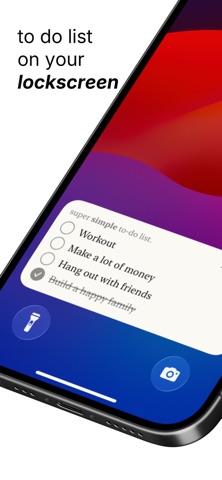
YOUR LIST ON YOUR LOCK SCREEN
Pin your to-do list to the Lock Screen and check things off without even unlocking your phone. Add a widget to your Home Screen too — tap the circle, task done, right from the widget.
MAKE IT TRULY YOURS
Pick from 20 hand-crafted themes: handwriting on notebook grid paper, a ruled journal with a red margin, sticky-note marker, chalkboard, typewriter, green-on-black terminal, elegant serif, and more. Add an optional font color and the whole list — text, checkmarks, everything — follows.
SIMPLE MEANS SIMPLE
• Type a task, hit return, type the next one
• Tap the circle to strike it out
• Swipe left to delete, hold and drag to reorder
• Clear all your done tasks in one tap
PRIVATE BY DESIGN
No account. No sign-up. No analytics, no tracking, no third-party anything. Your tasks live on your device and nowhere else.
Free. Simple. Yours.