

SuperKeys Accessible Keyboard
SuperKeys Accessible Keyboard is made and published by Crick Software. AppBrain is an independent app data site and isn't affiliated with Crick Software. The app name, icon, screenshots and description belong to Crick Software and are shown as published on the App Store.
AppBrain's verdict
Established- Rating on App Store
- 2.67
- 3 ratings
- Last updated
- February 18, 2025
It doesn't have enough ratings yet to judge what users think.
Rankings
App Store top chartsApp Store Rankings for SuperKeys Accessible Keyboard
Competitors
Similar apps and more from Crick SoftwareAlternatives to SuperKeys Accessible Keyboard




More from Crick Software



Releases
Updates seen on the App Store- Version
- 2.1.2
- Launched
- October 2014
No changelog data
User feedback
Ratings and reviews on the App StoreComments on SuperKeys Accessible Keyboard for iOS
We don't have enough comments to show example comments. Please check back later.
Technology
Found in the app by AppBrain- Price
- $12.99
- App size
- 57.9 MB
- Content rating
- Everyone
Technologies used by SuperKeys Accessible Keyboard
About the app and developer
About SuperKeys Accessible Keyboard
SuperKeys Accessible Keyboard is an utilities app developed by Crick Software.
User Ratings
SuperKeys Accessible Keyboard is rated 2.67 out of 5 stars. The rating is based on 3 ratings.
App Information
SuperKeys Accessible Keyboard costs $12.99. The app size is 57.92 MB. The latest version available is 2.1.2. The last update was on February 18, 2025.
Technical Requirements
The app has a content rating of Everyone. The app has been available on the App Store since October 2014.
Developer information for Crick Software
Address:
Frequently asked questions about SuperKeys Accessible Keyboard
Is SuperKeys Accessible Keyboard free?
No. SuperKeys Accessible Keyboard costs $12.99 on the App Store.
Is SuperKeys Accessible Keyboard still available?
Yes. SuperKeys Accessible Keyboard is on the App Store, and the last update we saw was on February 18, 2025.
How large is SuperKeys Accessible Keyboard?
SuperKeys Accessible Keyboard is 57.92 MB.
Is SuperKeys Accessible Keyboard suitable for children?
App Store rates the content of SuperKeys Accessible Keyboard as suitable for everyone.
How do people rate SuperKeys Accessible Keyboard?
SuperKeys Accessible Keyboard scores 2.67 out of 5 stars, from 3 ratings on the App Store.
Who made SuperKeys Accessible Keyboard?
SuperKeys Accessible Keyboard was developed by Crick Software. It is listed in the utilities category on the App Store.
What are the best alternatives to SuperKeys Accessible Keyboard?
People looking at SuperKeys Accessible Keyboard also look at these utilities apps: Hiru, Tboard, Big Keys Low Vision Keyboard, Highlighted Large Keyboard, StoneKey - Custom Keyboard.
Store listing
By Crick Software, from the App Store


Description by Crick Software Written by the developer, not by AppBrain. Click to read.
- Having difficulty using the iPhone or iPad keyboard?
- Struggling to see the keys?
If your answer is "Yes" to either of these, then SuperKeys is for you. SuperKeys can totally replace your standard keyboard or be available just when you need it.
"Superkeys is the most innovative alternate access app I've seen in years. Not just for children and adults with motor disabilities but also for anyone with low vision!"
- Dr Denise DeCoste, Assistive Technology Consultant, MD
“I used SuperKeys with standard productivity iOS apps...SuperKeys provides new options not previously possible.”
- Carl Leynse Harpold, Occupational Therapist
JUST SEVEN KEYS INSTEAD OF 30+
The unique design of SuperKeys gives you just 7 clusters to target instead of over 30 small keys! Just tap or hold the cluster containing the letter you want, then select the letter in the enlarged cluster. There’s no double-tapping, no essential swiping, and no learning required.
INTELLIGENT WORD PREDICTION
Word suggestions are displayed on large buttons as you type (you can customize the size) to make selection easy, and suggestions are updated as a cluster is opened, making it much more likely that the word you want is included.
EASY CURSOR MOVEMENT
Get the cursor where you want it with just a few taps. Choose to move forward or back one character or one word.
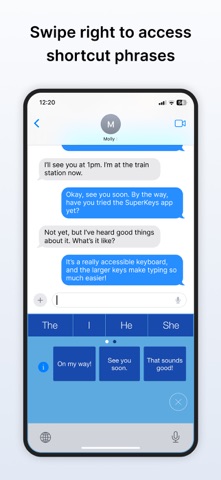
ONE-TOUCH SHORTCUTS
There’s also easy access to your iOS Text Replacement phrases - your personalised phrases containing 3+ words are displayed in the SuperKeys shortcuts. Just tap the shortcuts key, then select the phrase you want. A single tap can enter any phrase, saving you lots of time and key presses.
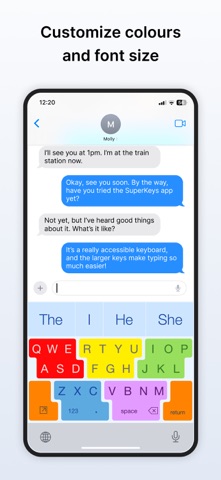
MAKE IT YOURS
SuperKeys can be fully personalized to your requirements:
• Get optimum clarity and contrast by customizing colours and font.
• Improve predictor access by setting the size that’s best for you.
• Get faster access to Delete, Space and Return by setting swipe options.
• Optimize visual experience by turning animation on or off.
• Achieve full control of the Delete key with auto-repeat options.
CAREFULLY RESEARCHED AND TESTED
Globally recognised by a coveted BETT award, SuperKeys was meticulously researched and tested. We used our 20+ years of accessible software expertise to create this unique patented approach to keyboard accessibility. The result is a keyboard that is accessible, friendly, and with a learning curve of zero.
UNIVERSAL APP
SuperKeys is optimized for both iPhone and iPad, and it includes both US and UK keyboards.
SUPERKEYS FOR CHILDREN
For younger writers, we recommend our Clicker Writer app, which includes a child-friendly keyboard with SuperKeys as an accessibility option. SuperKeys is also included in Clicker 8 for Windows and Mac.
A CRICK SOFTWARE PRODUCT
Based in the UK and US, Crick Software has a worldwide reputation for quality assistive and educational software for all ages and abilities. Find more of our apps by searching for Crick Software in the App Store.