

SuperMote: Smart TV Remote
SuperMote: Smart TV Remote is made and published by Fan Wai Ho. AppBrain is an independent app data site and isn't affiliated with Fan Wai Ho. The app name, icon, screenshots and description belong to Fan Wai Ho and are shown as published on the App Store.
AppBrain's verdict
- Rating on App Store
- 4.92
- 12 ratings
- Last updated
- October 3, 2026
- Size
- 38.5 MB
It doesn't have enough ratings yet to judge what users think.
User feedback
Ratings and reviews on the App StoreComments on SuperMote: Smart TV Remote for iOS
We don't have enough comments to show example comments. Please check back later.
Store listing
By Fan Wai Ho, from the App Store


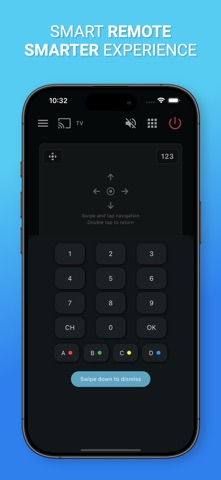
Description by Fan Wai Ho Written by the developer, not by AppBrain. Click to read.
Connect your phone and TV to the same Wi-Fi network, scan for nearby devices, pair in seconds, and control your TV from one clean remote interface.
Supported TVs and Devices
SuperMote is designed to work with many Wi-Fi enabled smart TVs and streaming devices, including:
• Samsung Smart TVs
• LG Smart TVs
• Sony BRAVIA TVs
• Google TV devices
• TCL smart TVs
• Hisense smart TVs
• Philips smart TVs
• Xiaomi TVs
• NVIDIA SHIELD TV
• Chromecast with Google TV
Compatibility may vary by TV brand, model, region, software version, and network remote control settings.
Key Features
• Smart TV Remote Control
Control your TV with familiar buttons for power, volume, mute, channels, navigation, playback, and more.
• Quick Device Discovery
SuperMote scans your local Wi-Fi network and helps you find supported smart TVs nearby.
• Easy Pairing
Connect using your TV’s standard on-screen pairing or approval flow. No complicated setup required.
• Touchpad Navigation
Use swipe and tap gestures to move through menus and apps on supported TVs.
• Multi-TV Support
Save and switch between multiple TVs in your home, perfect for bedrooms, living rooms, and shared spaces.
• Clean Remote Interface
A modern, responsive layout designed for everyday TV control.
• Local Network Control
SuperMote works over your Wi-Fi network. Your phone and TV must be connected to the same network.
How to Get Started
1. Connect your phone and TV to the same Wi-Fi network.
2. Open SuperMote and scan for available devices.
3. Select your TV and complete pairing on the TV screen.
4. Start controlling your TV from your phone.
Troubleshooting
If your TV is not found, please make sure:
• Your phone and TV are on the same Wi-Fi network
• Network remote control is enabled on your TV
• Your TV allows pairing or device approval
• Your TV is powered on and connected to the network
Disclaimer
SuperMote is an independent application and is not affiliated with, endorsed by, or sponsored by any TV manufacturer. All trademarks are the property of their respective owners.
Download SuperMote and enjoy a smarter way to control your TV.
Safety and technology
Found in the app by AppBrain- Price
- Free
- App size
- 38.5 MB
- Content rating
- Everyone
Technologies used by SuperMote: Smart TV Remote
Releases
Updates seen on the App Store- Version
- 1.4.5
- Launched
- April 2025
No changelog data
Alternatives
Similar apps and more from Fan Wai Ho


Rankings
App Store top chartsApp Store Rankings for SuperMote: Smart TV Remote
About the app and developer
About SuperMote: Smart TV Remote
SuperMote: Smart TV Remote is an utilities app developed by Fan Wai Ho.
User Ratings
SuperMote: Smart TV Remote is rated 4.92 out of 5 stars. The rating is based on 12 ratings.
App Information
SuperMote: Smart TV Remote is freely available from the App Store. The app size is 38.49 MB. The latest version available is 1.4.5. The last update was on October 3, 2026.
Technical Requirements
The app has a content rating of Everyone. The app has been available on the App Store since April 2025.
Developer information for Fan Wai Ho
Address:
Frequently asked questions about SuperMote: Smart TV Remote
Is SuperMote: Smart TV Remote free?
Yes. SuperMote: Smart TV Remote is free on the App Store.
Is SuperMote: Smart TV Remote still available?
Yes. SuperMote: Smart TV Remote is on the App Store, and the last update we saw was on October 3, 2026.
How large is SuperMote: Smart TV Remote?
SuperMote: Smart TV Remote is 38.49 MB.
Is SuperMote: Smart TV Remote suitable for children?
App Store rates the content of SuperMote: Smart TV Remote as suitable for everyone.
How do people rate SuperMote: Smart TV Remote?
SuperMote: Smart TV Remote scores 4.92 out of 5 stars, from 12 ratings on the App Store.
Who made SuperMote: Smart TV Remote?
SuperMote: Smart TV Remote was developed by Fan Wai Ho. It is listed in the utilities category on the App Store.
What are the best alternatives to SuperMote: Smart TV Remote?
People looking at SuperMote: Smart TV Remote also look at these utilities apps: Mocha LPR Lite, Zip-Unzip & Rar Files, TV Remote+ for Samsung, Fun Jigsaw fun Puzzle, Da Echo.