

Surge 5 is made and published by Surge Networks Inc. AppBrain is an independent app data site and isn't affiliated with Surge Networks Inc. The app name, icon, screenshots and description belong to Surge Networks Inc. and are shown as published on the App Store.
AppBrain's verdict
EstablishedWell rated- Rating on App Store
- 4.11
- 1,019 ratings
- Last updated
- October 12, 2026
- Size
- 72.7 MB
Users rate it well: 4.1 stars from 1,019 ratings.
User feedback
Ratings and reviews on the App StoreComments on Surge 5 for iOS
We don't have enough comments to show example comments. Please check back later.
Store listing
By Surge Networks Inc., from the App Store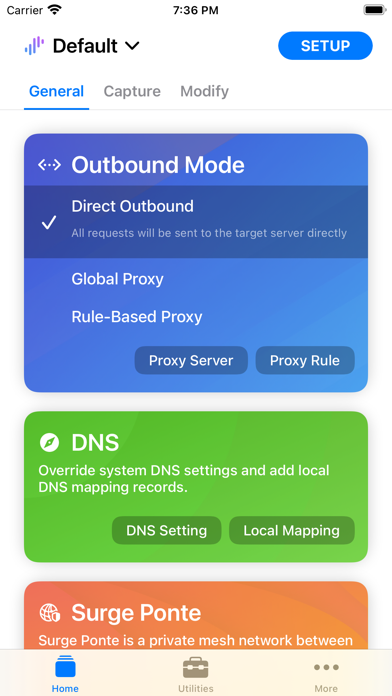


Description by Surge Networks Inc. Written by the developer, not by AppBrain. Click to read.
These four capabilities form the core workflow of Surge:
· Takeover: Take over the network connections sent by the device. Surge supports both proxy service and virtual NIC takeover, capturing HTTP, HTTPS, TCP, and UDP traffic from any app — even those ignoring proxy settings. All features work on the cellular network.
· Processing: Modify the requests and responses that have been taken over: URL rewrite, header and body rewrite, local file mapping, custom DNS answers, and JavaScript-based modification.
· Forwarding: Forward requests to proxy servers, either globally or driven by a flexible rule system. Policy groups select the best server automatically by latency, availability, or learned connection quality.
· Intercept: Record and inspect requests and responses, including headers and bodies, and decrypt HTTPS traffic with MITM.
Highlighted Features
· Proxy protocols: HTTP/HTTPS, SOCKS5, SOCKS5-TLS, HTTP2 CONNECT, TrustTunnel, Shadowsocks, Snell, Trojan, Hysteria 2, AnyTLS, and SSH, with UDP relay support.
· Used as a WireGuard or Tailscale client, converting the L3 VPN into a proxy policy.
· Rules based on domain match/suffix/keyword/wildcard, CIDR IP range, GeoIP, ASN, protocol, port, and logical combinations; reusable rule sets hosted locally or remotely.
· Policy groups: manual selection, automatic latency testing, fallback, load balancing, and the self-learning Smart group.
· Complete DNS suite: DNS-over-HTTPS, DNS-over-HTTP/3, DNS-over-QUIC, DNS-over-TLS, and concurrent queries for the fastest answer.
· Local DNS mapping (equivalent to /etc/hosts) with wildcards, aliases, and per-domain DNS servers. Switch your app between production and development environments without changing any code.
· Decrypt HTTPS traffic with Man-in-the-Middle and a built-in CA certificate generator.
· Record and display HTTP requests and responses with JSON, text, image, and video viewers for the captured body; album mode for the request list; pre-filter for capturing.
· Raw L3 packet capture.
· Scripting: extend Surge with JavaScript — modify requests and responses, write custom rules, customize DNS answers, and run scheduled tasks.
· Block unwanted requests by rules with high-performance pre-matching.
· Measure traffic usage and network speed on Wi-Fi, cellular, and proxy connections.
· Remote Dashboard: observe and debug traffic in real time from a Mac via Wi-Fi or USB, including cellular traffic.
· Surge Ponte: access your home or office network remotely via your own devices, with no third-party service involved.
· HTTPS proxy protocol supports client-side TLS certificate validation.
· Safari extension to add rules; widgets and Information Panel for quick control.
· Sync profiles across devices with iCloud Drive or Dropbox.
· Full IPv6 support, TLS 1.3, HTTP/2, and QUIC.
· High performance and industrial-grade stability, suitable for intensive use.
Surge does not provide any proxy or VPN service; you need to configure your own servers.
You may read the online manual for more information: https://nssurge.com/support
Terms and Conditions: https://nssurge.com/legal/terms
Privacy Policy: https://nssurge.com/legal/privacy
Safety and technology
Found in the app by AppBrain- Price
- Free
- App size
- 72.7 MB
- Content rating
- Everyone
Technologies used by Surge 5
Releases
Updates seen on the App Store- Version
- 5.23.0
- Launched
- November 2018
No changelog data
Alternatives
Similar apps and more from Surge Networks Inc.Alternatives to Surge 5







More from Surge Networks Inc.


Rankings
App Store top chartsApp Store Rankings for Surge 5
About the app and developer
About Surge 5
Surge 5 is an overall app developed by Surge Networks Inc.
What is the rating of Surge 5?
Surge 5 is rated 4.11 out of 5 stars, based on 1 thousand ratings.
Is Surge 5 free?
Surge 5 is free. The app size is 72.74 MB. The latest version available is 5.23.0. The last update was on October 12, 2026.
What are the requirements for Surge 5?
The app has a content rating of Everyone. The app has been available on the App Store since November 2018.
Developer information for Surge Networks Inc.
Address: