

Surya Time — Sun Clock
Surya Time — Sun Clock is made and published by Max Schleining. AppBrain is an independent app data site and isn't affiliated with Max Schleining. The app name, icon, screenshots and description belong to Max Schleining and are shown as published on the App Store.
AppBrain's verdict
- Last updated
- September 23, 2026
- Size
- 4.38 MB
User feedback
Ratings and reviews on the App StoreComments on Surya Time — Sun Clock for iOS
We don't have enough comments to show example comments. Please check back later.
Store listing
By Max Schleining, from the App Store


Description by Max Schleining Written by the developer, not by AppBrain. Click to read.
Surya Time answers the way people did before anyone thought of time zones. It takes the light you are actually given today, from sunrise to sunset, and divides it into twelve hours; then it does the same with the night. An hour here is as long as the light allows. In June yours will run past sixty-six minutes, and by December they will have shrunk towards forty, and neither figure is a rounding error. It is simply what the sky did.
All of it is worked out on the phone from your own coordinates, which means that noon arrives when the sun is over you, and not when it is over the city your time zone happens to be named after.
The dial shows you what the day has spent and what it still owes you: seven hours and fifty-five minutes of light, say, and the hour you are presently standing in. Sunrise and sunset are given on the clock the place itself keeps, so a city you have pinned reads as a local would read it.
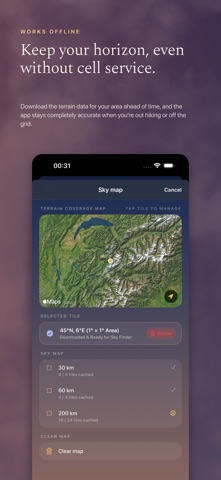
And the day does not end at a flat horizon. Download the ground around you and the app draws the skyline you actually stand in front of, with the summits on it named and measured: Mont Blanc de Courmayeur at 4,748 m, and the nearer, lower hills that take more of your evening precisely because they are close. A ridge to the west can be worth a quarter of an hour, and now you can see which one is taking it.
Which raises a practical question, so there is an answer for that as well. The Vantage Map ranks the ridges and lookouts around you by how much more sunset each would give back — a hundred and nine minutes for a summit fifteen kilometres off, if that is a walk you fancy — and it shows you the gain before you set out. Choose an area of thirty, sixty or two hundred kilometres, download its elevation once, and the horizon keeps working with no signal at all.
There are five widget sizes for the home screen and the lock screen, and each one asks for its own fix, so a phone that has flown overnight has already caught up before you open the app.
If you want to know how far your watch has drifted from the sun, the app will tell you, and it will tell you where the minutes went: some are the price of your longitude inside a time zone drawn for somebody else, and the rest belong to the Earth, whose orbit is an ellipse and whose axis is tilted.
Some days twelve hours of sixty is exactly what you want. On other days you would rather simply hear that two fifths of the daylight has gone, and the app will say it that way instead. The hours can be named in Greek, in Latin, or in plain English, whichever sounds least like an instrument panel to you.
When you lose the moon, hold the phone up and the app will point at it. Sun or moon, the bearing is worked out for the ground you are standing on rather than for the centre of the Earth, which matters more than it sounds: close to the horizon the difference between the two is wider than the moon itself.
There is a map as well, showing where the daylight is falling this second, with the line between day and night drawn true and your own place marked upon it.
The moon is drawn as a real terminator rather than an emoji, and the colours follow the sun's true altitude, so the screen tends to look like the hour it is describing. You can pin a city if you would sooner read somebody else's sky. There is no account, no sign-in and nothing that tracks you.
Safety and technology
Found in the app by AppBrain- Price
- $0.99
- App size
- 4.38 MB
- Content rating
- Everyone
Technologies used by Surya Time — Sun Clock
Releases
Updates seen on the App Store- Version
- 1.5
- Launched
- August 2026
No changelog data
Rankings
App Store top chartsApp Store Rankings for Surya Time — Sun Clock
About the app and developer
About Surya Time — Sun Clock
Surya Time — Sun Clock is an utilities app developed by Max Schleining.
User Ratings
The app has no ratings yet.
App Information
Surya Time — Sun Clock costs $0.99. The app size is 4.38 MB. The latest version available is 1.5. The last update was on September 23, 2026.
Technical Requirements
The app has a content rating of Everyone. The app has been available on the App Store since August 2026.
Developer information for Max Schleining
Address:
Frequently asked questions about Surya Time — Sun Clock
Is Surya Time — Sun Clock free?
No. Surya Time — Sun Clock costs $0.99 on the App Store.
Is Surya Time — Sun Clock still available?
Yes. Surya Time — Sun Clock is on the App Store, and the last update we saw was on September 23, 2026.
How large is Surya Time — Sun Clock?
Surya Time — Sun Clock is 4.38 MB.
Is Surya Time — Sun Clock suitable for children?
App Store rates the content of Surya Time — Sun Clock as suitable for everyone.
Who made Surya Time — Sun Clock?
Surya Time — Sun Clock was developed by Max Schleining. It is listed in the utilities category on the App Store.