

Suspicious Device Cam Detector
Suspicious Device Cam Detector is made and published by Max Bishop. AppBrain is an independent app data site and isn't affiliated with Max Bishop. The app name, icon, screenshots and description belong to Max Bishop and are shown as published on the App Store.
AppBrain's verdict
Loved by users- Rating on App Store
- 4.50
- 395 ratings
- Last updated
- August 1, 2025
Users love it: 4.5 stars from 395 ratings.
Rankings
App Store top chartsApp Store Rankings for Suspicious Device Cam Detector
Competitors
Similar apps and more from Max BishopMore from Max Bishop

Releases
Updates seen on the App Store- Version
- 1.0
- Launched
- August 2025
No changelog data
User feedback
Ratings and reviews on the App StoreComments on Suspicious Device Cam Detector for iOS
We don't have enough comments to show example comments. Please check back later.
Technology
Found in the app by AppBrain- Price
- Free
- App size
- 161.1 MB
- Content rating
- Everyone
Technologies used by Suspicious Device Cam Detector
About the app and developer
About Suspicious Device Cam Detector
Suspicious Device Cam Detector is an utilities app developed by Max Bishop.
User Ratings
Suspicious Device Cam Detector is rated 4.50 out of 5 stars. The rating is based on 400 ratings.
App Information
Suspicious Device Cam Detector is freely available from the App Store. The app size is 161.10 MB. The latest version available is 1.0. The last update was on August 1, 2025.
Technical Requirements
The app has a content rating of Everyone. The app has been available on the App Store since August 2025.
Developer information for Max Bishop
Address:
Store listing
By Max Bishop, from the App Store
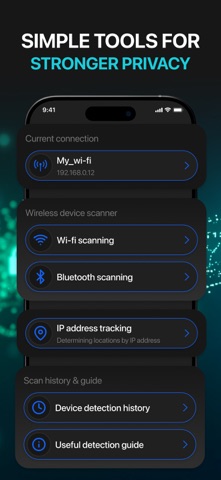


Description by Max Bishop Written by the developer, not by AppBrain. Click to read.
Start with Bluetooth and Wi-Fi analysis, instantly detect all nearby connections and devices with just one tap. Uncover unauthorized access points or unknown connections trying to interact with your phone. It’s perfect for situations where you're unsure who else has been in the space before you, like rentals, hostels, co-working areas, or even public transportation hubs.
The built-in infrared camera filter allows you to visually inspect a room. In low-light or shadowy corners, bright spots in the filtered view may signal the presence of electronics, even those that are otherwise difficult to spot. Quickly scan bedsides, ceilings, air vents, or décor that might conceal technology. The scanner runs quietly and gives you a unique edge in maintaining spatial awareness.
Need to track changes in your network status? The app offers real-time insight into your current IP address and can help flag unexpected changes, giving you clues if your device suddenly connects to a different network without warning.
Every scan session is automatically saved, so you can track what you’ve found, when, and where. This is particularly useful if you visit certain locations frequently, just compare current scans with past ones to identify what’s changed.
Stay calm in new places: the application helps to quickly detect unauthorized devices nearby - in hotels, rented apartments, coworking spaces and other spaces.
Features available only in Premium:
Unlimited scanning of Wi-Fi and Bluetooth devices without limits.
Full-featured infrared signal mode: use the camera filter to find devices even in dark corners.
Advanced network tools: detailed diagnostics of the IP address and tracking of changes at first.
Completely no ads.
Free features:
Useful detection guide
Saving scan history: track their results and compare them during repeat visits.
Basic information about the current network status.
Premium subscription includes a free 3-day trial period. Payment will be written from your iTunes account after confirmation of purchase. The subscription is automatically renewed unless you change it at least 24 hours before the end of the current period. You can manage your subscription in your account.
No ads and smooth, priority performance.
Privacy and Support:
Explore our privacy policy:https://gilfoylegeneral.digital/PrivacyPolicy.html
Click to review our Terms of Use and understand how we protect your data:https://gilfoylegeneral.digital/TermsOfUse.html
Get in touch with our support service:c.gilfoyle@gilfoylegeneral.digital
Wherever life takes you — stay one step ahead. Download the app and stay informed, alert, and in control.