

SweetCue: Couples Keyboard
SweetCue: Couples Keyboard is made and published by Hangzhou Shengli Technology Co., Ltd. AppBrain is an independent app data site and isn't affiliated with Hangzhou Shengli Technology Co., Ltd. The app name, icon, screenshots and description belong to Hangzhou Shengli Technology Co., Ltd. and are shown as published on the App Store.
AppBrain's verdict
- Last updated
- October 19, 2026
Rankings
App Store top chartsApp Store Rankings for SweetCue: Couples Keyboard
Competitors
Similar apps and more from Hangzhou Shengli Technology Co., Ltd.Alternatives to SweetCue: Couples Keyboard


More from Hangzhou Shengli Technology Co., Ltd.

Releases
Updates seen on the App Store- Version
- 1.2
- Launched
- August 2026
No changelog data
User feedback
Ratings and reviews on the App StoreComments on SweetCue: Couples Keyboard for iOS
We don't have enough comments to show example comments. Please check back later.
Technology
Found in the app by AppBrain- Price
- Free
- App size
- 6.19 MB
- Content rating
- Everyone
Technologies used by SweetCue: Couples Keyboard
About the app and developer
About SweetCue: Couples Keyboard
SweetCue: Couples Keyboard is a productivity app developed by Hangzhou Shengli Technology Co., Ltd.
What is the rating of SweetCue: Couples Keyboard?
SweetCue: Couples Keyboard has no ratings yet.
Is SweetCue: Couples Keyboard free?
SweetCue: Couples Keyboard is free. The app size is 6.19 MB. The latest version available is 1.2. The last update was on October 19, 2026.
What are the requirements for SweetCue: Couples Keyboard?
The app has a content rating of Everyone. The app has been available on the App Store since August 2026.
Developer information for Hangzhou Shengli Technology Co., Ltd.
Store listing
By Hangzhou Shengli Technology Co., Ltd., from the App Store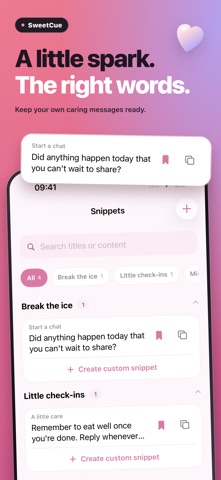


Description by Hangzhou Shengli Technology Co., Ltd. Written by the developer, not by AppBrain. Click to read.
YOUR WORDS, READY WHEN YOU NEED THEM
• Save your own greetings, caring messages, miss-you notes and invitations.
• Organize phrases into categories, search your library and keep favorites close.
• Start with four conversation scenarios, then edit the phrases to make them yours.
PRO: REWRITE AND TRANSLATE
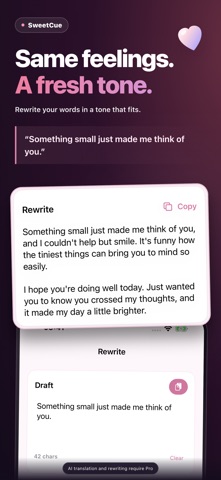
• Rewrite text you provide with a selected or custom tone. Review the result before using it.
• Detect the source language automatically or choose it yourself, then select a target language.
• Use AI tools in the app or keyboard and choose when to copy or insert the result.
TAP TO INSERT
Keyboard setup is optional. Add SweetCue in iOS Settings to insert saved phrases in compatible text fields. Allow Full Access to sync the main app’s phrase library and settings and use the keyboard’s online features. You can use the main app before setting up the keyboard.
FREE AND PRO
Your four oldest phrases, ordered by creation time, are available for free. Additional saved phrases are kept and unlock with a subscription. An active Pro subscription enables unlimited phrase creation and use, AI translation and tone rewriting. Weekly and yearly plans are available; the purchase screen shows the price and billing period. Subscriptions renew automatically and can be managed or canceled in your Apple Account subscription settings.
AI AND YOUR PERMISSION
AI features require an internet connection. Only after you agree to the data-sharing notice are the relevant text and language or tone options sent to DeepSeek or PoYo for processing. You can withdraw permission in Settings and keep using regular phrases within your current free or subscription access.
Support: support@sunnycreate.com
Terms of Use (EULA): https://sunnycreate.com/autokeyboard/terms/
Privacy Policy: https://sunnycreate.com/autokeyboard/privacy/