




AppBrain's verdict
- Rating on App Store
- 5.00
- 4 ratings
- Last updated
- October 6, 2026
- Size
- 1.31 MB
It doesn't have enough ratings yet to judge what users think.
User feedback
Ratings and reviews on the App StoreComments on SweetKeyboard Pro for iOS
We don't have enough comments to show example comments. Please check back later.
Store listing
By David Demri, from the App StoreDescription by David Demri Written by the developer, not by AppBrain. Click to read.
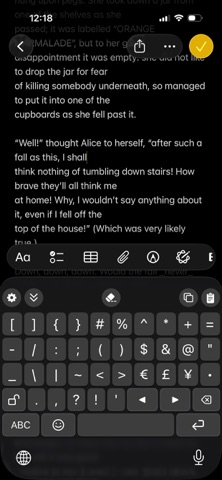
SweetKeyboard is a local-first iOS keyboard that keeps numbers, symbols, cursor movement, and reusable clipboard snippets close to the typing flow without forcing users to learn an unfamiliar layout. Built for quick edits, codes, forms, and repeated snippets, it delivers a familiar typing experience with smarter everyday controls.
EVERYTHING YOU NEED IN ONE PLACE
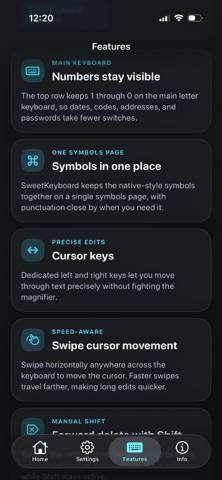
• Numbers Stay Visible: The familiar English QWERTY letter layout features a permanent top number row from 1 to 0, reducing interruptions while you type codes, dates, and addresses.
• Symbols in One Place: Symbols are grouped on one clean page, designed to avoid deep symbol switching. Tap one symbol and return to letters, or lock symbols when you need to type multiple characters or emojis.
• Smarter Cursor Control: Move the cursor without fighting the iOS text magnifier using dedicated arrow keys or speed-aware horizontal swiping across the keyboard.
• Context-Aware Typing: SweetKeyboard adapts to the field you are typing in. For example, the keyboard shows a contextual @ shortcut in email fields and suppresses unwanted auto-capitalization.
• Long-Press Shortcuts: Hold supported keys for common accents and quick punctuation, keeping the main keyboard free of visual clutter.
• Fast Typing Stability: Designed for stable everyday typing, even when you move quickly and your fingers overlap.
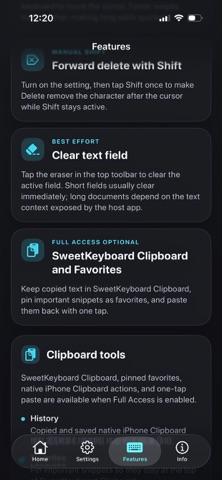
• Forward Delete: Turn on forward delete, then use manual Shift to delete ahead of the cursor.
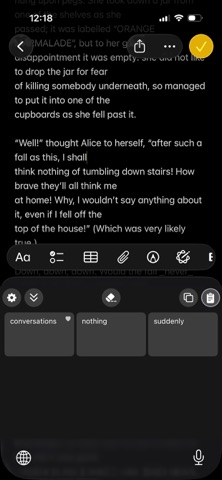
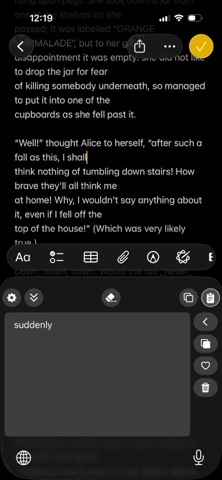
• Save and Reuse Snippets: Access a local clipboard grid inside the keyboard to save up to 50 local text snippets.
• Pin Favorites: Pin favorites so important snippets stay at the top of your list for quick, one-tap pasting.
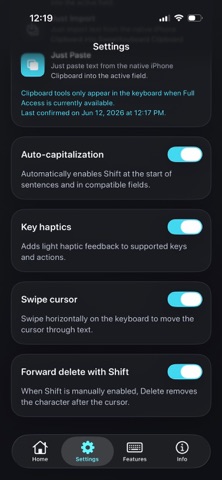
• Native Clipboard Integration: Choose how SweetKeyboard handles text copied to the native iPhone Clipboard. You can import, paste, or do both after initiating a user action.
• Clear Text Field: Easily clear short fields directly from the compact keyboard toolbar.
CUSTOMIZABLE TO YOUR PREFERENCES
Your typing experience should fit your needs. Easily configure settings in the app, including optional haptic feedback for responsive keys, auto-capitalization rules, cursor swipe behaviors, and custom clipboard toolbar options.
PRIVATE BY DEFAULT, LOCAL BY DESIGN
Privacy is a central product value, not a secondary note.
• There are no analytics, no advertising SDKs, no tracking SDKs, and no cloud sync.
• SweetKeyboard features no remote text processing or keystroke uploading.
A NOTE ON CLIPBOARD FEATURES AND "FULL ACCESS"
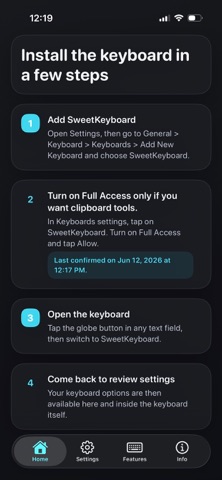
To enable the optional clipboard features, iOS requires you to grant "Full Access". This simply gives the keyboard the necessary permissions to interact with the phone's native clipboard tools and shared local settings. This does not mean we have access to your data. Because SweetKeyboard is local by design with no cloud sync or remote processing, your typing, snippets, and clipboard history remain completely local to your device and are never compromised.
Platform Limitations: Some features depend on what the active app exposes to third-party keyboards. Secure text fields and certain apps may use the system keyboard instead. Clear Text Field works best in short fields and may be limited in long documents.
Safety and technology
Found in the app by AppBrain- Price
- Free
- App size
- 1.31 MB
- Content rating
- Everyone
Technologies used by SweetKeyboard Pro
Releases
Updates seen on the App Store- Version
- 1.0.1
- Launched
- June 2026
No changelog data
Alternatives
Similar apps and more from David DemriAlternatives to SweetKeyboard Pro


Rankings
App Store top chartsApp Store Rankings for SweetKeyboard Pro
About the app and developer
About SweetKeyboard Pro
SweetKeyboard Pro is an utilities app developed by David Demri.
User Ratings
SweetKeyboard Pro is rated 5.00 out of 5 stars. The rating is based on 4 ratings.
App Information
SweetKeyboard Pro is freely available from the App Store. The app size is 1.31 MB. The latest version available is 1.0.1. The last update was on October 6, 2026.
Technical Requirements
The app has a content rating of Everyone. The app has been available on the App Store since June 2026.
SweetKeyboard Pro is made and published by David Demri. AppBrain is an independent app data site and isn't affiliated with David Demri. The app name, icon, screenshots and description belong to David Demri and are shown as published on the App Store.
Developer information for David Demri
Address: