

SwiftTrack IO
SwiftTrack IO is made and published by SWIFTTRACK SOLUTIONS LLC. AppBrain is an independent app data site and isn't affiliated with SWIFTTRACK SOLUTIONS LLC. The app name, icon, screenshots and description belong to SWIFTTRACK SOLUTIONS LLC and are shown as published on the App Store.
AppBrain's verdict
- Rating on App Store
- 5.00
- 1 ratings
- Last updated
- October 8, 2026
It doesn't have enough ratings yet to judge what users think.
Rankings
App Store top chartsApp Store Rankings for SwiftTrack IO
Competitors
Similar apps and more from SWIFTTRACK SOLUTIONS LLCAlternatives to SwiftTrack IO


Releases
Updates seen on the App Store- Version
- 1.2026.101
- Launched
- November 2025
No changelog data
User feedback
Ratings and reviews on the App StoreComments on SwiftTrack IO for iOS
We don't have enough comments to show example comments. Please check back later.
Technology
Found in the app by AppBrain- Price
- Free
- App size
- 53.5 MB
- Content rating
- Everyone
Technologies used by SwiftTrack IO
About the app and developer
About SwiftTrack IO
SwiftTrack IO is a business app developed by SWIFTTRACK SOLUTIONS LLC.
User Ratings
SwiftTrack IO is rated 5.00 out of 5 stars. The rating is based on one rating ratings.
App Information
SwiftTrack IO is freely available from the App Store. The app size is 53.46 MB. The latest version available is 1.2026.101. The last update was on October 8, 2026.
Technical Requirements
The app has a content rating of Everyone. The app has been available on the App Store since November 2025.
Developer information for SWIFTTRACK SOLUTIONS LLC
Address:
Store listing
By SWIFTTRACK SOLUTIONS LLC, from the App Store




Description by SWIFTTRACK SOLUTIONS LLC Written by the developer, not by AppBrain. Click to read.
SwiftTrack IO is the professional inventory and warehouse management app for modern retail and e-commerce businesses. Connect your store, keep stock accurate across every location, and map your warehouse down to the bin, all from your iPhone or iPad.
SEAMLESS INTEGRATIONS
Connect Shopify, Square or Clover in minutes with step-by-step setup guides, then manage your catalog and stock from one app.
POWERFUL INVENTORY TOOLS
• Product Management: Create and edit products and variants with SKU, UPC, price, cost, weight and categories
• Smart Barcode Scanning: Scan one item, scan continuously, or use Rapid Count to count fast
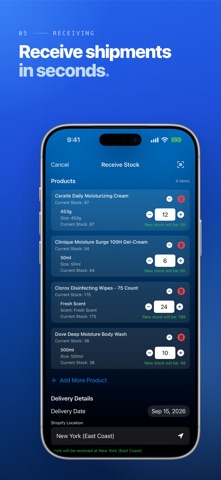
• Stock Receiving: Receive deliveries with automatic carrier detection and photo evidence
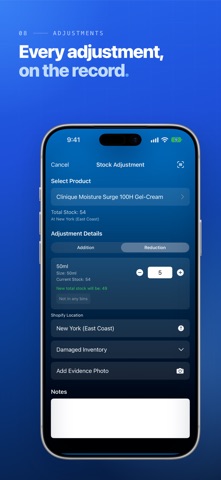
• Inventory Adjustments: Record a reason and photo evidence for every change
• Stock Transfers: Move stock between store locations, or between Clover merchant accounts
• Master Cartons: Track cartons and loose units side by side
• Multi-Location Support: Manage several locations and workspaces from one account
WAREHOUSE MANAGEMENT
• Guided Setup: Create a warehouse, or a Distribution Center shared across your workspaces, in five steps
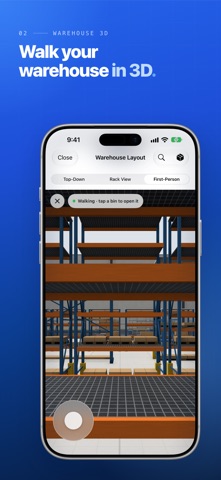
• 2D & 3D Floor Plans: Place racks, draw zones, and add walls, doors, dock doors and store fixtures, with undo and redo
• Rack Templates: Build custom racks with the shelves and bins you actually use
• First-Person Walkthrough: Walk your aisles in 3D and tap any bin to see what's inside
• Smart Assignment: Drag products straight onto bins
• Product Finder: Search or scan to see exactly which bins hold a product
• Bin Transfers: Move stock bin to bin and follow active transfers on your Lock Screen and in the Dynamic Island
• Cycle Counting: Blind or guided counts with a count queue, history and flagged discrepancies
• QR Labels: Print QR labels for your racks and bins
• Live Presence: See which teammates are in the warehouse right now
TEAM COLLABORATION
• Workspaces: Run separate workspaces for different businesses or locations
• Roles & Permissions: Owner, Admin and Member roles, with detailed permissions for each teammate
• Team Invitations: Invite by email or with a secure QR code
• Real-Time Updates: Permissions and bin stock update instantly
SMART FEATURES
• AI Assistant: Ask questions about your inventory in plain language
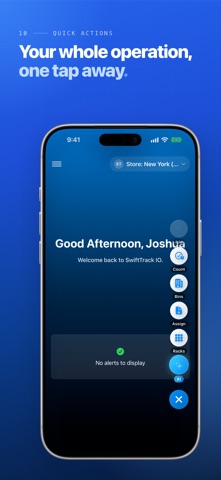
• Quick Actions: Jump to common tasks from the floating action button
• Stock Alerts: Spot low-stock and out-of-stock products at a glance
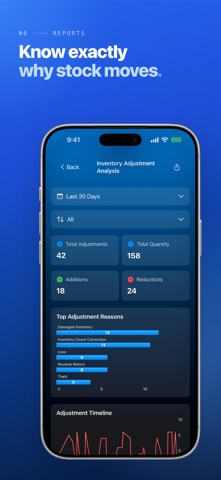
• Reports: Adjustments, stock loss prevention, evidence compliance, receiving velocity and receipt costs
• Practice Guides: Hands-on tutorials that never touch your real data
SWIFTTRACK IO PROFESSIONAL
Eligible new subscribers can start with a 1-month free trial. Professional includes:
• Unlimited products
• Stock receiving, adjustments and transfers
• Multiple locations
• Warehouse management and Distribution Centers
• Advanced reports and analytics
• Team management
• Priority support
Payment is charged to your Apple Account when you confirm your purchase, or when your free trial ends. Your subscription renews monthly unless you cancel at least 24 hours before the end of the current period. Manage or cancel it anytime in your Apple Account settings.
WHY BUSINESSES CHOOSE SWIFTTRACK IO
• Complete Visibility: See your stock across every location, down to the bin
• Built to Scale: From a single store to a shared distribution center
• Secure Sign-In: Apple, Google, Face ID or Touch ID, with sign-in details kept in the iOS Keychain
PERFECT FOR
Retail stores, e-commerce brands, multi-location retailers, warehouses and distribution centers.
GET STARTED TODAY
Download SwiftTrack IO and start your free trial.
Support: support@swifttrack.io
Privacy Policy: https://swifttrack.io/legal/privacy
Terms of Use: https://swifttrack.io/legal/terms