

SwingMonitor is made and published by Thomas Yoon. AppBrain is an independent app data site and isn't affiliated with Thomas Yoon. The app name, icon, screenshots and description belong to Thomas Yoon and are shown as published on the App Store.
AppBrain's verdict
- Rating on App Store
- 3.88
- 8 ratings
- Last updated
- August 27, 2026
It doesn't have enough ratings yet to judge what users think.
Rankings
App Store top chartsApp Store Rankings for SwingMonitor
Competitors
Similar apps and more from Thomas YoonAlternatives to SwingMonitor



More from Thomas Yoon




Releases
Updates seen on the App Store- Version
- 1.10.0
- Launched
- May 2023
No changelog data
User feedback
Ratings and reviews on the App StoreComments on SwingMonitor for iOS
We don't have enough comments to show example comments. Please check back later.
Technology
Found in the app by AppBrain- Price
- Free
- App size
- 3.72 MB
- Content rating
- Everyone
Technologies used by SwingMonitor
About the app and developer
About SwingMonitor
SwingMonitor is a sports app developed by Thomas Yoon.
User Ratings
SwingMonitor is rated 3.88 out of 5 stars. The rating is based on 8 ratings.
App Information
SwingMonitor is freely available from the App Store. The app size is 3.72 MB. The latest version available is 1.10.0. The last update was on August 27, 2026.
Technical Requirements
The app has a content rating of Everyone. The app has been available on the App Store since May 2023.
Developer information for Thomas Yoon
Address:
Store listing
By Thomas Yoon, from the App Store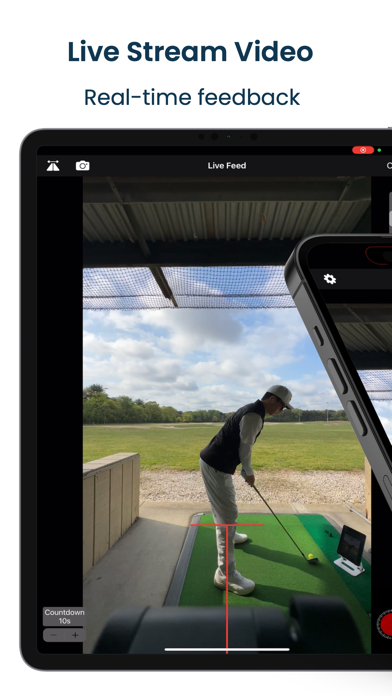


Description by Thomas Yoon Written by the developer, not by AppBrain. Click to read.
FEATURES
• Stream live video to a second iOS device and monitor your practice as it happens.
• Split View: watch the front-facing camera and the primary recording camera side by side, from two angles at once.
• Record in slow motion or 4K, with a built-in countdown timer.
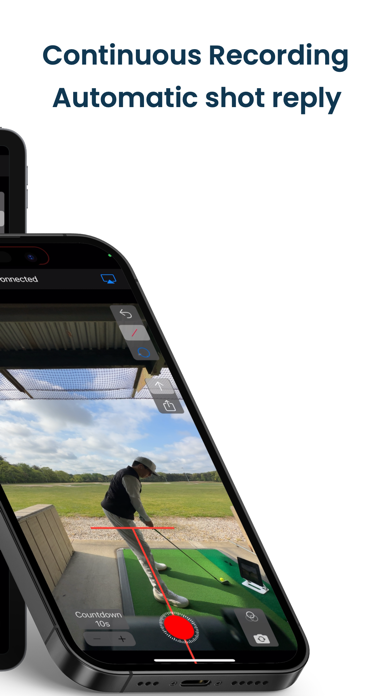
• Continuous recording: SwingMonitor records automatically at a set interval and instantly replays each shot on the connected device — an automatic training aid for the range. Enable auto-dismiss on Shot Replay and the countdown starts on its own.
• Center line and horizontal line overlays to help level and center your recording device.
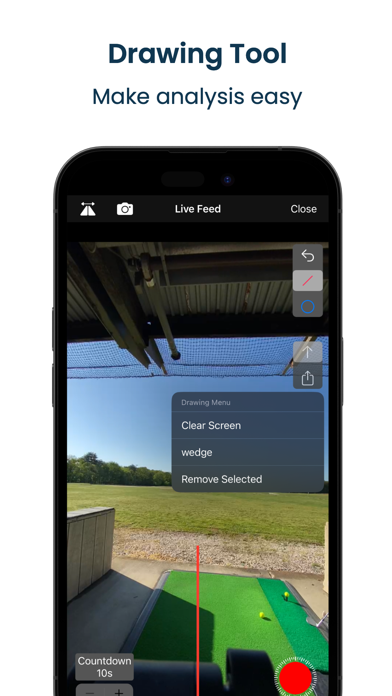
• Draw guide lines — pause the Shot Replay view, draw your guides, and they carry over to the Live Feed view automatically.
• Save guide lines so you don't have to redraw them every time you switch views.
• Save video straight to your Photos album.
• Automatically keeps your last five shot replays in the app.
• Load two videos and compare them side by side.
Terms of Use:
https://www.apple.com/legal/internet-services/itunes/dev/stdeula/
SwingMonitor Subscription:
Payment will be charged to iTunes Account at confirmation of purchase. Subscription automatically renews unless auto-renew is turned off at least 24 hours before the end of the current period. Account will be charged for renewal within 24 hours prior to the end of the current period. Subscriptions may be managed by the user by going to the user's Apple ID Settings. Any unused portion of a free trial period, if offered, will be forfeited when the user purchases a subscription, where applicable. Account won't be charged while in the free trial period.
Please visit https://videotoliveios.com/swingmonitor for more information and https://www.videotoliveios.com/blog/categories/swingmonitor for tips.