Photo Cleaner: Swipe Gallery is an utilities app developed by nuriddin hakimov.
User Ratings
Photo Cleaner: Swipe Gallery is rated 4.00 out of 5 stars. The rating is based on 3 ratings.
App Information
Photo Cleaner: Swipe Gallery is freely available from the App Store. The app size is 27.76 MB. The latest version available is 1.8. The last update was on October 12, 2026.
Technical Requirements
The app has a content rating of Everyone. The app has been available on the App Store since March 2025.
Photo Cleaner: Swipe Gallery is made and published by
nuriddin hakimov.
AppBrain is an independent app data site and isn't affiliated with nuriddin hakimov.
The app name, icon, screenshots and description belong to nuriddin hakimov and are shown as published on the App Store.
Description by nuriddin hakimov(from the App Store)
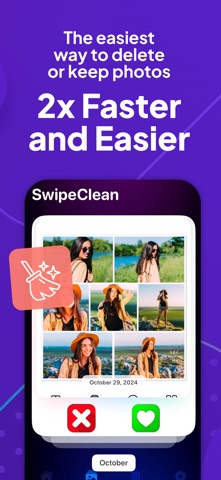
Wipe and organize your photos with Swipe Clean, your simple photo manager. With our picture cleaner, you can save hours of time and gigabytes of storage space.
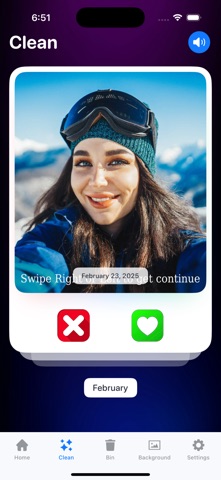
SWIPE TO DELETE Swipe left to delete, and right to cherish! The most intuitive and fastest way to delete photos.
PHOTO BIN View all deleted photos, and delete them permanently from the PhotoBin. This is here just if you change your mind and want to restore a photo.
GALLERY View all your photos in one place. See them by month, and check your ‘On This Day’ photo.
WHY SWIPE CLEAN? Your memories should be easy to relive—without the distraction of blurry duplicates, random screenshots, and unnecessary clutter getting in the way.
FEATURES: · photo cleaner & manager · swipe to delete · photobin to see deleted images · home page gallery with all your photos
Say goodbye to clutter and hello to a perfectly organized gallery! Get our simple app to clear out duplicates, blurry shots, and unnecessary photos in just a few swipes. Try Swipe Clean for FREE.
___
UNLOCK PRO - Get unlimited access to all features (all unlimited swipes, No ads, and more) - The payment will be charged to your iTunes account. - There is a 3-day trial period. - The subscription automatically renews unless auto-renew is turned off at least 24 hours before the end of the current period. - Subscription may be managed and auto-renewal may be turned off by going to Account Settings after purchase.
■ Terms of use: https://www.apple.com/legal/internet-services/itunes/dev/stdeula/
Each subscription will automatically renew 3 days before the expiration date for
the same time period. Subscriptions can be cancelled at any time before the renewal.