



AppBrain's verdict
New- Rating on App Store
- 5.00
- 3 ratings
- Last updated
- October 22, 2026
- Size
- 24.5 MB
Swipe to Delete Photo: Deleep came out 71 days ago. It doesn't have enough ratings yet to judge what users think.
User feedback
Ratings and reviews on the App StoreComments on Swipe to Delete Photo: Deleep for iOS
We don't have enough comments to show example comments. Please check back later.
Store listing
By Nikita Zhukov, from the App StoreDescription by Nikita Zhukov Written by the developer, not by AppBrain. Click to read.
NO TIME TO READ? Here's why this app exists:
1. Built by people who understand your fears
- Your photos stay on your iPhone. We don’t upload, store, or share them.
- A swipe never deletes a photo instantly. You always get a chance to review your choices before anything is removed.
2. We feel your task paralysis:
- Clean up your gallery in small, manageable batches. Photos are organized by month, but you can sort each month in even smaller batches, so you don’t have to face your entire camera roll at once.
- Take a break whenever you want. The app remembers exactly where you left off, so you can come back later.
- See the whole month-by-month picture on one screen with our oddly satisfying stats. Honestly, once you see your progress, it’s hard to stop cleaning.
- Sort photos with quick left and right swipes, or use the Keep and Delete buttons if that’s more your thing.
IMPORTANT NOTE #1: YOUR PHOTOS STAY PRIVATE
Your photo library is personal, and it stays that way.
+ Photos are processed locally on your iPhone.
+ We don’t upload, store, or share your photos.
You can learn more about this in our Privacy Policy and Terms of Use. You’ll find these documents in the app menu and on the app’s App Store page.
IMPORTANT NOTE #2: SWIPING DOESN’T MEAN DELETING
Accidentally swiped left on a photo you love? No problem.
+ Made a mistake? Just hit Undo to reverse your last action immediately.
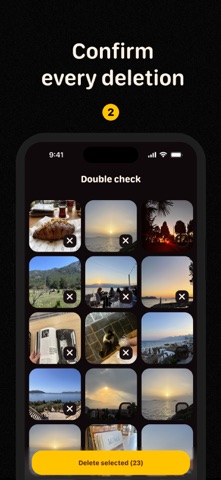
+ After finishing each batch of photos (= one month), you’ll see a Double Check screen where you can review everything and change your mind about any photo.
+ Ready to delete? Your iPhone will ask for confirmation before Deleep can remove any photos. Nothing gets deleted until you say yes.
+ And even then, your photos are moved to Recently Deleted on your iPhone, where you can recover them for up to 30 days.
So the flow looks like this:
You swipe → you double-check → your iPhone asks if you’re ready → you say yes → your photos go to Recently Deleted.
No accidental swipe-to-oblivion situation here.
IMPORTANT NOTE #3: WHY WE ASK FOR FULL ACCESS
To sort your entire photo library, Deleep needs Full Access to your photos. This allows the app to show you everything you want to organize.
If giving Full Access makes you nervous, read IMPORTANT NOTE #1. Still nervous? Tell us what worries you: avermilk.help@gmail.com
Safety and technology
Found in the app by AppBrain- Price
- Free
- App size
- 24.5 MB
- Content rating
- Everyone
Technologies used by Swipe to Delete Photo: Deleep
Releases
Updates seen on the App Store- Version
- 1.3.0
- Launched
- August 2026
No changelog data
Alternatives
Similar apps and more from Nikita ZhukovAlternatives to Swipe to Delete Photo: Deleep


More from Nikita Zhukov


Rankings
App Store top chartsApp Store Rankings for Swipe to Delete Photo: Deleep
About the app and developer
About Swipe to Delete Photo: Deleep
Swipe to Delete Photo: Deleep is a photo & video app developed by Nikita Zhukov.
User Ratings
Swipe to Delete Photo: Deleep is rated 5.00 out of 5 stars. The rating is based on 3 ratings.
App Information
Swipe to Delete Photo: Deleep is freely available from the App Store. The app size is 24.48 MB. The latest version available is 1.3.0. The last update was on October 22, 2026.
Technical Requirements
The app has a content rating of Everyone. The app has been available on the App Store since August 2026.
Swipe to Delete Photo: Deleep is made and published by Nikita Zhukov. AppBrain is an independent app data site and isn't affiliated with Nikita Zhukov. The app name, icon, screenshots and description belong to Nikita Zhukov and are shown as published on the App Store.
Developer information for Nikita Zhukov
Address:
Frequently asked questions about Swipe to Delete Photo: Deleep
Is Swipe to Delete Photo: Deleep free?
Yes. Swipe to Delete Photo: Deleep is free on the App Store.
Is Swipe to Delete Photo: Deleep still available?
Yes. Swipe to Delete Photo: Deleep is on the App Store, and the last update we saw was on October 22, 2026.
How large is Swipe to Delete Photo: Deleep?
Swipe to Delete Photo: Deleep is 24.48 MB.
Is Swipe to Delete Photo: Deleep suitable for children?
App Store rates the content of Swipe to Delete Photo: Deleep as suitable for everyone.
How do people rate Swipe to Delete Photo: Deleep?
Swipe to Delete Photo: Deleep scores 5.00 out of 5 stars, from 3 ratings on the App Store.
Who made Swipe to Delete Photo: Deleep?
Swipe to Delete Photo: Deleep was developed by Nikita Zhukov. It is listed in the photo & video category on the App Store.
What are the best alternatives to Swipe to Delete Photo: Deleep?
People looking at Swipe to Delete Photo: Deleep also look at these photo & video apps: Roll35: AI Camera Roll, Photo Organizer - FlickTidy, Temfy: Swipe Photo Cleaner, talktrack teleprompter, Swipellio: Photo Cleaner.