

SyncDrop - Smart Photo Sync
SyncDrop - Smart Photo Sync is made and published by 子昂 陈. AppBrain is an independent app data site and isn't affiliated with 子昂 陈. The app name, icon, screenshots and description belong to 子昂 陈 and are shown as published on the App Store.
AppBrain's verdict
- Rating on App Store
- 3.00
- 2 ratings
- Last updated
- October 27, 2026
It doesn't have enough ratings yet to judge what users think.
Rankings
App Store top chartsApp Store Rankings for SyncDrop - Smart Photo Sync
Competitors
Similar apps and more from 子昂 陈Alternatives to SyncDrop - Smart Photo Sync


Releases
Updates seen on the App Store- Version
- 1.2.9
- Launched
- February 2026
No changelog data
User feedback
Ratings and reviews on the App StoreComments on SyncDrop - Smart Photo Sync for iOS
We don't have enough comments to show example comments. Please check back later.
Technology
Found in the app by AppBrain- Price
- Free
- App size
- 50.8 MB
- Content rating
- Everyone
Technologies used by SyncDrop - Smart Photo Sync
About the app and developer
About SyncDrop - Smart Photo Sync
SyncDrop - Smart Photo Sync is a photo & video app developed by 子昂 陈.
User Ratings
SyncDrop - Smart Photo Sync is rated 3.00 out of 5 stars. The rating is based on 2 ratings.
App Information
SyncDrop - Smart Photo Sync is freely available from the App Store. The app size is 50.79 MB. The latest version available is 1.2.9. The last update was on October 27, 2026.
Technical Requirements
The app has a content rating of Everyone. The app has been available on the App Store since February 2026.
Developer information for 子昂 陈
Address:
Frequently asked questions about SyncDrop - Smart Photo Sync
Is SyncDrop - Smart Photo Sync free?
Yes. SyncDrop - Smart Photo Sync is free on the App Store.
Is SyncDrop - Smart Photo Sync still available?
Yes. SyncDrop - Smart Photo Sync is on the App Store, and the last update we saw was on October 27, 2026.
How large is SyncDrop - Smart Photo Sync?
SyncDrop - Smart Photo Sync is 50.79 MB.
Is SyncDrop - Smart Photo Sync suitable for children?
App Store rates the content of SyncDrop - Smart Photo Sync as suitable for everyone.
How do people rate SyncDrop - Smart Photo Sync?
SyncDrop - Smart Photo Sync scores 3.00 out of 5 stars, from 2 ratings on the App Store.
Who made SyncDrop - Smart Photo Sync?
SyncDrop - Smart Photo Sync was developed by 子昂 陈. It is listed in the photo & video category on the App Store.
What are the best alternatives to SyncDrop - Smart Photo Sync?
People looking at SyncDrop - Smart Photo Sync also look at these photo & video apps: OpenPhotos, SNAP DOCK - Shoot to Sort, Phonas, Photo_Organizer, OrangePic.
Store listing
By 子昂 陈, from the App Store




Description by 子昂 陈 Written by the developer, not by AppBrain. Click to read.
Main Features:
Universal Sync & Transfer
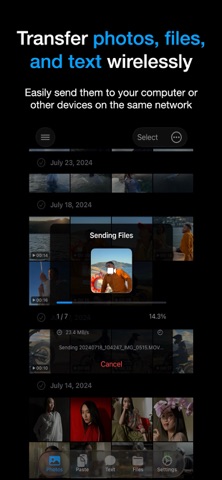
* Any File, Any Size: Move files fast between mobile, PC, and NAS with zero compression.
* Cross-Platform Clipboard: Copy on one device, paste on another. Sync links and text instantly.
* Instant Messaging: Send text messages and notes directly between your own devices without relying on chat apps.
The Pro Choice for Photographers
* Studio Mode: Capture on mobile, preview on your Mac/PC in full screen instantly.
* Deep Metadata: Professional EXIF viewer with full support for focal length (and 35mm equivalent).
Automated Backup & Private Cloud
* Cloud & NAS Support: Seamless sync with Google Drive, Google Photos, WebDAV, and private NAS.
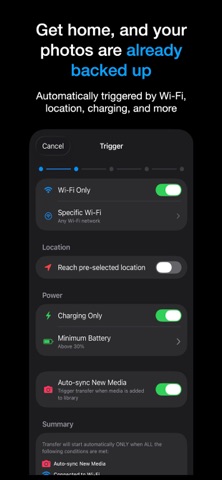
* Smart Rules: Backup only when charging or on trusted Wi-Fi. It’s automation that respects your battery.
Speed & Security
* Ultra-Fast P2P: Direct connection technology. High-speed transfer even without an internet connection.
* TLS 1.3 Encryption: Secure peer-to-peer transfers. Your data never touches a central server.
* No Account Required: Quick pairing via QR code. Protect your privacy from day one.
Common Scenarios:
* Productivity: Copy a link on your phone and paste it directly into your PC browser.
* Traveling: No signal? No problem. Use Hotspot Mode to share high-res travel videos with peers.
* Storage Saving: Run out of space? Automatically move memories to your PC or NAS.
Install SyncDrop today and simplify your multi-device life.
Terms of Use: https://www.apple.com/legal/internet-services/itunes/dev/stdeula/