Download Android Apps and Games
AppBrain
  • Apps
  • Apps being viewed right now Trending apps today Most popular apps All-time most downloaded apps Top rated apps iPhone and iPad apps
  • Intelligence ▾
    Intelligence overview → Track any Android app or your whole market
    Track & analyze
    Keyword Tracker & OptimizerTrack & improve Play rankings App Performance ReportOne-off PDF for any app StatisticsFree Android & Play market stats
    Promote your app
    Featured Apps App Links
  • Intelligence
  • Pricing
  • Dashboard
  • Sign up
  • Log in
Last updated on: 2026-09-23
App Store Apps > Utilities > SynoDocker
SynoDocker icon

SynoDocker

1.0
钊辰 王
5.00
1 reviews
Free

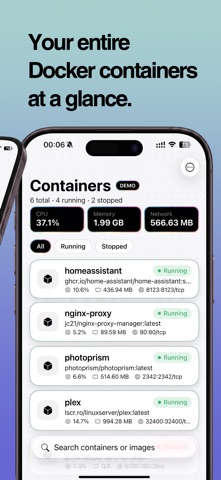
SynoDocker Screenshot 1 of 5
SynoDocker Screenshot 2 of 5
SynoDocker Screenshot 3 of 5
SynoDocker Screenshot 4 of 5
SynoDocker Screenshot 5 of 5
5.00 · 1 reviews
Download from the App Store

About SynoDocker

SynoDocker is an utilities app developed by 钊辰 王.

User Ratings

SynoDocker is rated 5.00 out of 5 stars. The rating is based on one rating ratings.

App Information

SynoDocker is FREE to download. The download size is 1.64 MB. The latest version available is 1.0. The last update was on August 29, 2026.

Technical Requirements

The app has a content rating of Everyone. The app has been available on App Store 3 weeks ago.

Description
SynoDocker is an app for signing in to Synology DSM and managing containers in Container Manager—without sitting at a computer.

WHY SYNODOCKER
If you run Home Assistant, Plex, reverse proxies, or other services in Container Manager, you often need a quick look at what is running, why something stopped, or a way to restart it while you are away. SynoDocker talks directly to your NAS. There is no SynoDocker cloud account and no extra server in the middle.

SIGN IN YOUR WAY
• Local IP, DDNS hostname, or QuickConnect ID
• HTTP or HTTPS, including self-signed certificates on networks you trust
• Common DSM ports (HTTP 5000, HTTPS 5001), or QuickConnect with no port to fill in
• DSM username and password (not a QuickConnect account)
• Two-factor authentication with a one-time code and a Paste shortcut
• Optional Remember sign-in: the session is stored in the on-device Keychain and cleared when you sign out

CONTAINER LIST
After sign-in you can:
• See every container’s name, image, and running or stopped status
• Check CPU, memory, and network overview at a glance
• Search by name or image
• Filter All / Running / Stopped
• Pull to refresh, or turn on auto-refresh (3, 5, 10, 30 seconds, or a custom 1–3600 seconds)

The list is available after sign-in. Opening a container for full details is a premium feature.

CONTAINER DETAILS (PREMIUM)
Unlock monthly, yearly, or lifetime to:
• View live CPU and memory
• See container ID, image, project, CPU priority, memory limit, auto-restart, and web portal
• Inspect network mode, gateway, IP, MAC address, restart policy, and port mappings
• Read real volume mount paths and the start command
• Browse environment variables as KEY / VALUE
• Scroll recent logs (ANSI color codes stripped)
• Long-press to copy logs, env vars, mounts, command, gateway, IP, MAC, and ports
• Start, stop, restart, or force-stop a container (force-stop is for unresponsive containers—use with care)

DEMO MODE
Tap Try Demo on the sign-in screen to explore six sample containers with no NAS. Demo data is discarded when you leave.

PRIVACY
Login and container traffic go from your iPhone to the NAS you enter (and to Synology QuickConnect only if you use a QuickConnect ID). Container lists, logs, and environment variables are not uploaded to us. Purchases are handled by Apple.

WHAT YOU NEED
• iPhone, iOS 17 or later
• A Synology NAS with Container Manager (or the older Docker package) installed and running
• A DSM account allowed to use that package

SUBSCRIPTIONS
• Monthly — auto-renews every month
• Yearly — auto-renews every year
• Lifetime — one-time purchase, no renewal

The container list is included after sign-in. Container details, logs, configuration, and start/stop/restart require an active subscription or a lifetime purchase. Prices are shown in the app and charged to your Apple ID. Subscriptions renew automatically unless auto-renew is turned off at least 24 hours before the end of the current period. Your account is charged for renewal within 24 hours prior to the end of the current period. Manage or cancel anytime: iPhone Settings → Apple ID → Subscriptions, or Manage Subscription in the app. Restore purchases on a new device with the same Apple ID.

Privacy Policy: https://jiw.github.io/SynoDocker/privacy_en.html
Terms of Use (EULA): https://www.apple.com/legal/internet-services/itunes/dev/stdeula/

Synology, DSM, Container Manager, Docker, and QuickConnect are trademarks of their respective owners. SynoDocker is an independent app and is not affiliated with Synology Inc.
Show more Show less

More data about SynoDocker

Price Free to download
Rating 5.00 based on a single rating
Ranking Not ranked
Version 1.0
App download size 1.64 MB
Suitable for Everyone

More from 钊辰 王

PDFToolbox-Converter/Watermark icon PDFToolbox-Converter/Watermark
钊辰 王
5.0
Free
1 ratings
WatermarkYourID icon WatermarkYourID
钊辰 王
0.0
Free

Changelog of SynoDocker

No changelog data

Developer information for 钊辰 王

钊辰 王

Address:

Share SynoDocker

Comments on SynoDocker for iOS

We don't have enough comments to show example comments. Please check back later.

App Store Rankings for SynoDocker

This app is not ranked

Technologies used by SynoDocker

Frequently asked questions about SynoDocker

Is SynoDocker free?

Yes. SynoDocker is free to download from App Store.

Is SynoDocker still available?

Yes. SynoDocker is on App Store, and the last update we saw was on August 29, 2026.

How large is the SynoDocker download?

SynoDocker is 1.64 MB to download.

Is SynoDocker suitable for children?

App Store rates the content of SynoDocker as suitable for everyone.

How do people rate SynoDocker?

SynoDocker has one rating of 5.00 stars on App Store.

Who made SynoDocker?

SynoDocker was developed by 钊辰 王. It is listed in the utilities category on App Store.

Apps on sale Apps other people are watching Popular Utilities Apps Today's trending apps Top new apps
More hot apps 🔥
Overview Reviews Rankings Technology
AppBrain Intelligence premium content

Subscribe now to get full and unlimited access to AppBrain Intelligence. You'll have access to:

  • App Intelligence dashboard (performance timeline, competitor comparison, country rankings, insight cards)
  • Detailed ranking data per app
  • Full timeline per developer
  • Device market shares data per country
  • Unlimited keyword tracking
1 Month

$75/mo
(billed every month)

SAVE 0%
Subscribe
3 Months

$65/mo
($195 billed every 3 months)

SAVE 13%
Subscribe
1 Year

$57.50/mo
($690 billed every year)

SAVE 23%
Subscribe
Each subscription will automatically renew 3 days before the expiration date for the same time period. Subscriptions can be cancelled at any time before the renewal.

AppBrain is a directory focused on discovering great apps and games. We give statistics, rankings and search options that Google Play and the App Store don't have. All trademarks are owned by their respective owners. AppBrain doesn't offer APKs or binaries, and always lets users install the official version from Google Play or the App Store.

More apps

  • Top Android apps being viewed
  • Saldo: Mileage Tracker for Android
  • Alberta Rivers
  • Contract Eye - Analyze & Sign

App statistics

  • Android statistics
  • Google Play Developer stats
  • Trending Android Apps
  • Trending iOS apps
  • Top popular Apps
  • Buy the best Android phone

About AppBrain

  • Contact
  • Privacy
  • Documentation
  • DMCA takedowns
  • Articles
  • Blog
  • Android App Marketing: Learn how to better market your Android app
© 2010-2026 - AppBrain