

SYNQ - Offline Music Player
SYNQ - Offline Music Player is made and published by Shawn Rodgers. AppBrain is an independent app data site and isn't affiliated with Shawn Rodgers. The app name, icon, screenshots and description belong to Shawn Rodgers and are shown as published on the App Store.
AppBrain's verdict
- Rating on App Store
- 4.85
- 13 ratings
- Last updated
- February 23, 2025
It doesn't have enough ratings yet to judge what users think.
Rankings
App Store top chartsApp Store Rankings for SYNQ - Offline Music Player
Competitors
Similar apps and more from Shawn RodgersAlternatives to SYNQ - Offline Music Player


Releases
Updates seen on the App Store- Version
- 2.5.2
- Launched
- August 2024
No changelog data
User feedback
Ratings and reviews on the App StoreComments on SYNQ - Offline Music Player for iOS
We don't have enough comments to show example comments. Please check back later.
Technology
Found in the app by AppBrain- Price
- Free
- App size
- 41.6 MB
- Content rating
- Everyone
Technologies used by SYNQ - Offline Music Player
About the app and developer
About SYNQ - Offline Music Player
SYNQ - Offline Music Player is a music app developed by Shawn Rodgers.
User Ratings
SYNQ - Offline Music Player is rated 4.85 out of 5 stars. The rating is based on 13 ratings.
App Information
SYNQ - Offline Music Player is freely available from the App Store. The app size is 41.61 MB. The latest version available is 2.5.2. The last update was on February 23, 2025.
Technical Requirements
The app has a content rating of Everyone. The app has been available on the App Store since August 2024.
Developer information for Shawn Rodgers
Address:
Frequently asked questions about SYNQ - Offline Music Player
Is SYNQ - Offline Music Player free?
Yes. SYNQ - Offline Music Player is free on the App Store.
Is SYNQ - Offline Music Player still available?
Yes. SYNQ - Offline Music Player is on the App Store, and the last update we saw was on February 23, 2025.
How large is SYNQ - Offline Music Player?
SYNQ - Offline Music Player is 41.61 MB.
Is SYNQ - Offline Music Player suitable for children?
App Store rates the content of SYNQ - Offline Music Player as suitable for everyone.
How do people rate SYNQ - Offline Music Player?
SYNQ - Offline Music Player scores 4.85 out of 5 stars, from 13 ratings on the App Store.
Who made SYNQ - Offline Music Player?
SYNQ - Offline Music Player was developed by Shawn Rodgers. It is listed in the music category on the App Store.
What are the best alternatives to SYNQ - Offline Music Player?
People looking at SYNQ - Offline Music Player also look at these music apps: Basic Music Player - Local MP3, Music Player & MP3 Player ‣, Spiral: Cloud Music Player, Beatlander: AI Beat Generator, Dubnote: Music Recorder.
Store listing
By Shawn Rodgers, from the App Store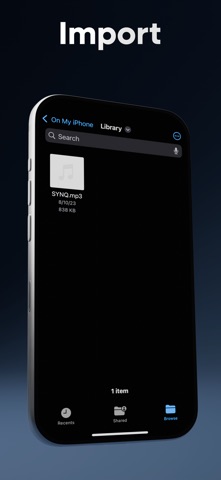


Description by Shawn Rodgers Written by the developer, not by AppBrain. Click to read.
You can import music from the Files app. You can also transfer them from any device on your network straight into the app! Once the files are in SYNQ, you can edit their metadata (song title, artists, albums, image, etc.). Finally, you can export your edited files to listen in apps like Spotify, or you can play them in SYNQ!
In the SYNQ music player, you can sort your music files into albums, by artist, or into playlists.
SYNQ currently supports the following file types: MP3, FLAC, M4A, WAV, and AAC. While you will be able to play all of these different file types with the SYNQ music player, MP3 is currently the only type supported by Spotify local files.
Own your music!
Terms of Use: https://directedbyshawn.com/synq-terms-conditions
Privacy Policy: https://directedbyshawn.com/synq-privacy-policy
The app wouldn't be possible without the amazing creators who have published their work to Flaticon for free use. Credit for all Flaticon icon usage throughout SYNQ can be found below:
List icons created by Chanut - Flaticon
Close icons created by Pixel perfect - Flaticon
Upload icons created by Ilham Fitrotul Hayat - Flaticon
Wifi icons created by Freepik - Flaticon
Sort icons created by Kiraaaaa6 - Flaticon
Membership icons created by Tanah Basah - Flaticon
Music icons created by Becris - Flaticon
Instruction icons created by Rahul Kaklotar - Flaticon
Info icons created by Freepik - Flaticon
Home icons created by Dooder - Flaticon
Gear icons created by Freepik - Flaticon
Open folder icons created by Freepik - Flaticon
Edit icons created by Kiranshastry - Flaticon
Save icons created by Bharat Icons - Flaticon
Delete icons created by Ilham Fitrotul Hayat - Flaticon
Back icons created by Freepik - Flaticon
Share icons created by Bankume - Flaticon
Random icons created by Lagot Design - Flaticon
Plus icons created by dmitri13 - Flaticon
Radio cassette icons created by Talha Dogar - Flaticon
Library icons created by inkubators - Flaticon
Cd drive icons created by Hilmy Abiyyu A. - Flaticon
Add to queue icons created by Fajrul Fitrianto - Flaticon
Remove icons created by Royyan Wijaya - Flaticon
Self loop icons created by Gabriele Malaspina - Flaticon
Tweet icons created by Freepik - Flaticon
Instagram logo icons created by Freepik - Flaticon
Discord icons created by Freepik - Flaticon
User icons created by Freepik - Flaticon
Restore icons created by Uniconlabs - Flaticon
Exclusive icons created by VectorPortal - Flaticon
Customize icons created by Nadiinko - Flaticon
Heart icons created by Freepik - Flaticon
Dislike icons created by Freepik - Flaticon
Folder icons created by Good Ware - Flaticon
Search icons created by Pixel perfect - Flaticon
Sort icons created by Kiraaaaa6 - Flaticon
Close icons created by Fuzzee - Flaticon