

System Status -
System Status - is made and published by Kenichi Yoshikawa. AppBrain is an independent app data site and isn't affiliated with Kenichi Yoshikawa. The app name, icon, screenshots and description belong to Kenichi Yoshikawa and are shown as published on the App Store.
AppBrain's verdict
Established- Rating on App Store
- 4.00
- 3 ratings
- Last updated
- November 2, 2022
It doesn't have enough ratings yet to judge what users think.
Rankings
App Store top chartsApp Store Rankings for System Status -
Competitors
Similar apps and more from Kenichi YoshikawaAlternatives to System Status -








More from Kenichi Yoshikawa
Releases
Updates seen on the App Store- Version
- 6.1.2
- Launched
- May 2015
No changelog data
User feedback
Ratings and reviews on the App StoreComments on System Status - for iOS
We don't have enough comments to show example comments. Please check back later.
Technology
Found in the app by AppBrain- Price
- $1.99
- App size
- 1.36 MB
- Content rating
- Everyone
Technologies used by System Status -
About the app and developer
About System Status -
System Status - is a productivity app developed by Kenichi Yoshikawa.
User Ratings
System Status - is rated 4.00 out of 5 stars. The rating is based on 3 ratings.
App Information
System Status - costs $1.99. The app size is 1.36 MB. The latest version available is 6.1.2. The last update was on November 2, 2022.
Technical Requirements
The app has a content rating of Everyone. The app has been available on the App Store since May 2015.
Developer information for Kenichi Yoshikawa
Address:
Frequently asked questions about System Status -
Is System Status - free?
No. System Status - costs $1.99 on the App Store.
Is System Status - still available?
Yes. System Status - is on the App Store, and the last update we saw was on November 2, 2022.
How large is System Status -?
System Status - is 1.36 MB.
Is System Status - suitable for children?
App Store rates the content of System Status - as suitable for everyone.
How do people rate System Status -?
System Status - scores 4.00 out of 5 stars, from 3 ratings on the App Store.
Who made System Status -?
System Status - was developed by Kenichi Yoshikawa. It is listed in the productivity category on the App Store.
What are the best alternatives to System Status -?
People looking at System Status - also look at these productivity apps: ADJUST!! Comments on the Image, SAT CONNECT, Pydio, Voiply Calls, Shopi - Shared Shopping Lists.
Store listing
By Kenichi Yoshikawa, from the App Store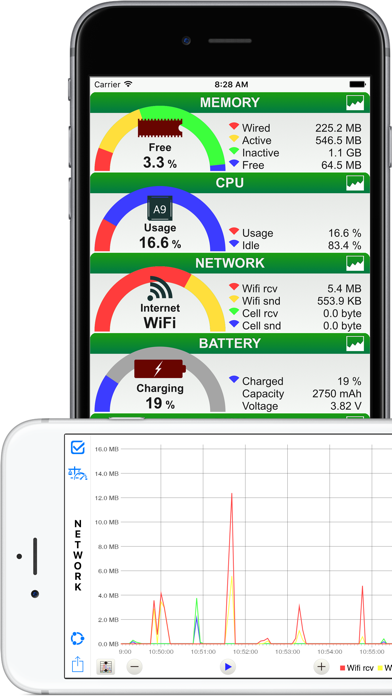




Description by Kenichi Yoshikawa Written by the developer, not by AppBrain. Click to read.
iPhone user can see wide screen view because it corresponds to a horizontal screen of the iPhone. In addition, iPad Air2 or later, iPad mini 4 or later, and iPad Pro or later can Split View and Slide Over and iPhone with 3D Touch that can be memory optimization from home screen.
Also supports dark mode, and you can change the appearance of the app with Setting: Appearance in INFORMATION.
Features
GENERAL : Rial time monitoring of memory, CPU, battery, disk usage and network connect
- Memory : Fee space ratio wired, active, inactive and free memory usage
- CPU : Usage and idle state
- Network : Wi-Fi, 3G or LTE connection state, sent and received data since system boot time
- Battery : Charge level and state (Full, Unplugged or Charging)
- Disk : Used, free and total space
- Information : Summary device information
OVERVIEW : Graph
- Line chart of memory, CPU, battery and disk usage
OVERVIEW DETAILS : CPU, battery etc, list
- CPU Status : CPU usage
- Battery Status : battery charged and battery status
- Disk usage : Disk free space and total disk space
- System uptime : system boot time and uptime
- Connection : default getaway address and dns server address
- WiFi : Connect IP address, subnet mask, SSID, BSSID, received & sent data since system boot
- Cellular : Connect IP address, network type(LTE / 3G) and received & sent data since system boot
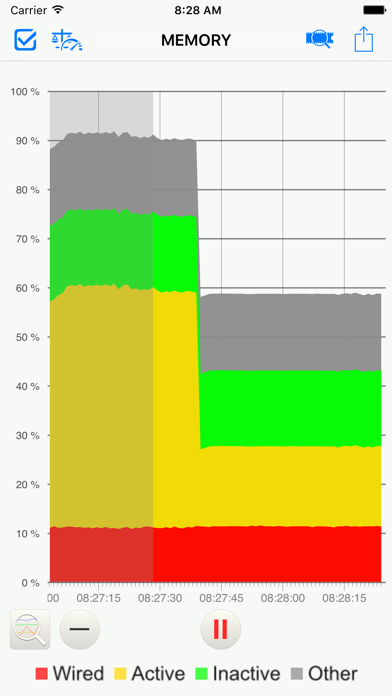
MEMORY : Graph
- Stacked line chart of wired, active, inactive, other memory usage
MEMORY DETAILS : Memory details list
- Memory Usage : wired, active, inactive, other, free, total memory and page size usage
- Page IN/OUT : page ins and page outs
- Page fault : faults and COW faults
- Page lookup : lookups and hits
- Page purge : purgeable count and purges
- Other Page : zero Filled, reactivated and speculative read
CPU : Graph
- Stacked line chart of CPU usage
NETWORK : Graph
- Line chart of wi-fi received and sent, cellular received and sent data
- Change the scale of the number of bytes(manually or automatically)
BATTERY : Graph
- Stacked line chart of battery charged level
DISK : Graph
- Stacked line chart of disk used space
INFORMATION
- Operating System : system, system build number, Kernel, system boot, uptime etc
- Device Information : device name, id, device model etc
- CPU Information : CPU model, GPU model, CPU frequency etc
- Hardware Features : display resolution, pixel density, etc
- Setting : Appearance : Auto, Light and Dark
Function of then Graph general
- Time scale change by button or double tap
- Scrolling past data
- AirPrint, save image, AirDrop, export email and more
- Background monitoring(3 minutes)
- Display the maximum value or the average value (range can be set)
- Move to the location of the maximum value
Supports
Non retina and Retina display on iPhone,iPad.
iPhone 4s or later, iPhone SE or later, iPhone X or later, iPad 2 or later, iPad Air or later and iPad mini or later.
iPhone, iPad both vertical and horizontal screen display.
Supported by "3D Touch" of the iPhone.
Supported by "Split View" and "Slide Over" of the iPad.
iOS 11.0 and later.