

Table Tennis Scoreboard: Voice
Table Tennis Scoreboard: Voice is made and published by arakawa yuichiro. AppBrain is an independent app data site and isn't affiliated with arakawa yuichiro. The app name, icon, screenshots and description belong to arakawa yuichiro and are shown as published on the App Store.
AppBrain's verdict
- Rating on App Store
- 4.79
- 58 ratings
- Last updated
- October 11, 2026
It doesn't have enough ratings yet to judge what users think.
Rankings
App Store top chartsApp Store Rankings for Table Tennis Scoreboard: Voice
Competitors
Similar apps and more from arakawa yuichiroAlternatives to Table Tennis Scoreboard: Voice




More from arakawa yuichiro







Also available on Google Play

Releases
Updates seen on the App Store- Version
- 4.5.2
- Launched
- May 2022
No changelog data
User feedback
Ratings and reviews on the App StoreComments on Table Tennis Scoreboard: Voice for iOS
We don't have enough comments to show example comments. Please check back later.
Technology
Found in the app by AppBrain- Price
- Free
- App size
- 39.9 MB
- Content rating
- Everyone
Technologies used by Table Tennis Scoreboard: Voice
About the app and developer
About Table Tennis Scoreboard: Voice
Table Tennis Scoreboard: Voice is a sports app developed by arakawa yuichiro.
User Ratings
Table Tennis Scoreboard: Voice is rated 4.79 out of 5 stars. The rating is based on 58 ratings.
App Information
Table Tennis Scoreboard: Voice is freely available from the App Store. The app size is 39.88 MB. The latest version available is 4.5.2. The last update was on October 11, 2026.
Technical Requirements
The app has a content rating of Everyone. The app has been available on the App Store since May 2022.
Developer information for arakawa yuichiro
Address:
Store listing
By arakawa yuichiro, from the App Store


Description by arakawa yuichiro Written by the developer, not by AppBrain. Click to read.
Optimized for both smartphones and tablets. A phone fits perfectly on the table for a quick home rally, while a tablet's larger display stays readable across a full-size match court.
--------------------------
▼ Features
--------------------------
1. Realistic flip-panel scoreboard animation
2. Automatic voice call-out of every point
3. No sign-up or account required
4. Saves your match results automatically
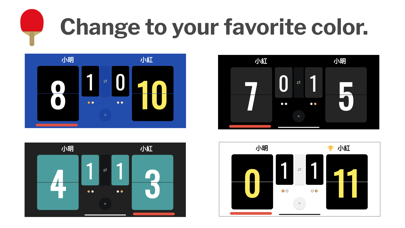
5. Customizable panel color themes
6. Apple Watch app for on-court control
--------------------------
▼ Perfect for
--------------------------
- Anyone who wants to enjoy casual table tennis right away
- Players who forgot a scoreboard - or just don't want to set one up
- Referees who want an easier way to keep score
- Showing the score clearly on a large screen
- Keeping a personal record of your matches
--------------------------
▼ Function details
--------------------------
■ Scoreboard
Tap the scoreboard to add a point. The new game score is read aloud automatically.
■ Match history
When a match ends, the result is saved automatically. Review past matches from the "Match History" screen in the menu. Swipe any record to delete it.
■ Correcting a mistaken point
To correct a point, double-tap the upper half of the target panel on the scoreboard. After a game ends, only the panel with the higher score can be rolled back. After the full match ends, scores can no longer be changed.
■ Voice language
Choose the call-out voice from several languages.
■ Auto change ends
Optionally enable automatic change of ends after each game.
■ Apple Watch app
Update the count from your wrist while you play.
--------------------------
▼ How to play
--------------------------
1. Choose your match length: best-of-3, best-of-5, or best-of-7 games.
2. Enter player names, decide the first server, and start the match.
3. Tap the lower half of a score panel to add a point.
4. Made a mistake? Double-tap the upper half of the panel to roll the point back.
5. When a game ends, change ends and start the next game.
6. When the match ends, the result appears. Past results are available from the menu under "Match History".
7. To replay with the same settings, choose "Play Again" from the menu.
8. To start a fresh match, choose "New Match" from the menu.
9. To mute the score voice, open "Settings" from the menu.
10. To change the scoreboard color, open "Settings" from the menu.
--------------------------
▼ Troubleshooting
--------------------------
- Watch app timeout when connecting: Quit both the Watch app and the iPhone app. Launch the Watch app first, then launch the iPhone app, and try again.
- Connection loading on the Watch score screen never finishes: Long-press the screen to cancel the connection, then try again.