

Take Note To Me
Take Note To Me is made and published by Kaan Tepeli. AppBrain is an independent app data site and isn't affiliated with Kaan Tepeli. The app name, icon, screenshots and description belong to Kaan Tepeli and are shown as published on the App Store.
AppBrain's verdict
- Last updated
- August 17, 2026
Rankings
App Store top chartsApp Store Rankings for Take Note To Me
Competitors
Similar apps and more from Kaan TepeliMore from Kaan Tepeli


Releases
Updates seen on the App Store- Version
- 1.0
- Launched
- August 2026
No changelog data
User feedback
Ratings and reviews on the App StoreComments on Take Note To Me for iOS
We don't have enough comments to show example comments. Please check back later.
Technology
Found in the app by AppBrain- Price
- $1.99
- App size
- 47.6 MB
- Content rating
- Everyone
Technologies used by Take Note To Me
About the app and developer
About Take Note To Me
Take Note To Me is a productivity app developed by Kaan Tepeli.
User Ratings
The app has no ratings yet.
App Information
Take Note To Me costs $1.99. The app size is 47.64 MB. The latest version available is 1.0. The last update was on August 17, 2026.
Technical Requirements
The app has a content rating of Everyone. The app has been available on the App Store since August 2026.
Developer information for Kaan Tepeli
Address:
Store listing
By Kaan Tepeli, from the App Store
Description by Kaan Tepeli Written by the developer, not by AppBrain. Click to read.
A BOARD, NOT A LIST
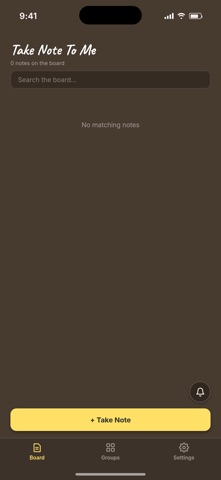
Press and drag "Take Note" onto the board and a fresh note appears where you dropped it. Notes sit side by side as
colored cards, each one slightly tilted, so you can see everything at a glance instead of scrolling through rows of
text.
MAKE IT YOURS
Every note gets its own color from a palette of 32, or pick any shade you like with the color picker. Give notes a
title, write as much as you need, and the note grows with you.
PIN WHAT MATTERS
Tap the pin on any note to fasten it to the top of the board. Pinned notes stay put while everything else moves around
them.
ARRANGE BY HAND
Long-press any note and drag it wherever you want. Your order is your order, not a timestamp's. Drag a note down onto
the "Take Note" area when you are done with it, confirm, and it is gone.
GROUPS
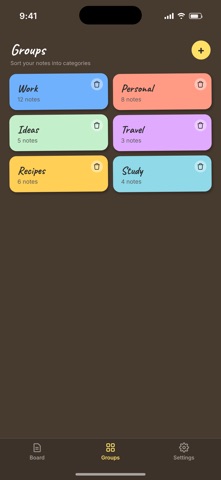
Create groups with their own names and colors, and file notes under them. A group shows how many notes it holds, and
opening one gives you just those notes. Delete a group and the notes inside stay safe.
WIDGETS FOR ANY NOTE
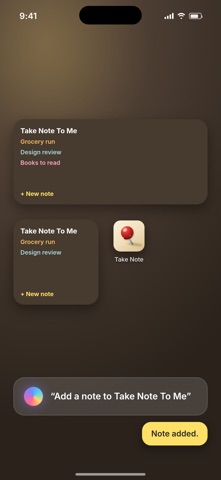
Pick a note, tap the widget button, then place a widget on your Home Screen. The note appears there with its title,
its text and its own color. Add as many widgets as you want, each one showing a different note, in small, medium or
large size.
SIRI AND SHORTCUTS
Ask Siri to add a note and speak it out loud. The note lands on your board, no need to open the app.
NOTIFICATIONS YOU CAN WRITE BACK TO
Send yourself a quick-note notification from the board. Pull it down, type your thought straight into the
notification, and it becomes a note.
SHARE FROM ANYWHERE
Found something worth keeping in another app? Share it to Take Note To Me and it turns into a note.
BRING YOUR OLD NOTES
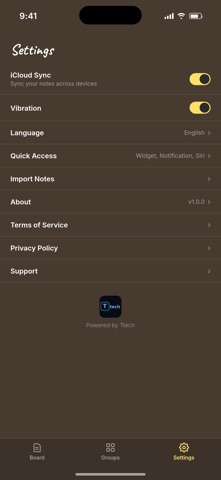
Import notes you exported from another app or from your iCloud archive, and they land on your board as their own
cards.
ACROSS YOUR DEVICES
Switch on iCloud sync and your notes, colors, groups and order follow you between your iPhone and iPad. Leave it off
and everything simply stays on this device.
SEARCH
Type in the search bar and the board filters down to matching notes, titles and content alike.
IN YOUR LANGUAGE
Fully translated into 25 languages.
Privacy Policy: https://ttech.company/takenotetome/privacy/
Terms of Service: https://ttech.company/takenotetome/terms/
Support: https://ttech.company/takenotetome/support/