

Taki AI Assistant
Taki AI Assistant is made and published by CHRISTOPHER NELSON BARLOW. AppBrain is an independent app data site and isn't affiliated with CHRISTOPHER NELSON BARLOW. The app name, icon, screenshots and description belong to CHRISTOPHER NELSON BARLOW and are shown as published on the App Store.
AppBrain's verdict
New- Rating on App Store
- 5.00
- 2 ratings
- Last updated
- October 28, 2026
Taki AI Assistant came out 69 days ago. It doesn't have enough ratings yet to judge what users think.
Rankings
App Store top chartsApp Store Rankings for Taki AI Assistant
Competitors
Similar apps and more from CHRISTOPHER NELSON BARLOWAlternatives to Taki AI Assistant


More from CHRISTOPHER NELSON BARLOW

Releases
Updates seen on the App Store- Version
- 2.0
- Launched
- August 2026
No changelog data
User feedback
Ratings and reviews on the App StoreComments on Taki AI Assistant for iOS
We don't have enough comments to show example comments. Please check back later.
Technology
Found in the app by AppBrain- Price
- Free
- App size
- 24.4 MB
- Content rating
- Medium
Technologies used by Taki AI Assistant
About the app and developer
About Taki AI Assistant
Taki AI Assistant is a productivity app developed by CHRISTOPHER NELSON BARLOW.
User Ratings
Taki AI Assistant is rated 5.00 out of 5 stars. The rating is based on 2 ratings.
App Information
Taki AI Assistant is freely available from the App Store. The app size is 24.42 MB. The latest version available is 2.0. The last update was on October 28, 2026.
Technical Requirements
The app has a content rating of Medium Maturity. The app has been available on the App Store since August 2026.
Developer information for CHRISTOPHER NELSON BARLOW
Address:
Frequently asked questions about Taki AI Assistant
Is Taki AI Assistant free?
Yes. Taki AI Assistant is free on the App Store.
Is Taki AI Assistant still available?
Yes. Taki AI Assistant is on the App Store, and the last update we saw was on October 28, 2026.
How large is Taki AI Assistant?
Taki AI Assistant is 24.42 MB.
Is Taki AI Assistant suitable for children?
App Store gives Taki AI Assistant a medium maturity rating, so it is not meant for young children.
How do people rate Taki AI Assistant?
Taki AI Assistant scores 5.00 out of 5 stars, from 2 ratings on the App Store.
Who made Taki AI Assistant?
Taki AI Assistant was developed by CHRISTOPHER NELSON BARLOW. It is listed in the productivity category on the App Store.
What are the best alternatives to Taki AI Assistant?
People looking at Taki AI Assistant also look at these productivity apps: MyLLTsubscription, Pixel Buddy: Always-On AI, MyWins: Chore Chart for ADHD, Slotmark: Reminder & To Do, Voxminder - Remind by Voice.
Store listing
By CHRISTOPHER NELSON BARLOW, from the App Store
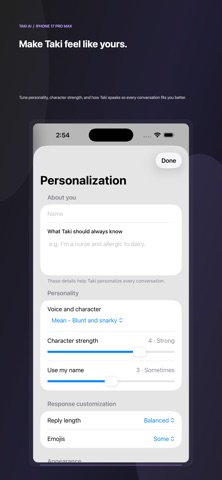
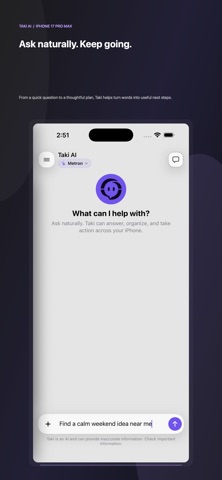

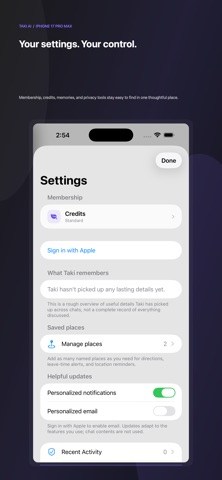
Description by CHRISTOPHER NELSON BARLOW Written by the developer, not by AppBrain. Click to read.
No rigid commands. Just talk the way you'd talk to a friend.
WHAT TAKI CAN DO
• Messages & calls — draft and send texts or emails in your own voice, save contacts, place calls
• Calendar & reminders — add, move, find, and clear events; get reminded when you arrive somewhere
• Maps & weather — find what's nearby, get directions, answer "will it rain?"
• Health — check steps, sleep, heart rate and more; log water or workouts; see your trends
• Photos — search your library on-device ("beach photos") and ask what's in a picture
• Music & home — play music and control HomeKit lights, locks, and thermostats
• Alarms, timers & stopwatch — with a Clock tab to manage them all
• Lists, notes, expenses & habits — capture it all just by asking
• Live info — sports scores, stock and crypto prices, flight status, and countdowns
• Get moving — hand off to your favorite ride, food, and reservation apps in a tap
LIVE ON YOUR LOCK SCREEN
Live Activities and the Dynamic Island keep the moment in view: a "time to leave" countdown that reads live traffic, package delivery updates, flight arrivals, timers, and alarms — all in a clean glass design.
TAKI LIVE — THE VOICE OF SUPERINTELLIGENCE
Talk naturally, interrupt replies, and keep the conversation going. Taki Live connects spoken conversation to the same research, reasoning, and supported tools as Taki 2.0. After initial setup on iPhone, start, mute, and end Live from CarPlay with your phone locked. Review action approvals on iPhone when safe.
Live audio uses 50 AI Credits per minute, measured per second and rounded up once per session, with a 13-credit minimum, plus delegated AI/tool usage. Sessions last up to five minutes, subject to balance. Silence and mute remain billable; End stops the session. Recorded voice uses the same AI Credit balance for AI processing, cloud transcription, and synthesized speech.
BUILT FOR TRUST
When sources are available, open the dedicated sources view to inspect them. Taki asks for clarification when needed, and consequential actions require your approval.
EVERYWHERE YOU ARE
Home Screen and Lock Screen widgets, Control Center, the Share sheet, and Siri ("Tell Taki to…").
PRIVACY FIRST
Photo search runs on your device. Taki sends only what it needs to answer your request, and you stay in control of your data.
Download Taki and start getting more done — just by asking.
—
Text and voice share one AI Credit balance. Plus includes 4,000 AI Credits per month, Premium 8,000, and Pro 16,000. Free includes 500 AI Credits each month.
Taki offers optional auto-renewable subscriptions. Payment is charged to your Apple Account at confirmation of purchase. Subscriptions renew automatically unless turned off at least 24 hours before the end of the current period; manage or cancel anytime in Settings.
Terms: https://takiai.app/terms-of-service/-of-service/-of-service/-of-service/-of-service/-of-service/
Privacy: https://takiai.app/privacy
Support: support@takiai.app