

Talking Counter is made and published by 方 沈. AppBrain is an independent app data site and isn't affiliated with 方 沈. The app name, icon, screenshots and description belong to 方 沈 and are shown as published on the App Store.
AppBrain's verdict
Established- Rating on App Store
- 5.00
- 1 ratings
- Last updated
- June 18, 2024
- Size
- 9.96 MB
It doesn't have enough ratings yet to judge what users think.
User feedback
Ratings and reviews on the App StoreComments on Talking Counter for iOS
We don't have enough comments to show example comments. Please check back later.
Store listing
By 方 沈, from the App Store


Description by 方 沈 Written by the developer, not by AppBrain. Click to read.
This App includes:
1)13 gesture talking counters
2)one talking counter by sound detection
3)one talking counter by proximity sensor detection (only available for iPhone)
4)every minute count down talking counter.
5)every minute count up talking counter.
6)every second count down talking counter.
7)every second count up talking counter.
In many situations, we need to count one by one. two by two or three by three. For example, we exercise in the work out room, we cook in our kitchen, we do our experiments in the laboratory, we study in the classroom. With the help of this App, we could count easily.
If we travel to other countries, we have to learn to count in some international language. With the help of this App, we could learn to count in new language quickly.
If we have the event to do after several minutes, we could use the timer counter to count down by talking. Also we could select the talking unit between the second unit and the minute unit.
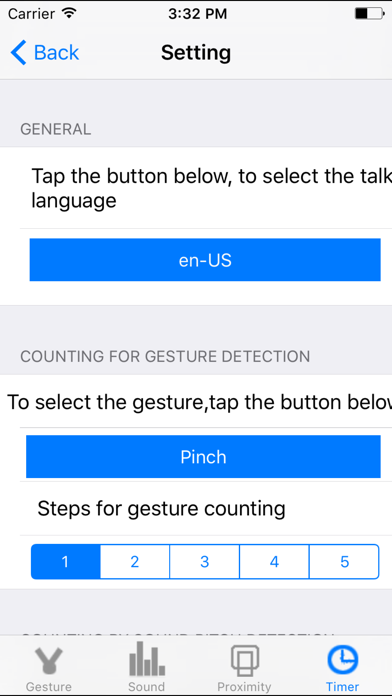
Some times, we like to tap our screen to count. Some times, we like to use other gestures to count such as pinch, double tap or swipe.
Sometimes, we like to count when we are acting or walking, in this case, we could use the proximity sensor detection in this App to count.
(Proximity sensor is only available in iPhone)
Sometimes, we like to count when our iOS devices are two meters away from us, in this case, we could use the sound detection in this App.
The gesture could be :
1 Single Tap
2 Double Tap
3 Pinch
4 Rotation
5 Pan
6 Long Press
7 Swipe Up
8 Swipe Down
9 Swipe Left
10 Swipe Right
11 Swipe Up or Swipe Down
12 Swipe Left or Swipe Right
13 Swipe Up or Down or Left or Right
The default talking language in this App is US English. But we could select the following languages from the setting view:
1 Thai
2 Portuguese BR
3 Slovak
4 French CA
5 Romanian
6 Norwegian
7 (fi-FI) Finnish
8 (pl-PL) Polish
9 (de-DE) German
10 (nl-NL) Netherlands
11 (id-ID) Indonesian
12 (tr-TR) Turkish
13 (it-IT) Italian
14 (pt-PT) Portuguese
15 (fr-FR) French FR
15 (ru-RU) Russian
16 (es-MX) Spanish MX
17 (zh-HK) Chinese HK
18 (sv-SE) Salvador SE
19 (hu-HU) Hungarian
20 (zh-TW) Chinese TW
21 (es-ES) Spanish ES
22 (zh-CN) Chinese CN
23 (nl-BE) Dutch BE
24 (en-GB) English GB
25 (ar-SA) Argentina SA
26 (ko-KR) Korean
27 (cs-CZ) Czech
28 (en-ZA) English ZA
29 (en-AU) English AU
30 (da-DK) Danish DK
31 (en-US) English US
32 (en-IE) English IE
33 (hi-IN) Hindi IN
34 (el-GR) Greek GR
35 (ja-JP) Japanese
The default counting step is One, but we could update the step to other numbers such as 2,3,4,5.
In the timer counter, we could select to count up or count down.
In the proximity sensor counter, we just cover the left top of the iPhone for one seconds or two seconds, the iPhone will talk the counting.
In the sound detection counter, we need to update the sound pitch level in order to make our sound be detected by the device.
If we enable to talk when counting, this App will start detecting for the next count only after the talking for the first counting is finished.If we disable the talking, this App will start detecting for the next count about one second later after the first counting is finished.
This edition could talk to the upcoming phone call with the phone. The iOS version should be 13.0 or newer. 1: accept the coming phone call, 2: when this App start talking, the other could hear the talking of this app from his or her phone. This feature is not available for sound counter.
Question:How to make the counting down job for gesture, sound or proximity counting?
Answer: In the setting view, make the steps of counting less than zero. The same for the counter in watch.
Question:How to start the counting job from the number different from zero?
Answer: in iOS, set the reset value. For watch, set the clear value in the setting view, tap reset button in the main view.
Safety and technology
Found in the app by AppBrain- Price
- $0.99
- App size
- 9.96 MB
- Content rating
- Everyone
Technologies used by Talking Counter
Releases
Updates seen on the App Store- Version
- 2.4.9
- Launched
- April 2017
No changelog data
Alternatives
Similar apps and more from 方 沈Alternatives to Talking Counter





More from 方 沈


Rankings
App Store top chartsApp Store Rankings for Talking Counter
About the app and developer
About Talking Counter
Talking Counter is an utilities app developed by 方 沈.
User Ratings
Talking Counter is rated 5.00 out of 5 stars. The rating is based on one rating ratings.
App Information
Talking Counter costs $0.99. The app size is 9.96 MB. The latest version available is 2.4.9. The last update was on June 18, 2024.
Technical Requirements
The app has a content rating of Everyone. The app has been available on the App Store since April 2017.
Developer information for 方 沈
Address: