
Talking Scientific Calculator
Talking Scientific Calculator is made and published by Adam Croser. AppBrain is an independent app data site and isn't affiliated with Adam Croser. The app name, icon, screenshots and description belong to Adam Croser and are shown as published on the App Store.
AppBrain's verdict
Established- Rating on App Store
- 5.00
- 3 ratings
- Last updated
- March 8, 2021
- Size
- 17.4 MB
It doesn't have enough ratings yet to judge what users think.
User feedback
Ratings and reviews on the App StoreComments on Talking Scientific Calculator for iOS
We don't have enough comments to show example comments. Please check back later.
Store listing
By Adam Croser, from the App Store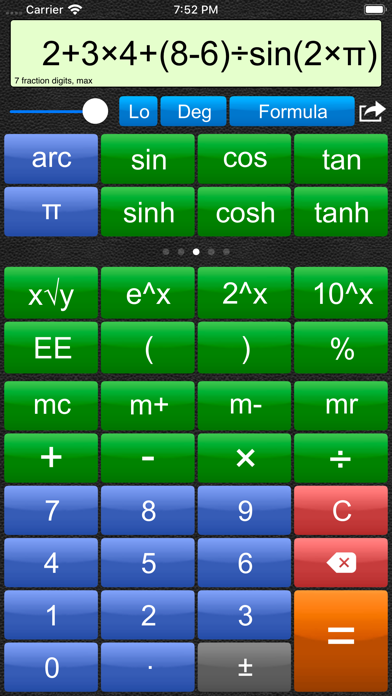
Description by Adam Croser Written by the developer, not by AppBrain. Click to read.
** Regularly featured on "What's Hot" - Utilities
Video demo available from the support link.
Features include:
--------------------------
- Can read answers, entered numbers and formulas aloud.
1,234.56 is spoken as "One thousand, two hundred thirty four point five six" when US pronunciation style selected. UK and German styles also available.
2 + 3 x 5^2 is spoken as "two plus three multiply five squared."
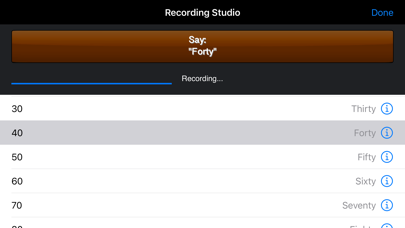
- Built in recording studio and script. Requires only 5 minutes to record a new voice. Recordings can be transferred between devices using Bluetooth.
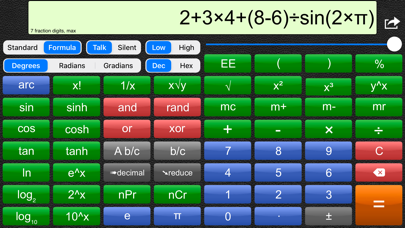
- Two entry modes, Standard and Formula. Standard mode emulates traditional calculators. Formula mode takes care of the order of operations for you. You enter a mathematical expression, complete with operators and parentheses (brackets), tap the = button, and the expression is evaluated.
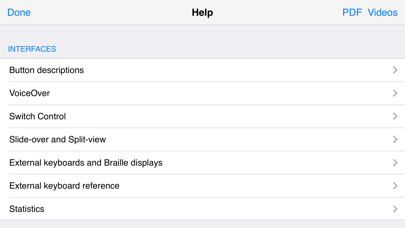
- The entire app's feature set is accessible to VoiceOver users (using standard or touch typing input styles) and Switch Control users.
- Unique to this app is an Enhanced VoiceOver Speech mode that pronounces large numbers and formula with natural language rather than one digit at a time.
- Supports entry and display of Braille on supported devices (thanks to assistance from the Washington State School for the Blind.)
- Numeric formatting of results: Max fraction digits (default), fixed fraction digits (useful for currency calculations), and max significant digits (useful for science and engineering lab work), plus international formatting.
- Trigonometric, hyperbolic, logarithmic, permutations, combinations, factorial, powers, roots, percent and bit-wise operations, conversion between hexadecimal and decimal, random numbers.
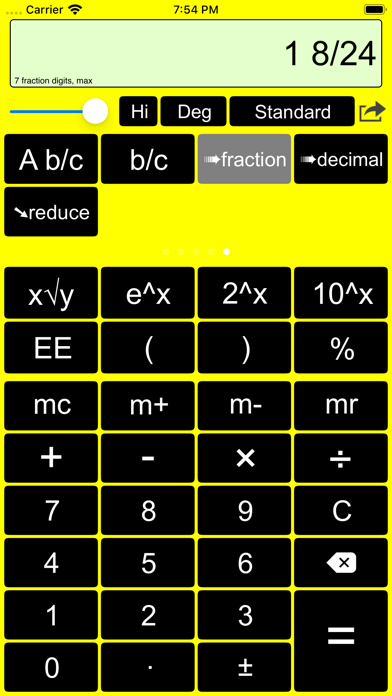
- Full support for fractions (simple and mixed), conversion to and from decimal, fraction reduction, and use of fractions with all operators.
- Easy access to basic calculator functions, for those who rarely use scientific operations.
- Paper log feature, designed particularly for classroom use. Calculations can be recorded with a timestamp to be viewed and emailed.
- iPads get a user interface designed to make use of the large screen area. iPhones and iPod Touches get a user interface designed for the smaller screen. This includes large, easy to read scientific buttons, accessed on a scrolling panel. All the features of the iPad version are included in the smaller design.
Looking for statistics functionality? Check out the companion Talking Statistics Calculator on the App Store.
Customizable for each level of vision:
--------------------------------------------
Normal to low vision: Large, clear buttons with optional speech.
Low vision: High contrast display mode, with optional speech.
No vision / blind: VoiceOver reads the button names before they are activated and also calculation results. Entry and display on refreshable Braille devices.
Switch control accessible. Split-view and Slide-over supported.
Why record new voices?
--------------------------------------------
Having your iPad, iPhone or iPod Touch talk with your own voice, or that of a friend or tutor will make the calculator sound more natural to you. The calculator will speak with the accent you are used to hearing.
How good is the sound quality of recorded voices?
Excellent: The microphone in your iPad / iPhone or iPod Touch is of very good quality, and this calculator performs digital signal processing to ensure the audio level is consistent across all recorded words.
Safety and technology
Found in the app by AppBrain- Price
- $4.99
- App size
- 17.4 MB
- Content rating
- Everyone
Technologies used by Talking Scientific Calculator
Releases
Updates seen on the App Store- Version
- 11.6
- Launched
- December 2010
No changelog data
Alternatives
Similar apps and more from Adam CroserAlternatives to Talking Scientific Calculator







More from Adam Croser

Rankings
App Store top chartsApp Store Rankings for Talking Scientific Calculator
About the app and developer
About Talking Scientific Calculator
Talking Scientific Calculator is an utilities app developed by Adam Croser.
What is the rating of Talking Scientific Calculator?
Talking Scientific Calculator is rated 5.00 out of 5 stars, based on 3 ratings.
Is Talking Scientific Calculator free?
Talking Scientific Calculator costs $4.99. The app size is 17.39 MB. The latest version available is 11.6. The last update was on March 8, 2021.
What are the requirements for Talking Scientific Calculator?
The app has a content rating of Everyone. The app has been available on the App Store since December 2010.
Developer information for Adam Croser
Address:
Frequently asked questions about Talking Scientific Calculator
Is Talking Scientific Calculator free?
No. Talking Scientific Calculator costs $4.99 on the App Store.
Is Talking Scientific Calculator still available?
Yes. Talking Scientific Calculator is on the App Store, and the last update we saw was on March 8, 2021.
How large is Talking Scientific Calculator?
Talking Scientific Calculator is 17.39 MB.
Is Talking Scientific Calculator suitable for children?
App Store rates the content of Talking Scientific Calculator as suitable for everyone.
How do people rate Talking Scientific Calculator?
Talking Scientific Calculator scores 5.00 out of 5 stars, from 3 ratings on the App Store.
Who made Talking Scientific Calculator?
Talking Scientific Calculator was developed by Adam Croser. It is listed in the utilities category on the App Store.
What are the best alternatives to Talking Scientific Calculator?
People looking at Talking Scientific Calculator also look at these utilities apps: The Talking Calculator, Big Calculator Low Vision, myMMX DB, Pellet QuickChange, Image-Explorer.