

Tally: Spending Control
Tally: Spending Control is made and published by Juan Carlos Rodicio Tirado. AppBrain is an independent app data site and isn't affiliated with Juan Carlos Rodicio Tirado. The app name, icon, screenshots and description belong to Juan Carlos Rodicio Tirado and are shown as published on the App Store.
AppBrain's verdict
- Last updated
- October 10, 2026
Rankings
App Store top chartsApp Store Rankings for Tally: Spending Control
Competitors
Similar apps and more from Juan Carlos Rodicio TiradoAlternatives to Tally: Spending Control


More from Juan Carlos Rodicio Tirado


Also available on Google Play

Releases
Updates seen on the App Store- Version
- 2.7.0
- Launched
- June 2026
No changelog data
User feedback
Ratings and reviews on the App StoreComments on Tally: Spending Control for iOS
We don't have enough comments to show example comments. Please check back later.
Technology
Found in the app by AppBrain- Price
- Free
- App size
- 66.9 MB
- Content rating
- Everyone
Technologies used by Tally: Spending Control
About the app and developer
About Tally: Spending Control
Tally: Spending Control is a finance app developed by Juan Carlos Rodicio Tirado.
User Ratings
The app has no ratings yet.
App Information
Tally: Spending Control is freely available from the App Store. The app size is 66.85 MB. The latest version available is 2.7.0. The last update was on October 10, 2026.
Technical Requirements
The app has a content rating of Everyone. The app has been available on the App Store since June 2026.
Developer information for Juan Carlos Rodicio Tirado
Address:
Frequently asked questions about Tally: Spending Control
Is Tally: Spending Control free?
Yes. Tally: Spending Control is free on the App Store.
Is Tally: Spending Control still available?
Yes. Tally: Spending Control is on the App Store, and the last update we saw was on October 10, 2026.
How large is Tally: Spending Control?
Tally: Spending Control is 66.85 MB.
Is Tally: Spending Control suitable for children?
App Store rates the content of Tally: Spending Control as suitable for everyone.
Who made Tally: Spending Control?
Tally: Spending Control was developed by Juan Carlos Rodicio Tirado. It is listed in the finance category on the App Store.
What are the best alternatives to Tally: Spending Control?
People looking at Tally: Spending Control also look at these finance apps: Spendro – Expense Tracker, Fast Chilean Peso CLP convert, Expense Tracker - Luca, Budget App - Tracky, MoneyTrack, Expense Manager.
Store listing
By Juan Carlos Rodicio Tirado, from the App Store



Description by Juan Carlos Rodicio Tirado Written by the developer, not by AppBrain. Click to read.
Tally is an expense tracker for iPhone that never connects to your bank account. You choose how each movement gets in, and none of them is saved until you approve it.
FOUR WAYS TO LOG
- By hand: tap +, pick expense or income, account, category, and date. Seconds.
- From a receipt: take the photo and tap “Analyze receipt”. Tally proposes the amount, date, and category, and you review them before saving.
- By importing a statement: a CSV or Excel file you download yourself from your online banking (or Norma 43, for Spanish banks). Row-by-row preview, with possible duplicates flagged.
- With Apple Wallet: an optional Shortcuts automation leaves each payment as a draft for you to review.
The last two, and unlimited receipt analyses, are part of Tally PRO.
WHAT MAKES TALLY DIFFERENT
- It never asks for access to your bank.
- Nothing is saved until you approve it.
- Your movements, accounts, and receipts stay on the device by default.
- No ads, and we do not sell your data.
WHAT ELSE YOU CAN DO
- Split your money across accounts, including event accounts for a trip or a party.
- Keep each account in its own currency, out of 47: your total is converted to your main currency on the phone, with the day’s exchange rates.
- Sort by category, and create 2 of your own for free (unlimited with PRO).
- Keep the receipt photo next to the movement.
- Track savings goals and recurring movements.
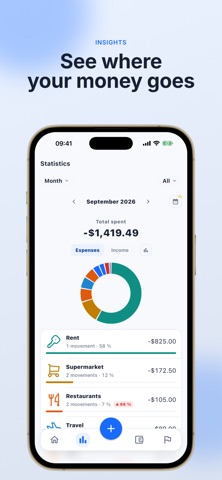
- See statistics by month, quarter, semester, and year.
- Share one specific account with someone else, encrypted on the device before it is uploaded. Requires PRO on both phones.
- Export your data to CSV whenever you want.
FREE AND TALLY PRO
Free, with no time limit and no ads: 3 accounts, the built-in categories plus 2 custom ones, 1 AI receipt analysis, 1 recurring item, and 1 goal.
Tally PRO adds unlimited and event accounts, unlimited custom categories, unlimited receipt analyses, statement import, the Wallet automation, advanced statistics and filters, and shared accounts. Billed monthly, yearly, or as a one-time purchase.
ABOUT THE AI
Tally uses artificial intelligence in two places, and only when you ask for it: when you tap “Analyze receipt”, and when it tidies up the rows of a statement you imported. The Apple Wallet automation uses no AI and makes no network calls. Neither of them needs access to your bank.
WHAT TALLY DOES NOT DO
- It does not connect to banks or Open Banking.
- It has no category budgets.
- It does not work out who owes what between people.
- It does not use real-time exchange rates: it converts with the day’s rates.
- There is no guest mode: an account is required.
Requires an account (Apple, Google, or email).
Built by Juan Carlos Rodicio.
Terms of use (EULA): https://www.apple.com/legal/internet-services/itunes/dev/stdeula/