

TallyDay: Spending & Diary
TallyDay: Spending & Diary is made and published by 莹莹 林. AppBrain is an independent app data site and isn't affiliated with 莹莹 林. The app name, icon, screenshots and description belong to 莹莹 林 and are shown as published on the App Store.
AppBrain's verdict
New- Rating on App Store
- 5.00
- 1 ratings
- Last updated
- October 14, 2026
TallyDay: Spending & Diary came out 80 days ago. It doesn't have enough ratings yet to judge what users think.
Rankings
App Store top chartsApp Store Rankings for TallyDay: Spending & Diary
Competitors
Similar apps and more from 莹莹 林Alternatives to TallyDay: Spending & Diary


Releases
Updates seen on the App Store- Version
- 1.1
- Launched
- August 2026
No changelog data
User feedback
Ratings and reviews on the App StoreComments on TallyDay: Spending & Diary for iOS
We don't have enough comments to show example comments. Please check back later.
Technology
Found in the app by AppBrain- Price
- Free
- App size
- 12.1 MB
- Content rating
- Everyone
Technologies used by TallyDay: Spending & Diary
About the app and developer
About TallyDay: Spending & Diary
TallyDay: Spending & Diary is a finance app developed by 莹莹 林.
What is the rating of TallyDay: Spending & Diary?
TallyDay: Spending & Diary is rated 5.00 out of 5 stars, based on one rating ratings.
Is TallyDay: Spending & Diary free?
TallyDay: Spending & Diary is free. The app size is 12.06 MB. The latest version available is 1.1. The last update was on October 14, 2026.
What are the requirements for TallyDay: Spending & Diary?
The app has a content rating of Everyone. The app has been available on the App Store since August 2026.
Developer information for 莹莹 林
Address:
Frequently asked questions about TallyDay: Spending & Diary
Is TallyDay: Spending & Diary free?
Yes. TallyDay: Spending & Diary is free on the App Store.
Is TallyDay: Spending & Diary still available?
Yes. TallyDay: Spending & Diary is on the App Store, and the last update we saw was on October 14, 2026.
How large is TallyDay: Spending & Diary?
TallyDay: Spending & Diary is 12.06 MB.
Is TallyDay: Spending & Diary suitable for children?
App Store rates the content of TallyDay: Spending & Diary as suitable for everyone.
How do people rate TallyDay: Spending & Diary?
TallyDay: Spending & Diary has one rating of 5.00 stars on the App Store.
Who made TallyDay: Spending & Diary?
TallyDay: Spending & Diary was developed by 莹莹 林. It is listed in the finance category on the App Store.
What are the best alternatives to TallyDay: Spending & Diary?
People looking at TallyDay: Spending & Diary also look at these finance apps: PiggySpy, FinWizard Financial Calculator, CentRail: Expense Tracker, Budget Tracker: SpendLog, Cires: Expense & Money Manager.
Store listing
By 莹莹 林, from the App Store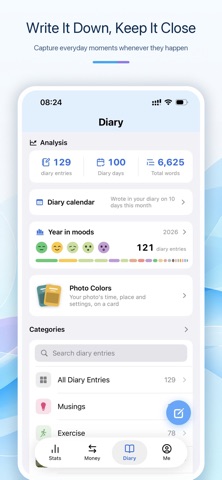


Description by 莹莹 林 Written by the developer, not by AppBrain. Click to read.
It does more than just track where your money goes — it holds onto your snapshots, your feelings, and the gentle fragments of life along the way.
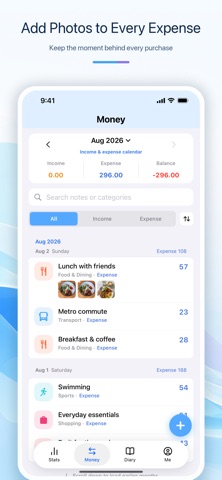
Attach photos to expenses, write down everyday moments, and move naturally between your financial calendar and diary check-ins. Your records become more than numbers—they become part of your story.
EASY, FLEXIBLE MONEY TRACKING
• Quickly record income, expenses, categories, dates, notes, and photos
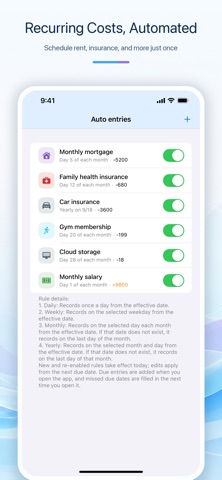
• Create automatic entries for recurring costs such as mortgages, insurance, and memberships
• Track full or partial expense refunds, with statistics based on the actual amount spent
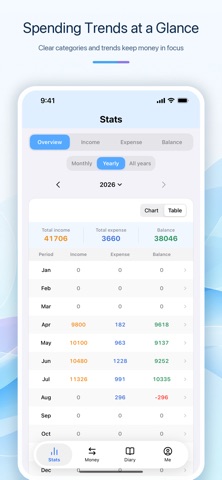
• Review transactions through calendars, category breakdowns, filters, and trend charts
• Create multiple ledgers for everyday life, travel, family finances, or other purposes
• Import and merge records into a family ledger for a consolidated overview
• Add custom image icons to your spending categories
IMPORT AND EXPORT
Save time by importing common CSV and Excel statement formats instead of entering every transaction manually.
TallyDay can identify transaction dates, amounts, income and expenses, and other available details. Duplicate records are detected during import, and you can choose the destination ledger when using multiple ledgers.
You can also import and export TallyDay backup files to keep portable copies of your records.
CAPTURE EVERYDAY MOMENTS
• Write notes with text, photos, videos, moods, and optional locations
• Organize entries into collections such as Musings, Exercise, or Year in Review
• Customize collection names, colors, symbols, and image icons
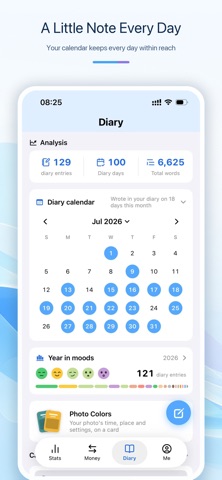
• Look back through a diary check-in calendar
• Review diary days, total word count, and mood patterns
• Keep money records and personal notes together without switching between separate apps
PRIVACY BY DESIGN
TallyDay follows a local-first approach:
• Spending records, diary entries, and personal settings are stored on your device by default
• No TallyDay account, phone number, or social sign-in is required
• No advertising and no third-party analytics SDK
• No cross-app tracking or advertising profiles
• No independent developer server that centrally stores your financial or diary content
• Camera, photo, location, and notification permissions are requested only when you choose to use the related feature
• System biometric protection is available, with authentication handled securely by iOS
iCloud is entirely optional. When enabled, spending records and diary entries can sync through the private iCloud space associated with your Apple Account. Sync and backup can be managed separately.
DESIGNED FOR IPHONE AND IPAD
TallyDay supports both iPhone and iPad. The iPad version includes a spacious multi-column layout for viewing lists, statistics, and record details more efficiently.
Whether you are organizing everyday spending or saving the small moments that matter, TallyDay offers a calm, clear, and private place to keep them together.
Terms of Use (EULA):
https://www.apple.com/legal/internet-services/itunes/dev/stdeula/
Additional Terms for TallyDay:
https://finngra.github.io/tallyday/terms-en.html
Privacy Policy:
https://finngra.github.io/tallyday/privacy-en.html