

TamperCheck: Photo Compare
TamperCheck: Photo Compare is made and published by Cyberdeen LLC. AppBrain is an independent app data site and isn't affiliated with Cyberdeen LLC. The app name, icon, screenshots and description belong to Cyberdeen LLC and are shown as published on the App Store.
AppBrain's verdict
- Rating on App Store
- 5.00
- 1 ratings
- Last updated
- May 28, 2026
It doesn't have enough ratings yet to judge what users think.
Rankings
App Store top chartsApp Store Rankings for TamperCheck: Photo Compare
Competitors
Similar apps and more from Cyberdeen LLC


Releases
Updates seen on the App Store- Version
- 1.3.3
- Launched
- April 2026
No changelog data
User feedback
Ratings and reviews on the App StoreComments on TamperCheck: Photo Compare for iOS
We don't have enough comments to show example comments. Please check back later.
Technology
Found in the app by AppBrain- Price
- Free
- App size
- 55.0 MB
- Content rating
- Everyone
Technologies used by TamperCheck: Photo Compare
About the app and developer
About TamperCheck: Photo Compare
TamperCheck: Photo Compare is an utilities app developed by Cyberdeen LLC.
What is the rating of TamperCheck: Photo Compare?
TamperCheck: Photo Compare is rated 5.00 out of 5 stars, based on one rating ratings.
Is TamperCheck: Photo Compare free?
TamperCheck: Photo Compare is free. The app size is 55.03 MB. The latest version available is 1.3.3. The last update was on May 28, 2026.
What are the requirements for TamperCheck: Photo Compare?
The app has a content rating of Everyone. The app has been available on the App Store since April 2026.
Developer information for Cyberdeen LLC
Address:
Frequently asked questions about TamperCheck: Photo Compare
Is TamperCheck: Photo Compare free?
Yes. TamperCheck: Photo Compare is free on the App Store.
Is TamperCheck: Photo Compare still available?
Yes. TamperCheck: Photo Compare is on the App Store, and the last update we saw was on May 28, 2026.
How large is TamperCheck: Photo Compare?
TamperCheck: Photo Compare is 55.03 MB.
Is TamperCheck: Photo Compare suitable for children?
App Store rates the content of TamperCheck: Photo Compare as suitable for everyone.
How do people rate TamperCheck: Photo Compare?
TamperCheck: Photo Compare has one rating of 5.00 stars on the App Store.
Who made TamperCheck: Photo Compare?
TamperCheck: Photo Compare was developed by Cyberdeen LLC. It is listed in the utilities category on the App Store.
What are the best alternatives to TamperCheck: Photo Compare?
People looking at TamperCheck: Photo Compare also look at these utilities apps: Flip Coin Master, Spotix, AI Home Inventory: Room Scan, Max Vision, Photo Analysis.
Store listing
By Cyberdeen LLC, from the App Store


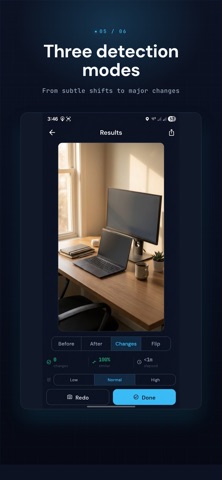

Description by Cyberdeen LLC Written by the developer, not by AppBrain. Click to read.
TamperCheck is a change detection camera. Take a photo of your desk, your shelf, your drawer — whatever you want to keep tabs on. Come back later and take another photo. The app figures out what's different.
It doesn't just overlay two images and hope you spot something. It actually aligns them first, correcting for the fact that you're never standing in exactly the same spot twice.
HOW IT WORKS
1. Take a reference photo of your space
2. Come back later and take a comparison photo
3. The app aligns the images and finds what changed
4. Changed areas show up highlighted in red
SMART ALIGNMENT
Here's the problem with other "spot the difference" apps: they need you to hold your phone in the exact same position both times. That's nearly impossible in practice.
TamperCheck uses the same feature-matching algorithm used in professional image analysis to find common points between your two photos, then mathematically warps one image to match the other's perspective. You can be standing a foot to the left, at a different angle, and it still works.
WHAT THE DETECTION ACTUALLY DOES
The comparison goes deeper than just checking if pixels changed color:
• It diffs each color channel independently. If someone swapped a red book for a blue one at the same brightness, grayscale comparison misses that. This doesn't.
• It adapts to uneven lighting. A lamp in one corner doesn't throw off the whole analysis.
• It runs the check at two different scales and only keeps detections that show up in both. Cuts out noise.
• It uses structural similarity (SSIM) to ignore cases where the lighting shifted but nothing actually moved.
Three sensitivity levels let you tune it. Low catches big stuff like moved furniture. High catches a drawer left slightly open.
YOUR PHOTOS STAY ON YOUR PHONE
There's no account to create. There's no cloud upload. There's no server on our end receiving your images.
All image processing happens on your device. We built it that way on purpose. We literally cannot see your photos.
WHO THIS IS FOR
• Shared apartments. Yes, your roommate did open that drawer.
• Your desk at work. Did someone go through your papers while you were at lunch?
• Hotel stays. Take a photo of the room when you check in, check it when you get back.
• Packed luggage. Take a photo before the flight, check it after.
• Insurance documentation. Before-and-after records of property condition.
• Storage units. Periodic checks that nothing's been disturbed.