AppBrain
AppBrain
  • Apps
  • Apps being viewed right now Trending apps today Most popular apps All-time most installed apps Top rated apps iPhone and iPad apps
  • Intelligence ▾
    Intelligence overview → Track any Android app or your whole market
    Track & analyze
    Keyword Tracker & OptimizerTrack & improve Play rankings App Performance ReportOne-off PDF for any app StatisticsFree Android & Play market stats
    Promote your app
    Featured Apps App Links
  • Intelligence
  • Pricing
  • Dashboard
  • Sign up
  • Log in
App Store Apps > Finance > Tangerine: Split & Expenses
Tangerine: Split & Expenses icon

Tangerine: Split & Expenses

1.6
Ahmed Hamzawy
0.00
0 reviews
Free

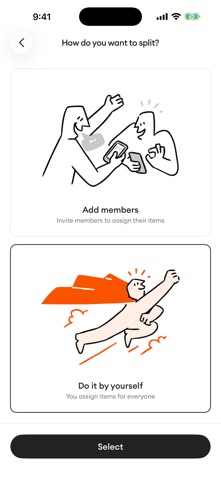
Tangerine: Split & Expenses Screenshot 1 of 6
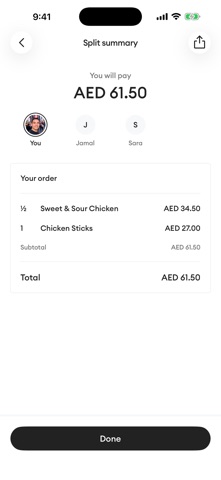
Tangerine: Split & Expenses Screenshot 2 of 6
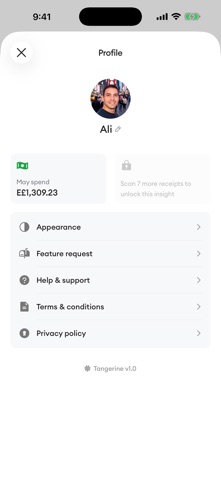
Tangerine: Split & Expenses Screenshot 3 of 6
Tangerine: Split & Expenses Screenshot 4 of 6
Tangerine: Split & Expenses Screenshot 5 of 6
Tangerine: Split & Expenses Screenshot 6 of 6
Screenshots by Ahmed Hamzawy, from the the App Store listing
View on the App Store

AppBrain's verdict on Tangerine: Split & Expenses

Last updated
July 7, 2026
Size
16.9 MB
Official page on the App Store

About Tangerine: Split & Expenses

Tangerine: Split & Expenses is a finance app developed by Ahmed Hamzawy.

What is the rating of Tangerine: Split & Expenses?

Tangerine: Split & Expenses has no ratings yet.

Is Tangerine: Split & Expenses free?

Tangerine: Split & Expenses is free. The app size is 16.94 MB. The latest version available is 1.6. The last update was on July 7, 2026.

What are the requirements for Tangerine: Split & Expenses?

The app has a content rating of Everyone. The app has been available on the App Store since May 2026.

Tangerine: Split & Expenses is made and published by Ahmed Hamzawy. AppBrain is an independent app data site and isn't affiliated with Ahmed Hamzawy. The app name, icon, screenshots and description belong to Ahmed Hamzawy and are shown as published on the App Store.

Description by Ahmed Hamzawy (from the App Store)
Splitting a bill shouldn't take longer than the meal.
Tangerine reads any receipt, screenshot, or shared image and turns it into an interactive summary in under a minute. Split it with the table, or just log it as your own expense — either way, it's done in a few taps.

Two Ways to Split the Bill

1. Solo (best for small groups)
Scan the receipt and tap what each person had. No one else installs anything, and the split is finished before the bill is even paid.

2. Live (best for larger tables)
Scan the receipt and send a link. Everyone joins from their own phone in any browser — no app required. They pick what they ordered while Tangerine totals it up.

Not Splitting? Just Log It
Grabbing groceries, paying a bill, or covering the whole table yourself? Scan it as a personal expense in seconds. Tangerine sorts it by category automatically — no forms, no manual tagging.

Perfect for:
- Friday dinners with friends
- Lunch at work
- Birthday brunches
- Group outings where everyone ordered something different
- Tracking your own spending between meals
- Those moments when no one wants to do the math

The Math, Handled:
- Tax, service charge, tip, delivery fee, and discounts are split correctly among the people who ordered each item.
- Works with both VAT-inclusive and VAT-exclusive bills.
- Reads Arabic and English receipts in the same scan — even bilingual ones.
- Flags when totals don't add up.
- Multi-currency support.

See Your Spending:
Every split and expense rolls up into a monthly spending ring, broken down by category — automatically, with no manual entry. Your totals stay in your profile, on your device.

Private by Design:
- Receipt images are processed and discarded immediately.
- Saved bills stay in your iCloud, not on app servers.
- No accounts, emails, or phone numbers needed to start.
- Anonymous analytics are never linked to your identity.

Works with Real Receipts:
- Restaurants, cafés, bars, takeaway, delivery — and everyday expenses.
- Accepts photos, screenshots, scans, PDFs, and thermal printouts.
- Detects the currency from the receipt, with a manual override.
- Adjusts service charge and VAT to the local region.

Requirements:
Tangerine requires an iPhone running iOS 17 or later.

Support:
For help, reach us at hi@tangerineapp.co
Show more Show less

Share Tangerine: Split & Expenses

User feedback
Ratings and reviews on the App Store

Comments on Tangerine: Split & Expenses for iOS

We don't have enough comments to show example comments. Please check back later.

Safety and technology
Found in the app by AppBrain
Price
Free
App size
16.9 MB
Content rating
Everyone

Technologies used by Tangerine: Split & Expenses

Changelog of Tangerine: Split & Expenses

Updates seen on the App Store
Version
1.6
Launched
May 2026

No changelog data

Alternatives
Similar apps and more from Ahmed Hamzawy

Alternatives to Tangerine: Split & Expenses

MeshBank icon MeshBank
Hossameldin Ismail
0.0
Free
SplitBite icon SplitBite
Dylan Thies
4.5
Free
4 ratings
Budget Planner: Expense Trend icon Budget Planner: Expense Trend
Expense Trend Inc.
0.0
Free
SplitSnap: AI Bill Splitter icon SplitSnap: AI Bill Splitter
John Carlo Miel
0.0
Free
Splitly: Split Group Expenses icon Splitly: Split Group Expenses
DELOS CREATOR HUB COMPANY LIMITED
0.0
Free
Walletry: Expense Tracker icon Walletry: Expense Tracker
Adel Bassiony
0.0
Free
Kristal:Digital Wealth Manager icon Kristal:Digital Wealth Manager
Kristal
3.8
Free
4 ratings
Trevi Financials icon Trevi Financials
Trevi
5.0
Free
1 ratings
Rankings
App Store top charts

App Store Rankings for Tangerine: Split & Expenses

This app is not ranked
About the app and developer

Developer information for Ahmed Hamzawy

Ahmed Hamzawy

Address:

Frequently asked questions about Tangerine: Split & Expenses

Is Tangerine: Split & Expenses free?

Yes. Tangerine: Split & Expenses is free on the App Store.

Is Tangerine: Split & Expenses still available?

Yes. Tangerine: Split & Expenses is on the App Store, and the last update we saw was on July 7, 2026.

How large is Tangerine: Split & Expenses?

Tangerine: Split & Expenses is 16.94 MB.

Is Tangerine: Split & Expenses suitable for children?

App Store rates the content of Tangerine: Split & Expenses as suitable for everyone.

Who made Tangerine: Split & Expenses?

Tangerine: Split & Expenses was developed by Ahmed Hamzawy. It is listed in the finance category on the App Store.

What are the best alternatives to Tangerine: Split & Expenses?

People looking at Tangerine: Split & Expenses also look at these finance apps: MeshBank, SplitBite, Budget Planner: Expense Trend, SplitSnap: AI Bill Splitter, Splitly: Split Group Expenses.

Apps other people are watching Popular Finance Apps Top new apps Price drops on Google Play Today's trending apps
MeshBank icon MeshBank
SplitBite icon SplitBite
Budget Planner: Expense Trend icon Budget Planner: Expense Trend
SplitSnap: AI Bill Splitter icon SplitSnap: AI Bill Splitter
Splitly: Split Group Expenses icon Splitly: Split Group Expenses
Walletry: Expense Tracker icon Walletry: Expense Tracker
Kristal:Digital Wealth Manager icon Kristal:Digital Wealth Manager
Trevi Financials icon Trevi Financials
Overview Alternatives Reviews Rankings Technology
AppBrain Intelligence premium content

Subscribe now to get full and unlimited access to AppBrain Intelligence. You'll have access to:

  • App Intelligence dashboard (performance timeline, competitor comparison, country rankings, insight cards)
  • Detailed ranking data per app
  • Full timeline per developer
  • Device market shares data per country
  • Unlimited keyword tracking
  • AI assistant access via MCP (Claude, Cursor or any MCP client)
1 Month

$75/mo
(billed every month)

SAVE 0%
Subscribe
3 Months

$65/mo
($195 billed every 3 months)

SAVE 13%
Subscribe
1 Year

$57.50/mo
($690 billed every year)

SAVE 23%
Subscribe
Each subscription will automatically renew 3 days before the expiration date for the same time period. Subscriptions can be cancelled at any time before the renewal.

AppBrain is an app data site, we track rankings, ratings, installs for all apps and games on Google Play and the App Store. AppBrain doesn't host app files or APKs, all install links go directly to the official store. All trademarks are owned by their respective owners.

More apps

  • Top Android apps being viewed
  • Cinebox Ultra+
  • Messenger: Text Messages, SMS
  • MicaRead

App statistics

  • Android statistics
  • Google Play Developer stats
  • Trending Android Apps
  • Trending iOS apps
  • Top popular Apps
  • Buy the best Android phone
  • Buy & sell app businesses

About AppBrain

  • Contact
  • Privacy
  • Documentation
  • DMCA takedowns
  • Blog
  • Free webpage for your Android app
© 2010-2026 - AppBrain