

Tape Measure AR - Camera Ruler
Tape Measure AR - Camera Ruler is made and published by ZipoApps. AppBrain is an independent app data site and isn't affiliated with ZipoApps. The app name, icon, screenshots and description belong to ZipoApps and are shown as published on the App Store.
AppBrain's verdict
- Rating on App Store
- 4.33
- 27 ratings
- Last updated
- September 5, 2026
It doesn't have enough ratings yet to judge what users think.
Rankings
App Store top chartsApp Store Rankings for Tape Measure AR - Camera Ruler
Competitors
Similar apps and more from ZipoAppsAlternatives to Tape Measure AR - Camera Ruler






More from ZipoApps


Releases
Updates seen on the App Store- Version
- 1.8.0
- Launched
- April 2025
No changelog data
User feedback
Ratings and reviews on the App StoreComments on Tape Measure AR - Camera Ruler for iOS
We don't have enough comments to show example comments. Please check back later.
Technology
Found in the app by AppBrain- Price
- Free
- App size
- 151.1 MB
- Content rating
- Everyone
Technologies used by Tape Measure AR - Camera Ruler
About the app and developer
About Tape Measure AR - Camera Ruler
Tape Measure AR - Camera Ruler is an utilities app developed by ZipoApps.
User Ratings
Tape Measure AR - Camera Ruler is rated 4.33 out of 5 stars. The rating is based on 27 ratings.
App Information
Tape Measure AR - Camera Ruler is freely available from the App Store. The app size is 151.12 MB. The latest version available is 1.8.0. The last update was on September 5, 2026.
Technical Requirements
The app has a content rating of Everyone. The app has been available on the App Store since April 2025.
Developer information for ZipoApps
Address:
Frequently asked questions about Tape Measure AR - Camera Ruler
Is Tape Measure AR - Camera Ruler free?
Yes. Tape Measure AR - Camera Ruler is free on the App Store.
Is Tape Measure AR - Camera Ruler still available?
Yes. Tape Measure AR - Camera Ruler is on the App Store, and the last update we saw was on September 5, 2026.
How large is Tape Measure AR - Camera Ruler?
Tape Measure AR - Camera Ruler is 151.12 MB.
Is Tape Measure AR - Camera Ruler suitable for children?
App Store rates the content of Tape Measure AR - Camera Ruler as suitable for everyone.
How do people rate Tape Measure AR - Camera Ruler?
Tape Measure AR - Camera Ruler scores 4.33 out of 5 stars, from 27 ratings on the App Store.
Who made Tape Measure AR - Camera Ruler?
Tape Measure AR - Camera Ruler was developed by ZipoApps. It is listed in the utilities category on the App Store.
What are the best alternatives to Tape Measure AR - Camera Ruler?
People looking at Tape Measure AR - Camera Ruler also look at these utilities apps: PicFlick - Swipe Photo Cleaner, CalScannn, Measuring Tape: AR Ruler, AI Image & Video Face Swap, Notebook AI - Podcast Maker.
Store listing
By ZipoApps, from the App Store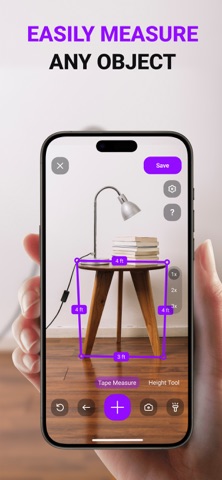


Description by ZipoApps Written by the developer, not by AppBrain. Click to read.
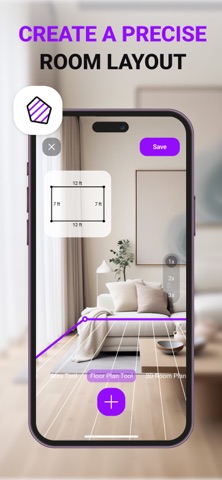
Point the camera at the object or space you want to measure and use the available tools to get measurements directly on your screen. The app is designed for quick measuring tasks, room measurement, photo ruler use, angle checking, surface calculations, and saving measurement results.
You can use AR Measure to measure length, estimate distances, calculate area and perimeter, check levels, measure slopes, scale objects, and create 3D models from a photo. It can be useful for home projects, room planning, furniture checks, object measurement, renovation planning, and everyday measuring tasks.
Please note that many features are available after purchasing a subscription.
Key Features
Tape measure tool for measuring objects
Distance meter
Height meter
Room measurement
Surface area calculation
Perimeter calculation
Angle measurement
Bubble level tool
Slope measurement
Photo ruler for measuring objects on the device screen
3D models from a photo
Object scaling
Support for different measurement units
Create and save measurements
Camera-based measuring tools
Tools for rooms, walls, structures, and objects
Measure Objects
Use the camera to measure objects around you. Point your device at the object, follow the on-screen measurement tools, and get the result directly in the app.
Measure Rooms and Surfaces
Measure room areas, wall heights, structures, and surfaces. The app can help calculate surface area and perimeter for room planning or project preparation.
Use Level and Slope Tools
AR Measure includes a bubble level and slope measurement tool to help check alignment, angles, and incline.
Photo Ruler
Use the photo ruler tool to measure objects directly on your device screen. This can help when working with images or objects captured through your camera.
Save Your Measurements
Create measurements and save them for later reference. This makes it easier to keep track of room dimensions, object sizes, and project measurements.
AR Measure: Tape Measure App combines multiple measuring tools in one app, including tape measure, distance meter, height meter, photo ruler, bubble level, slope measurement, area calculation, and 3D model creation from a photo.
Terms of Use: https://zipoapps.com/mymeterios/terms
Privacy Policy: https://zipoapps.com/mymeterios/privacy