

Tapko is made and published by David Lars Guva. AppBrain is an independent app data site and isn't affiliated with David Lars Guva. The app name, icon, screenshots and description belong to David Lars Guva and are shown as published on the App Store.
AppBrain's verdict
- Rating on App Store
- 5.00
- 2 ratings
- Last updated
- September 28, 2026
It doesn't have enough ratings yet to judge what users think.
Rankings
App Store top chartsApp Store Rankings for Tapko
Competitors
Similar apps and more from David Lars GuvaMore from David Lars Guva


Releases
Updates seen on the App Store- Version
- 2.7.1
- Launched
- March 2026
No changelog data
User feedback
Ratings and reviews on the App StoreComments on Tapko for iOS
We don't have enough comments to show example comments. Please check back later.
Technology
Found in the app by AppBrain- Price
- $4.99
- App size
- 6.47 MB
- Content rating
- Everyone
Technologies used by Tapko
About the app and developer
About Tapko
Tapko is a music app developed by David Lars Guva.
User Ratings
Tapko is rated 5.00 out of 5 stars. The rating is based on 2 ratings.
App Information
Tapko costs $4.99. The app size is 6.47 MB. The latest version available is 2.7.1. The last update was on September 28, 2026.
Technical Requirements
The app has a content rating of Everyone. The app has been available on the App Store since March 2026.
Developer information for David Lars Guva
Address:
Frequently asked questions about Tapko
Is Tapko free?
No. Tapko costs $4.99 on the App Store.
Is Tapko still available?
Yes. Tapko is on the App Store, and the last update we saw was on September 28, 2026.
How large is Tapko?
Tapko is 6.47 MB.
Is Tapko suitable for children?
App Store rates the content of Tapko as suitable for everyone.
How do people rate Tapko?
Tapko scores 5.00 out of 5 stars, from 2 ratings on the App Store.
Who made Tapko?
Tapko was developed by David Lars Guva. It is listed in the music category on the App Store.
Store listing
By David Lars Guva, from the App Store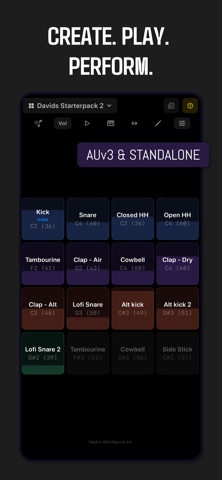


Description by David Lars Guva Written by the developer, not by AppBrain. Click to read.
Use Tapko on its own as a playable drum machine, or load it as an AUv3 instrument in AUM, Loopy Pro, GarageBand, Cubasis, and more.
16 PADS, TOTAL CONTROL
• 16-pad grid with per-pad sample import (WAV, AIFF, MP3, M4A, FLAC, CAF)
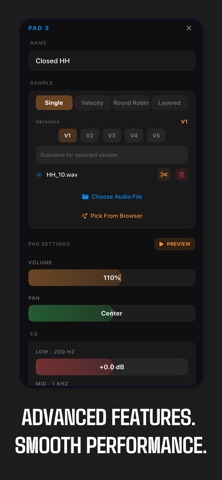
• Per-pad 3-band EQ with adjustable gain and frequency, volume, pan, gain, choke groups, and configurable Fade Out
• Swipe pads to tweak volume, EQ, pan, and reverb send on the fly
• MIDI Learn — tap a pad, play a note, instantly assign note and channel
• Swipe left/right on single-sample pads to cycle saved versions
• Built-in stereo reverb with per-pad send, per-pad dry level, and global room/decay/wet-level controls
• Built-in delay/echo with per-pad send and global time, feedback, damping, and wet-level controls
• Per-pad varispeed pitch — retune a pad up or down, turntable-style
• Let a pad's hits overlap and ring out instead of cutting each other off — perfect for cymbals and pads
ADVANCED SAMPLING
• Velocity layers — up to 5 layers per pad with adjustable velocity ranges
• Round robin — cycle through up to 5 samples per pad (sequential or random)
• Layer mode — stack up to 5 samples per pad and trigger them simultaneously
• Random velocity — override incoming velocity with base +/- variation for natural dynamics
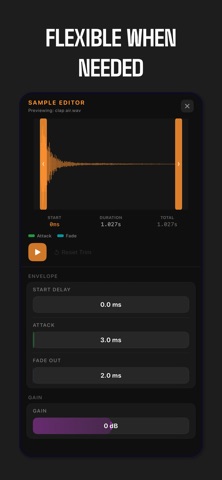
• Sample Editor with zoomable waveform: high-detail zoom view above, full-file overview below with a draggable zoom-window and in/out markers, pinch-to-zoom, trim handles, start delay, attack, and per-pad gain
• Global media browser — import clips once, assign to any pad in any kit; organize into folders, multi-select to move or delete, and export/import your whole library as a single file
KITS & SHARING
• Create, rename, duplicate, and delete kits
• Import and export kits as .tapkokit files
• Kit Store — browse and download free community kits
• Full backup and restore of all kits and media to a single .tapkobackup file
• iCloud backup — upload your kits and Media Library and restore them on another device, with live progress and a clear confirmation once everything is in iCloud
• Build kits on your computer at tapko.davidguva.se
MULTI-OUTPUT ROUTING
• 9 stereo output buses (1 Main + 8 Aux) for hosts that support multi-output
• Assign each pad to an individual output bus for separate mixing and effects
• Pads assigned to an Aux bus are isolated to that bus, so you can send drums to individual channel strips without duplicating them on Main
• Single-output hosts hear every pad that's still assigned to Main
• Pads routed to an Aux bus show which output they use right on the pad
MIDI & HOST INTEGRATION
• MIDI input with customizable note mapping (GM drum layout by default)
• Per-pad MIDI channel assignment (omni or channel 1–16)
• MIDI output and Program Change for kit switching
• All parameters exposed to the host for automation
• Delay syncs to the host's tempo
• Factory presets support
BUILT FOR PERFORMANCE
• Real-time C++ DSP engine with vDSP acceleration
• 48-voice polyphonic playback with intelligent voice stealing
• Efficient CPU usage for most kits; usage increases with kit complexity (more layers, longer samples/tails, and heavier FX/routing)
STANDALONE & PLUGIN
Tapko works as a standalone drum machine right out of the box. It also registers as an AUv3 instrument plugin so any compatible host can load it.