

Taptile Timetracking
Taptile Timetracking is made and published by Taptile Apps UG (haftungsbeschraenkt). AppBrain is an independent app data site and isn't affiliated with Taptile Apps UG (haftungsbeschraenkt). The app name, icon, screenshots and description belong to Taptile Apps UG (haftungsbeschraenkt) and are shown as published on the App Store.
AppBrain's verdict
- Last updated
- September 18, 2026
Rankings
App Store top chartsApp Store Rankings for Taptile Timetracking
Competitors
Similar apps and more from Taptile Apps UG (haftungsbeschraenkt)Alternatives to Taptile Timetracking







More from Taptile Apps UG (haftungsbeschraenkt)


Releases
Updates seen on the App Store- Version
- 5.0
- Launched
- September 2022
No changelog data
User feedback
Ratings and reviews on the App StoreComments on Taptile Timetracking for iOS
We don't have enough comments to show example comments. Please check back later.
Technology
Found in the app by AppBrain- Price
- Free
- App size
- 21.2 MB
- Content rating
- Everyone
Technologies used by Taptile Timetracking
About the app and developer
About Taptile Timetracking
Taptile Timetracking is a business app developed by Taptile Apps UG (haftungsbeschraenkt).
User Ratings
The app has no ratings yet.
App Information
Taptile Timetracking is freely available from the App Store. The app size is 21.16 MB. The latest version available is 5.0. The last update was on September 18, 2026.
Technical Requirements
The app has a content rating of Everyone. The app has been available on the App Store since September 2022.
Developer information for Taptile Apps UG (haftungsbeschraenkt)
Store listing
By Taptile Apps UG (haftungsbeschraenkt), from the App Store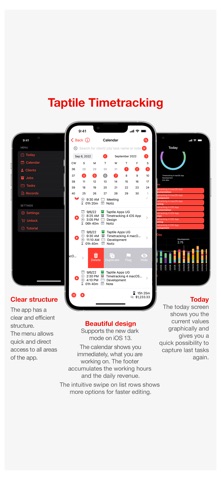



Description by Taptile Apps UG (haftungsbeschraenkt) Written by the developer, not by AppBrain. Click to read.
With flexible low-cost subscriptions, no cloud account needed, stores data only locally on your device!
Features:
- Fastest one-tap time tracking via the time clock button
- Supports iOS dark mode
- Supports DynamicText = set your preferred font size in iOS settings
- Now with new elegant design.
- Customize app color via settings
- Budget management and tracking
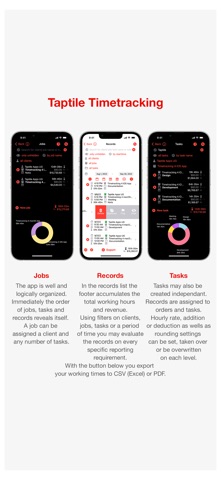
- Free text and time filtering for evaluation of your data
- Filter options directly by client, job and task
- Time period filtering to analyze your data
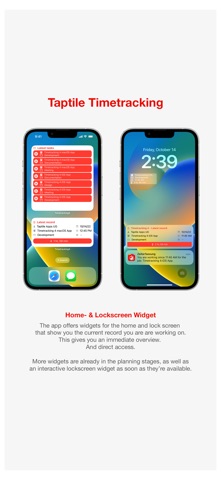
- Lockscreen- & HomeScreen widgets: See at a glance what you are tracking your working time on
- Efficient management of your data via calendar-, client-, task- and entry-lists
- Graphical presentation of your data in clear charts
- Localizations for Chinese, French, Japanese, Portuguese, Russian, Spanish
After activation of all functions by subscription purchase:
- Create, manage and analyze as much data as you want
- Excel and Numbers CSV export to send via email, iCloud Drive export or open directly on your device
- PDF export to send via email, iCloud Drive export or open directly on your device
- Easy database backup and restore
- iCloud synchronization of your data between any number of devices
Do you have any questions or suggestions for us, please send us an email to our support, directly from the app!
Your Taptile Apps Team
Terms of Use (Standard Apple License Agreement):
http://www.apple.com/legal/itunes/appstore/dev/stdeula