

TapTiller is made and published by 高阳 王. AppBrain is an independent app data site and isn't affiliated with 高阳 王. The app name, icon, screenshots and description belong to 高阳 王 and are shown as published on the App Store.
AppBrain's verdict
- Last updated
- June 11, 2026
Rankings
App Store top chartsApp Store Rankings for TapTiller
This app is not ranked
Competitors
Similar apps and more from 高阳 王Alternatives to TapTiller





More from 高阳 王


Releases
Updates seen on the App Store- Version
- 1.1
- Launched
- June 2026
No changelog data
User feedback
Ratings and reviews on the App StoreComments on TapTiller for iOS
We don't have enough comments to show example comments. Please check back later.
Technology
Found in the app by AppBrain- Price
- Free
- App size
- 18.9 MB
- Content rating
- Everyone
Technologies used by TapTiller
About the app and developer
About TapTiller
TapTiller is an utilities app developed by 高阳 王.
What is the rating of TapTiller?
TapTiller has no ratings yet.
Is TapTiller free?
TapTiller is free. The app size is 18.86 MB. The latest version available is 1.1. The last update was on June 11, 2026.
What are the requirements for TapTiller?
The app has a content rating of Everyone. The app has been available on the App Store since June 2026.
Developer information for 高阳 王
Address:
Store listing
By 高阳 王, from the App Store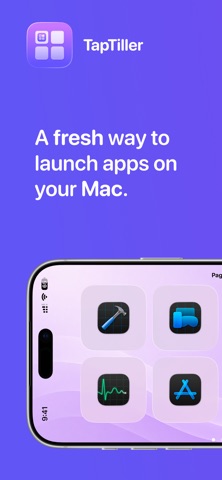


Screenshots by 高阳 王, from the the App Store listing
Description by 高阳 王 Written by the developer, not by AppBrain. Click to read.
TapTiller turns your iPhone into a beautiful, customizable command surface for your Mac.
Pair your iPhone with your Mac on the same local network, build your own control grid, and keep your most-used actions one tap away. Open Mac apps, launch websites, trigger keyboard shortcuts, control media, adjust volume, and manage compatible Home accessories from a clean touch-first interface.
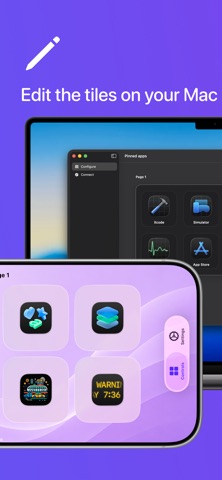
Create pages for different workflows, like design, writing, meetings, music, or smart home control. Choose compact or expanded layouts, customize tile colors, organize shortcut groups, and make TapTiller fit the way you work.
Features:
- Pair securely with your Mac using a short local code
- Launch Mac apps from your iPhone
- Open websites and saved URLs
- Run keyboard shortcuts and window actions
- Control playback, mute, skip, and volume
- Add compatible Home accessories like lights, fans, outlets, and shades
- Create multiple custom pages for different workflows
- Use 2x4 or 3x6 grid layouts
- Customize tile colors and icons
- No account required
- TapTiller is not a remote desktop. It is a focused control surface for the actions you use all day, designed to keep your Mac visible and your workflow moving.
Note: TapTiller requires the Mac companion app and both devices must be on the same Wi-Fi or local network.
Pair your iPhone with your Mac on the same local network, build your own control grid, and keep your most-used actions one tap away. Open Mac apps, launch websites, trigger keyboard shortcuts, control media, adjust volume, and manage compatible Home accessories from a clean touch-first interface.
Create pages for different workflows, like design, writing, meetings, music, or smart home control. Choose compact or expanded layouts, customize tile colors, organize shortcut groups, and make TapTiller fit the way you work.
Features:
- Pair securely with your Mac using a short local code
- Launch Mac apps from your iPhone
- Open websites and saved URLs
- Run keyboard shortcuts and window actions
- Control playback, mute, skip, and volume
- Add compatible Home accessories like lights, fans, outlets, and shades
- Create multiple custom pages for different workflows
- Use 2x4 or 3x6 grid layouts
- Customize tile colors and icons
- No account required
- TapTiller is not a remote desktop. It is a focused control surface for the actions you use all day, designed to keep your Mac visible and your workflow moving.
Note: TapTiller requires the Mac companion app and both devices must be on the same Wi-Fi or local network.