

Taskbuzz is made and published by Kapil Manek. AppBrain is an independent app data site and isn't affiliated with Kapil Manek. The app name, icon, screenshots and description belong to Kapil Manek and are shown as published on the App Store.
AppBrain's verdict
- Last updated
- May 29, 2026
Rankings
App Store top chartsApp Store Rankings for Taskbuzz
Competitors
Similar apps and more from Kapil ManekAlternatives to Taskbuzz


Releases
Updates seen on the App Store- Version
- 1.0
- Launched
- May 2026
No changelog data
User feedback
Ratings and reviews on the App StoreComments on Taskbuzz for iOS
We don't have enough comments to show example comments. Please check back later.
Technology
Found in the app by AppBrain- Price
- Free
- App size
- 6.45 MB
- Content rating
- Everyone
Technologies used by Taskbuzz
About the app and developer
About Taskbuzz
Taskbuzz is a productivity app developed by Kapil Manek.
User Ratings
The app has no ratings yet.
App Information
Taskbuzz is freely available from the App Store. The app size is 6.45 MB. The latest version available is 1.0. The last update was on May 29, 2026.
Technical Requirements
The app has a content rating of Everyone. The app has been available on the App Store since May 2026.
Developer information for Kapil Manek
Address:
Frequently asked questions about Taskbuzz
Is Taskbuzz free?
Yes. Taskbuzz is free on the App Store.
Is Taskbuzz still available?
Yes. Taskbuzz is on the App Store, and the last update we saw was on May 29, 2026.
How large is Taskbuzz?
Taskbuzz is 6.45 MB.
Is Taskbuzz suitable for children?
App Store rates the content of Taskbuzz as suitable for everyone.
Who made Taskbuzz?
Taskbuzz was developed by Kapil Manek. It is listed in the productivity category on the App Store.
What are the best alternatives to Taskbuzz?
People looking at Taskbuzz also look at these productivity apps: RemiBuddy, Duelight, Taskli: Family Tasks & Rewards, Didit: A Smarter Way to Ask, BYO Queue.
Store listing
By Kapil Manek, from the App Store


Description by Kapil Manek Written by the developer, not by AppBrain. Click to read.
Build a list. Share it. Assign tasks. Talk about them in line. And when something really can't wait, hit Buzz — your friend's phone vibrates and lights up wherever they are.
— WHAT MAKES IT DIFFERENT —
- Comments on every task. No more dropping into iMessage for "did you actually buy oat milk?" — the conversation lives with the task. Push notifications when someone replies.
- Buzz: Tap the Buzz button on any task to shake your friend's phone with a custom vibration pattern + screen-shake animation. Rate-limited (2 buzzes per task per day) so it stays respectful.
- Shared lists with smart sharing. Trusted friends are added instantly; everyone else gets an invite they can accept or decline. Co-members who aren't your friends can be added on the spot
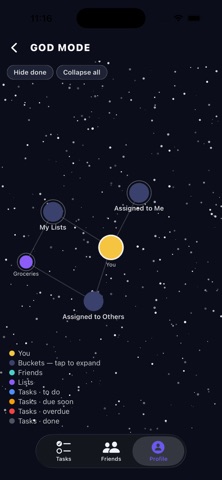
- Three views for three brains. "My Lists" for what you own, "Assigned to Others" for what you delegated, "Assigned to Me" for what's on your plate. Red dot indicators show unread comments at every level.
— EVERYDAY ESSENTIALS —
- Phone-number sign-in. One account per number, no passwords.
- Due dates + time pickers with smart "yellow when due soon, red when overdue" coloring.
- Recurring tasks: weekly, monthly, yearly — every 1 week, every 3 months, whatever cadence you need.
- Pin a task or a whole list to the top.
- Copy & paste lists in and out: every line becomes a task, every task can be copied back to chat or notes.
- Progress dashboard on your Profile tab — total vs done, overdue, due-soon, a 7-day completion sparkline, streak counter, and a breakdown of created/delegated/on-your-plate.
- GOD Mode: see your tasks, lists, and friends as one living, force-directed graph. Tap any node to drill in.
- Voice intent shortcuts. "Hey Siri, add task to TaskBuzz" and you're typing into a new task.
- Offline-friendly. Browse your lists when the network drops; changes sync when you're back.
— PRIVACY FIRST —
• Phone number, task titles, descriptions, and comment content are encrypted at rest.
• No ads. No trackers. We do not sell your data.
• Contacts access is optional and used only to match numbers you search. Your contact list never leaves your device.
• Delete your account and all data any time, from Profile.
— WHO IT'S FOR —
• Couples & roommates running the same household.
• Families coordinating school runs, groceries, weekend plans.
• Small teams and side-project pairs
• Anyone who wants a fast, social, get-out-of-the-way task list.