

TaskCard: Visual Day Planner
TaskCard: Visual Day Planner is made and published by Cihat Salik. AppBrain is an independent app data site and isn't affiliated with Cihat Salik. The app name, icon, screenshots and description belong to Cihat Salik and are shown as published on the App Store.
AppBrain's verdict
- Rating on App Store
- 5.00
- 2 ratings
- Last updated
- October 15, 2026
It doesn't have enough ratings yet to judge what users think.
Rankings
App Store top chartsApp Store Rankings for TaskCard: Visual Day Planner
Competitors
Similar apps and more from Cihat SalikMore from Cihat Salik





Releases
Updates seen on the App Store- Version
- 3.1.0
- Launched
- June 2025
No changelog data
User feedback
Ratings and reviews on the App StoreComments on TaskCard: Visual Day Planner for iOS
We don't have enough comments to show example comments. Please check back later.
Technology
Found in the app by AppBrain- Price
- Free
- App size
- 11.7 MB
- Content rating
- Everyone
Technologies used by TaskCard: Visual Day Planner
About the app and developer
About TaskCard: Visual Day Planner
TaskCard: Visual Day Planner is a productivity app developed by Cihat Salik.
User Ratings
TaskCard: Visual Day Planner is rated 5.00 out of 5 stars. The rating is based on 2 ratings.
App Information
TaskCard: Visual Day Planner is freely available from the App Store. The app size is 11.66 MB. The latest version available is 3.1.0. The last update was on October 15, 2026.
Technical Requirements
The app has a content rating of Everyone. The app has been available on the App Store since June 2025.
Developer information for Cihat Salik
Address:
Frequently asked questions about TaskCard: Visual Day Planner
Is TaskCard: Visual Day Planner free?
Yes. TaskCard: Visual Day Planner is free on the App Store.
Is TaskCard: Visual Day Planner still available?
Yes. TaskCard: Visual Day Planner is on the App Store, and the last update we saw was on October 15, 2026.
How large is TaskCard: Visual Day Planner?
TaskCard: Visual Day Planner is 11.66 MB.
Is TaskCard: Visual Day Planner suitable for children?
App Store rates the content of TaskCard: Visual Day Planner as suitable for everyone.
How do people rate TaskCard: Visual Day Planner?
TaskCard: Visual Day Planner scores 5.00 out of 5 stars, from 2 ratings on the App Store.
Who made TaskCard: Visual Day Planner?
TaskCard: Visual Day Planner was developed by Cihat Salik. It is listed in the productivity category on the App Store.
Store listing
By Cihat Salik, from the App Store


Description by Cihat Salik Written by the developer, not by AppBrain. Click to read.
PLAN BY TIME, NOT BY LIST
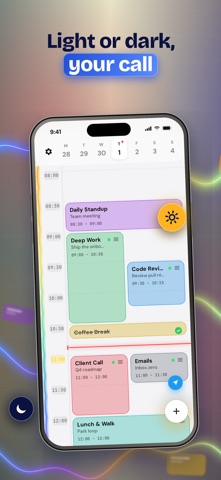
Add a task with a start time and a duration and it becomes a block on a 24-hour grid. The current time line is always visible, so you can see what is now and what is next at a glance.
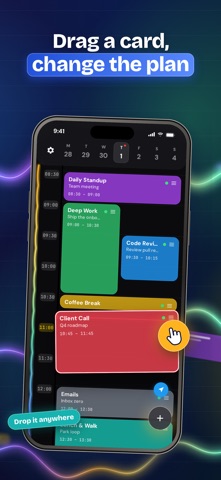
DRAG TO RESCHEDULE
Plans change. Drag a card to a new hour, pull its edge to make it longer or shorter, and the rest of the day stays readable. Tasks that run past midnight stay visible on both days.
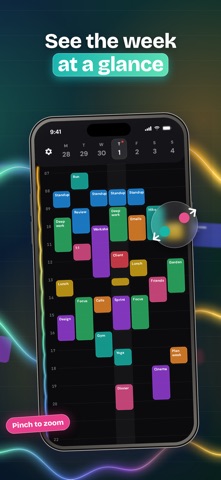
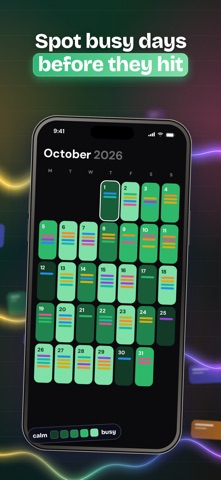
SEE THE WEEK, MONTH AND YEAR
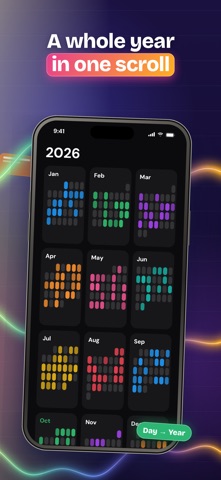
Pinch the grid to zoom out to a week, then a month, then a year, and pinch back in to the day. Every level is anchored on the day under your fingers, so you never lose your place.
MAKE THE CARDS YOURS
Pick colors, gradients, fonts, patterns, icons and emoji for every card. Start from a preset library with ready-made tasks for work, study, fitness, home and daily routines.
REMINDERS AND ALARMS
Get a notification when a block starts or when time is up, plus an optional alarm for the blocks you cannot miss. A Live Activity keeps the countdown on your Lock Screen and Dynamic Island.
REPEAT AND PRIORITIZE
Repeat daily, on weekdays, weekly, or on your own pattern. Set a priority from low to urgent and spot what matters by color.
WIDGETS AND SYNC
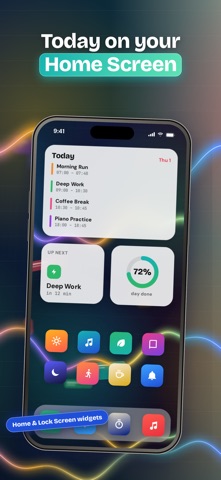
Put today's schedule on your Home Screen and Lock Screen with TaskCard Pro. Your plan syncs across iPhone and iPad over iCloud, and analytics show how much of each day you actually finish.
BUILT TO STAY OUT OF THE WAY
One main screen, no setup, no clutter. Create, complete, move, or delete from the same view.
TaskCard is for anyone who thinks in time blocks: people protecting deep work, students planning study sessions, and anyone with ADHD who needs the day laid out visually instead of as an endless list.
FREE AND PRO
TaskCard is free to use with up to 3 cards a day, including reminders, alarms, iCloud sync and analytics. TaskCard Pro adds unlimited cards every day, Home Screen and Lock Screen widgets, and the Live Activity countdown.
FOR SCHOOLS AND TEAMS
TaskCard can be distributed to many iPhones, iPads and Macs through Apple School Manager and Apple Business Manager.
TaskCard Pro is available as a monthly or yearly auto-renewing subscription, or as a one-time lifetime purchase. Eligible new subscribers may get a free trial; its length is shown before you subscribe. Payment is charged to your Apple Account at confirmation of purchase. Subscriptions renew automatically unless cancelled at least 24 hours before the end of the current period, and can be managed or cancelled in your App Store account settings.
Privacy Policy: https://apps.cihat.dev/taskcard/privacy-policy/
Terms of Use: https://www.apple.com/legal/internet-services/itunes/dev/stdeula/