





AppBrain's verdict
- Last updated
- July 16, 2026
- Size
- 28.6 MB
User feedback
Ratings and reviews on the App StoreComments on TaskFlow:To Do List & Calendar for iOS
We don't have enough comments to show example comments. Please check back later.
Store listing
By mouhamad cherkawi, from the App StoreDescription by mouhamad cherkawi Written by the developer, not by AppBrain. Click to read.
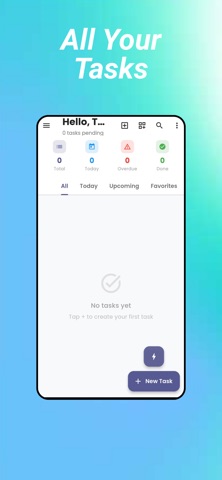
Organize your to-do lists, track deadlines, and plan your schedule using proven productivity methods and an intuitive calendar view.
Key Features
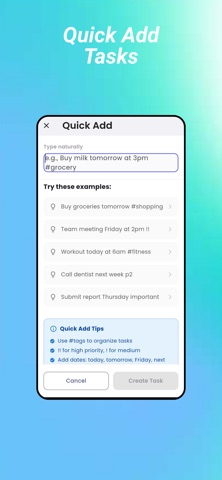
Smart Task Entry (Natural Language Input)
Add tasks quickly using plain text.
Example: “Team meeting Friday 2pm important work”
TaskFlow automatically detects dates, times, priorities, and categories, saving you time when creating tasks.
Eisenhower Matrix Task Prioritization
Prioritize tasks using the urgency vs. importance method.
Focus on high-impact tasks, reduce distractions, and make better decisions about what to do next.
Pomodoro Timer for Focus
Boost concentration using built-in 25-minute focus sessions.
Perfect for deep work, studying, and improving daily productivity.
Smart Reminders & Notifications
Never forget a task or deadline:
Scheduled reminders
One-hour deadline alerts
Overdue task notifications
Recurring task reminders
Stay organized without constant manual checking.
Task Templates for Faster Planning
Create tasks instantly with ready-to-use templates:
Team meetings with agendas
Grocery shopping lists
Workout routines
Content and blog workflows
Project and checklist templates
Calendar View & Weekly Planner
Visualize your schedule with a clean calendar view.
Drag and drop tasks, view daily and weekly plans, and manage priorities using color-coded tasks.
Recurring Tasks & Habit Tracking
Set tasks to repeat daily, weekly, monthly, yearly, or on custom schedules.
Ideal for habits, routines, work tasks, and reminders.
Productivity Insights & Analytics
Track your progress and improve your habits:
Task completion rates
Focus time tracking
Productivity trends
Category breakdowns
Streak tracking
Understand your workflow and stay motivated over time.
Perfect For
Task management and to-do lists
Personal productivity and goal tracking
Work and project planning
Daily routines and habit building
Students, professionals, and busy schedules
Start Organizing Your Life Today
TaskFlow helps you manage tasks, plan your day, and stay productive with clarity and control.
Find Our
Terms of Use : https://docs.google.com/document/d/19HJlIRFS3__keYQV9IP4sSZHrVLqG_IXcwMJuKEk0vY/edit?usp=sharing
Privacy Policy : https://docs.google.com/document/d/1217qx_prb4WFHsklYP4QEjptMJqFX0lrrmzodKmLtKs/edit?usp=sharing
Safety and technology
Found in the app by AppBrain- Price
- Free
- App size
- 28.6 MB
- Content rating
- Everyone
Technologies used by TaskFlow:To Do List & Calendar
Releases
Updates seen on the App Store- Version
- 0.0.3
- Launched
- February 2026
No changelog data
Alternatives
Similar apps and more from mouhamad cherkawiMore from mouhamad cherkawi


Also available on Google Play

Rankings
App Store top chartsApp Store Rankings for TaskFlow:To Do List & Calendar
About the app and developer
About TaskFlow:To Do List & Calendar
TaskFlow:To Do List & Calendar is a productivity app developed by mouhamad cherkawi.
What is the rating of TaskFlow:To Do List & Calendar?
TaskFlow:To Do List & Calendar has no ratings yet.
Is TaskFlow:To Do List & Calendar free?
TaskFlow:To Do List & Calendar is free. The app size is 28.61 MB. The latest version available is 0.0.3. The last update was on July 16, 2026.
What are the requirements for TaskFlow:To Do List & Calendar?
The app has a content rating of Everyone. The app has been available on the App Store since February 2026.
TaskFlow:To Do List & Calendar is made and published by mouhamad cherkawi. AppBrain is an independent app data site and isn't affiliated with mouhamad cherkawi. The app name, icon, screenshots and description belong to mouhamad cherkawi and are shown as published on the App Store.
Developer information for mouhamad cherkawi
Address: