

Taskito: Visual Day Planner
Taskito: Visual Day Planner is made and published by Studio Zeli. AppBrain is an independent app data site and isn't affiliated with Studio Zeli. The app name, icon, screenshots and description belong to Studio Zeli and are shown as published on the App Store.
AppBrain's verdict
- Rating on App Store
- 4.63
- 19 ratings
- Last updated
- October 9, 2026
- Size
- 25.6 MB
It doesn't have enough ratings yet to judge what users think.
User feedback
Ratings and reviews on the App StoreComments on Taskito: Visual Day Planner for iOS
We don't have enough comments to show example comments. Please check back later.
Store listing
By Studio Zeli, from the App Store



Description by Studio Zeli Written by the developer, not by AppBrain. Click to read.
Use Taskito to stay organized and manage day-to-day agenda. Make a shopping list or task lists, take notes, track projects and set reminders to increase productivity and focus on what matters to you.
Students find it easy to manage schedule, assignments and curriculum with Taskito. You can create to.do list for each subject, add task with checklist for each chapter. Professionals can schedule daily agenda with calendar events integration. Scheduling can also help you with time blocking.
Taskito is versatile and configurable. Import Calendar to see meetings and tasks side-by-side. Organize your board with color coded projects to accomplish hobbies, school work or side projects. Taskito to.do app is one of the best apps for organizing.
Taskito focuses on daily tasks. Create todo lists and add task reminders to get rich notifications. Break down your tasks with checklists. Create daily recurring tasks to build a routine.
Based on suggestions from people, we keep improving Taskito to make it the best task manager app.
Core features:
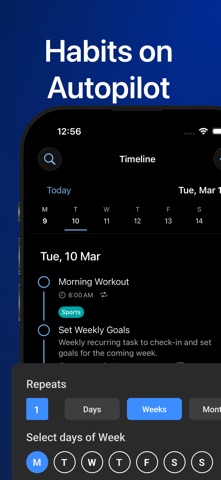
- Timeline View to see all your to-do tasks, checklists, notes, calendar events, reminders in one place.
- Smart Parsing: Just type "Make dinner tomorrow 7pm" and a task will be scheduled for tomorrow at 7pm for you. No need to select date, time, priority, etc manually.
- Agenda View: See your tasks and events as blocks. Drag your tasks to reschedule and use time blocking method.
- Easy to access calendar with busy or overdue indicators.
- Manage daily to-do lists with Day Mode.
- Add reminder to keep check on your agenda.
- Kanban board to manage projects.
- Import Calendar events to see daily schedule.
- Recurring tasks or habit tracking.
- Get daily reminders. Weekly or Monthly reminders to keep track of your important tasks.
- Reminder notifications.
- Sync tasks and projects instantly with multiple devices.
Why people love Taskito?
- Sort project tasks based on priority, due date, or manual drag and drop.
- Crate color coded tags and labels. Categorize to-do tasks with tags.
- Templates to automate your day. Create grocery checklist template, workout routine templates, daily routine template.
- Assign color to projects, manually change to do task order by simple drag/drop.
- Bulk actions.
How people use Taskito:
- Make a digital planner and timeline diary.
- Make a Bullet Journal (BuJo) using Timeline & projects.
- Habit tracker with recurring tasks and reminders.
- To-Do list & Task Manager.
- Grocery list, shopping checklist template.
- Daily reminder to track work and plan meetings.
- Keep a health log with notes and tags.
- Make comprehensive work log.
- Daily diary and notes.
- Kanban style project management.
- Import calendars to keep track of holiday events, meeting events, time blocking and much more.
Taskito will assist you to improve your productivity.
If you have feedback or suggestions, feel free to send us an email: hey.taskito@gmail.com
Website: https://taskito.io/
Help Center: https://taskito.io/help
Blog: https://taskito.io/blog
Terms of use: https://www.apple.com/legal/internet-services/itunes/dev/stdeula/
Safety and technology
Found in the app by AppBrain- Price
- Free
- App size
- 25.6 MB
- Content rating
- Everyone
Technologies used by Taskito: Visual Day Planner
Releases
Updates seen on the App Store- Version
- 1.1.3
- Launched
- March 2024
No changelog data
Alternatives
Similar apps and more from Studio ZeliAlternatives to Taskito: Visual Day Planner





More from Studio Zeli

Rankings
App Store top chartsApp Store Rankings for Taskito: Visual Day Planner
About the app and developer
About Taskito: Visual Day Planner
Taskito: Visual Day Planner is a productivity app developed by Studio Zeli.
User Ratings
Taskito: Visual Day Planner is rated 4.63 out of 5 stars. The rating is based on 19 ratings.
App Information
Taskito: Visual Day Planner is freely available from the App Store. The app size is 25.55 MB. The latest version available is 1.1.3. The last update was on October 9, 2026.
Technical Requirements
The app has a content rating of Everyone. The app has been available on the App Store since March 2024.
Developer information for Studio Zeli
Address:
Frequently asked questions about Taskito: Visual Day Planner
Is Taskito: Visual Day Planner free?
Yes. Taskito: Visual Day Planner is free on the App Store.
Is Taskito: Visual Day Planner still available?
Yes. Taskito: Visual Day Planner is on the App Store, and the last update we saw was on October 9, 2026.
How large is Taskito: Visual Day Planner?
Taskito: Visual Day Planner is 25.55 MB.
Is Taskito: Visual Day Planner suitable for children?
App Store rates the content of Taskito: Visual Day Planner as suitable for everyone.
How do people rate Taskito: Visual Day Planner?
Taskito: Visual Day Planner scores 4.63 out of 5 stars, from 19 ratings on the App Store.
Who made Taskito: Visual Day Planner?
Taskito: Visual Day Planner was developed by Studio Zeli. It is listed in the productivity category on the App Store.
What are the best alternatives to Taskito: Visual Day Planner?
People looking at Taskito: Visual Day Planner also look at these productivity apps: FlowNote, To-Do List & Planner, CLOC: Tasks & Time Tracker, to.day: Calendar, Notes, Tasks, TanabotTodo, Tastik: Customizable Lists.