



AppBrain's verdict
- Rating on App Store
- 4.43
- 23 ratings
- Last updated
- October 31, 2026
- Size
- 73.3 MB
It doesn't have enough ratings yet to judge what users think.
User feedback
Ratings and reviews on the App StoreComments on taskr: Chores & Screen Time for iOS
We don't have enough comments to show example comments. Please check back later.
Store listing
By TASKR LLC, from the App StoreDescription by TASKR LLC Written by the developer, not by AppBrain. Click to read.
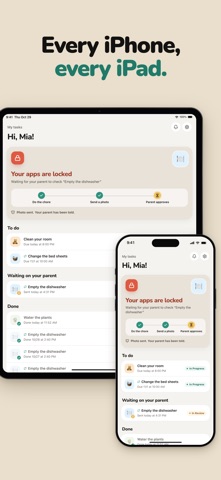
You set the chore and a deadline. If it isn't done on time, the apps you chose (games, YouTube, TikTok) lock automatically and stay locked until your kid sends a photo of the finished chore and you approve it. If getting them to empty the dishwasher turns into a negotiation every night, taskr changes who holds the line: the phone does, not you.
HOW IT WORKS
1. Assign a chore with a deadline. "Dishwasher by 6pm." Make it repeat daily or weekly if you like.
2. Pick the apps to block if it's late. Usually the ones the fight is about: Roblox, YouTube, TikTok, Snapchat, games.
3. The deadline passes with no proof? Those apps lock on your kid's device. No reminder from you, no warning shot, no argument.
4. Your kid does the chore and snaps a photo as proof.
5. You get the photo, take a look, tap Approve.
6. Their apps unlock.
Done on time, nothing locks at all. There are no points or earned minutes to manage: their phone works normally until a chore is late. Kids figure out quickly that the shortest way back to their apps is to just do the thing.
WHY IT WORKS
The consequence comes from the phone, not from you. You're not nagging, counting to three, or taking anything away. The rule is set once and the device keeps it, the same way every day. There's nothing left to argue about, so most of the arguing stops.
Photo proof ends "I already did it." You see the made bed, the clean counter, the walked dog, and you decide whether it's done.
WHAT LOCKS, AND WHAT DOESN'T
Only the apps you pick. Messages, Maps, the school portal, and anything else you leave off the list stay open. Closing taskr doesn't lift a lock, because the lock is enforced by iOS through Apple's Family Controls, not by an app your kid can swipe away. If Screen Time access is ever switched off on their device, you get a notification.
Works for more than one kid, and for chores that repeat. Homework, instrument practice, walking the dog, taking out the trash: if it has a deadline, taskr can hold it.
GOOD FOR AGES 7 TO 16
Younger kids like the photo part. Teens respect a rule that's clear and the same every day. Parents like not being the bad guy.
PRIVACY
- No ads, ever.
- Built on Apple's Family Controls, the same system behind Screen Time. Apple reviews and approves every app that uses it.
- Proof photos are private to your family. They're never shared or sold, and they aren't used for anything else.
- taskr doesn't collect precise location or read your kid's messages. It locks the apps you chose when a chore is late. That's it.
QUESTIONS PARENTS ASK
"What if my kid just deletes taskr?" iOS stops them. Once you approve Screen Time access with your Apple Account, Apple won't let your kid delete taskr. The in-app guide also shows you how to turn off app deletion as a second layer.
"Do I have to be home?" No. The photo comes to your phone wherever you are, and you approve from there.
"Does it work on an iPad?" Yes. taskr blocks apps on a kid's iPhone or iPad.
"Will my kid see it as punishment?" Most don't. Nothing happens when the chore is done on time, the rule is the same every day, and they hold the key.
SETUP
About ten minutes: create your family, your kid joins with a code on their own device, you connect Screen Time, you assign the first chore. There's a step-by-step guide in the app, and a real person answers support email.
TRY TASKR FREE
Try taskr free. After the trial it's one monthly or yearly subscription for your whole family, and Apple shows you the exact trial length and price before you confirm. Cancel anytime in your Apple ID settings.
Questions? sebas@thetaskr.app or https://thetaskr.app/support
Privacy Policy: https://thetaskr.app/privacy
Terms of Use: https://www.apple.com/legal/internet-services/itunes/dev/stdeula/
Safety and technology
Found in the app by AppBrain- Price
- Free
- App size
- 73.3 MB
- Content rating
- Everyone
Technologies used by taskr: Chores & Screen Time
Releases
Updates seen on the App Store- Version
- 1.0.25
- Launched
- December 2025
No changelog data
Rankings
App Store top chartsApp Store Rankings for taskr: Chores & Screen Time
About the app and developer
About taskr: Chores & Screen Time
taskr: Chores & Screen Time is a productivity app developed by TASKR LLC.
User Ratings
taskr: Chores & Screen Time is rated 4.43 out of 5 stars. The rating is based on 23 ratings.
App Information
taskr: Chores & Screen Time is freely available from the App Store. The app size is 73.26 MB. The latest version available is 1.0.25. The last update was on October 31, 2026.
Technical Requirements
The app has a content rating of Everyone. The app has been available on the App Store since December 2025.
taskr: Chores & Screen Time is made and published by TASKR LLC. AppBrain is an independent app data site and isn't affiliated with TASKR LLC. The app name, icon, screenshots and description belong to TASKR LLC and are shown as published on the App Store.
Developer information for TASKR LLC
Address:
Share taskr: Chores & Screen Time
Subscribe now to get full and unlimited access to AppBrain Intelligence. You'll have access to:
- App Intelligence dashboard (performance timeline, competitor comparison, country rankings, insight cards)
- Detailed ranking data per app
- Full timeline per developer
- Device market shares data per country
- Unlimited keyword tracking
AppBrain is an app data site, we track rankings, ratings, installs for all apps and games on Google Play and the App Store. AppBrain doesn't host app files or APKs, all install links go directly to the official store. All trademarks are owned by their respective owners.
More apps
App statistics