Tasks - Uniflow is made and published by
Josh Engels.
AppBrain is an independent app data site and isn't affiliated with Josh Engels.
The app name, icon, screenshots and description belong to Josh Engels and are shown as
published on the App Store.
About Tasks - Uniflow
Tasks - Uniflow is a productivity app developed by Josh Engels.
What is the rating of Tasks - Uniflow?
Tasks - Uniflow has no ratings yet.
Is Tasks - Uniflow free?
Tasks - Uniflow costs $0.99. The app size is 1.44 MB. The latest version available is 1.1. The last update was on March 3, 2026.
What are the requirements for Tasks - Uniflow?
The app has a content rating of Everyone. The app has been available on the App Store since February 2026.
Description by Josh Engels(from the App Store)
Tasks - Uniflow: Your Tasks, Unified and Flexible
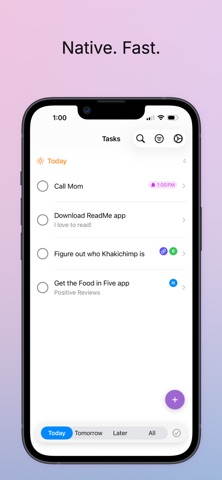
Tasks is a native iOS task manager designed for real life. Use it as a standalone app for fast, private task management, or connect it to Notion and Apple Reminders to unify everything in one beautiful interface. The choice is yours—Tasks adapts to how you work.
WHY TASKS - UNIFLOW? Most task apps force you into their ecosystem. Tasks takes a different approach: it's a powerful standalone app that becomes even better when you connect your existing tools. Already invested in Notion? Keep using it. Love Apple Reminders? They work great, too. Prefer keeping tasks local and private? That works perfectly.
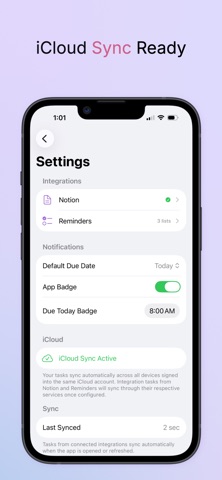
STANDALONE EXCELLENCE Tasks works beautifully on its own with no setup required: - Fast & Native - Built with SwiftUI for iOS, not a web wrapper - Private by Design - Local storage on your device, optional iCloud sync - No Account Required - Start managing tasks immediately - iCloud Sync - Automatic sync across all your iOS devices - Smart Notifications - Get reminded at exactly the right time - Intelligent Badge - See overdue tasks at a glance
OPTIONAL NOTION INTEGRATION Connect Tasks to your Notion workspace to keep everything in sync: - Bidirectional Sync - Create and edit tasks in either app - Date & Time Support - Syncs due dates and reminder times - Rich Details - Task notes and URLs sync seamlessly - Completion Status - Check off tasks anywhere, updates everywhere - Background Sync - Stays current automatically, even when closed Perfect for teams using Notion who want a faster mobile experience, or individuals who love Notion's flexibility but want iOS-native task management.
OPTIONAL APPLE REMINDERS INTEGRATION Use Tasks alongside your existing Reminders: - List Selection - Choose which Reminder lists to sync - Alarm Support - Reminder times sync as notifications - Native Integration - Leverages iOS EventKit framework Keep using Reminders for quick Siri capture while enjoying Tasks' superior organization and viewing options.
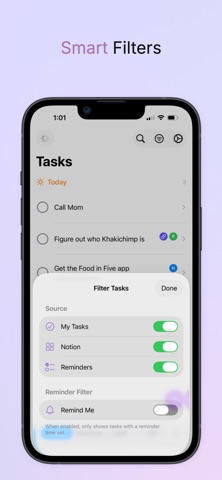
UNIFIED VIEW, YOUR WAY See all your tasks together, regardless of source: - Smart Filtering - Today, Tomorrow, Later, or All - Intelligent Grouping - Overdue, Today, This Week, Next Week, and more - Source Toggles - Show/hide Local, Notion, or Reminders tasks instantly - Powerful Search - Find tasks across all sources - "Remind Me" Filter - Focus on time-sensitive tasks
THOUGHTFUL FEATURES The details matter: - Shake to Undo - Accidentally completed a task? Shake your phone within 30 seconds to undo - Quick Actions - Long-press the app icon to quickly add a task - Date Flexibility - Set due dates without reminders, or add specific reminder times - URL Support - Attach links to tasks for quick reference - Rich Notes - Add context and details to any task - Completed Tasks - Toggle to show/hide finished tasks - Background Sync - Automatic sync every 15 minutes keeps everything current
PRIVACY & SECURITY Your data belongs to you: - Local-First - Tasks stored on your device - Secure Storage - Integration credentials stored in iOS Keychain - Optional iCloud - Cloud sync uses your private iCloud account - No Tracking - We don't collect analytics or usage data - No Ads - Clean, focused experience without distractions
PERFECT FOR: - Individuals who want a fast, clean task manager - Notion users wanting better mobile task management - Apple Reminders users needing more organization - Teams using multiple task systems - People who value privacy and local-first apps - Anyone who wants flexibility without complexity
TECHNICAL EXCELLENCE Requires iOS 17.0 or later Native SwiftUI interface CloudKit-powered cross-device sync Background refresh capability
THE TASKS - UNIFLOW DIFFERENCE Tasks respects your choices. It doesn't force you into a new system or make you abandon your existing tools. It's a standalone app that gets better when you connect it to other services—but only if you want to.
Each subscription will automatically renew 3 days before the expiration date for
the same time period. Subscriptions can be cancelled at any time before the renewal.